
For years, Google Search has been the primary way customers discover WooCommerce stores. Store owners focused on keyword rankings, backlinks, and technical SEO to attract visitors and drive sales.
That landscape is changing rapidly.
Today, millions of people are asking AI assistants like ChatGPT, Google Gemini, Claude, and Perplexity for product recommendations, buying advice, and comparisons instead of scrolling through pages of search results. Rather than presenting a list of links, these AI platforms generate direct answers, summarize information from multiple sources, and often recommend specific products or brands.
This shift is creating a new challenge for WooCommerce businesses.
Ranking well in Google is still important, but it’s no longer the only way customers discover your products. If AI systems can’t understand your store, your products may never appear in the answers shoppers receive.
Artificial intelligence is changing the way people discover products online.
Instead of typing short keywords into search engines and browsing through multiple websites, many shoppers now ask AI assistants complete questions such as,
“What’s the best gaming keyboard under $100?”,
“Recommend a wireless gaming mouse under $50.”
or “Which coffee machine is best for a small office?”
Within seconds, tools like ChatGPT, Google AI Mode, Gemini, Claude, and Perplexity provide detailed answers, product recommendations, comparisons, and buying advice.
This shift represents one of the biggest changes in search since the rise of Google.
For WooCommerce store owners, it also creates a new opportunity.
Appearing in AI-generated answers is no longer just about ranking #1 on Google. AI systems evaluate websites differently.
They look for clear product information, structured data, trustworthy reviews, authoritative content, and reliable sources to generate helpful responses. If your store provides high-quality information that AI can easily understand, your products are more likely to be recommended when users ask for shopping advice.
The good news is that optimizing your WooCommerce store for AI search doesn’t require abandoning traditional SEO.
In fact, many of the practices that improve your visibility in AI search engines also strengthen your Google rankings, enhance user experience, and increase conversions. The goal is to make your website easier for both humans and AI systems to understand.
Whether you’re running a small niche store or managing thousands of products, preparing your WooCommerce site for AI search today can give you a competitive advantage as AI-assisted shopping continues to grow.
In this comprehensive guide, you’ll learn:
- What AI search is and how it differs from traditional search engines.
- How ChatGPT, Gemini, Claude, Perplexity, and other AI platforms discover and understand WooCommerce websites.
- The difference between Search Engine Optimization (SEO) and Generative Engine Optimization (GEO).
- How to optimize your product pages, category pages, and blog content for better AI visibility.
- Why structured data, product feeds, customer reviews, and brand authority play a critical role in AI recommendations.
- Technical best practices that improve your store’s discoverability by AI systems.
- Practical strategies to future-proof your WooCommerce store for the next generation of AI-powered shopping.
By the end of this guide, you’ll have a clear roadmap for building a WooCommerce store that isn’t just optimized for search engines, but also prepared for the rapidly evolving world of AI-powered search and intelligent shopping assistants.
Note: AI search technology is evolving rapidly. The recommendations in this guide are based on publicly available documentation, current industry best practices, and how leading AI platforms retrieve and present information as of 2026. We’ll keep this guide updated as AI search continues to evolve.
What Is AI Search?
AI search is a new way of finding information online where artificial intelligence generates direct answers instead of simply displaying a list of web pages.
Rather than requiring users to visit multiple websites, AI search platforms analyze information from trusted sources, understand the context of a question, and present a comprehensive response in natural language.
For example, instead of searching Google for “best wireless earbuds under $100” and comparing results from several websites, a user might ask ChatGPT:
“What are the best wireless earbuds under $100 for gym workouts?”
Instead of returning ten blue links, ChatGPT may provide a curated list of products, explain the pros and cons of each option, compare features, and even recommend the best choice based on the user’s specific needs.
This conversational experience is changing how people research products, compare brands, and make purchasing decisions. As AI assistants become more capable, they’re increasingly acting as shopping advisors rather than just search tools.
For WooCommerce store owners, this means your website needs to provide information that AI systems can easily understand, evaluate, and trust. If your products are well documented and your store follows modern SEO and structured data best practices, you’re more likely to appear in AI-generated recommendations.
Unlike traditional search, AI search focuses less on matching exact keywords and more on understanding intent, context, and the overall quality of information. A product page that clearly explains features, benefits, specifications, pricing, availability, customer reviews, and common questions is much easier for AI systems to interpret than a page with only a short description.
As AI-powered shopping continues to grow, optimizing your WooCommerce store for AI search is becoming just as important as optimizing it for traditional search engines.
How AI Search Is Different from Traditional Search
Although both traditional search engines and AI search platforms help users find information, they work in very different ways.
Traditional search engines, such as Google and Bing, primarily return a ranked list of web pages based on hundreds of ranking factors, including relevance, authority, page quality, and user experience. The user is responsible for opening multiple websites, comparing information, and deciding which result best answers their question.
AI search platforms take a different approach. Instead of showing only links, they analyze information from multiple trusted sources and generate a single, conversational answer. These answers often include summaries, comparisons, recommendations, and citations, helping users find what they need more quickly.
This shift changes how businesses should think about online visibility. Rather than focusing only on ranking for keywords, store owners should also focus on making their content clear, structured, trustworthy, and easy for AI systems to understand.
| Traditional Search | AI Search |
|---|---|
| Returns a list of web pages | Generates direct answers |
| Users compare multiple websites | AI summarizes information from multiple sources |
| Focuses heavily on keyword matching | Focuses on user intent and context |
| Clicks drive traffic to websites | Answers may satisfy users without additional clicks |
| Rankings determine visibility | Content quality, authority, and structured data influence recommendations |
Both approaches remain important. While traditional SEO continues to drive valuable traffic, AI search introduces a new way for customers to discover products and brands.
Why AI Search Matters for WooCommerce Stores
The way people shop online is evolving.
Instead of browsing dozens of product pages, many shoppers now ask AI assistants questions before making a purchase. They want personalized recommendations, quick comparisons, buying advice, and answers tailored to their specific needs.
For example, a customer may ask:
- “What’s the best ergonomic office chair for long working hours?”
- “Recommend a lightweight travel backpack under $80.”
- “Which skincare products are suitable for oily skin?”
- “What’s the best mechanical keyboard for programming?”
If your WooCommerce store provides detailed, trustworthy, and well-structured product information, AI systems have a much better chance of understanding your products and including them in these recommendations.
This doesn’t mean AI search replaces Google Search. Instead, it’s becoming another important discovery channel that works alongside traditional search, social media, marketplaces, and paid advertising.
Businesses that prepare early by improving their content quality, technical SEO, and structured data will be better positioned as AI-assisted shopping becomes more common.
💡 Expert Tip: Don’t optimize your WooCommerce store for a single AI platform like ChatGPT. Instead, focus on creating high-quality, structured, and trustworthy content that any AI system can understand. Whether it’s ChatGPT, Google AI Mode, Gemini, Claude, or future AI assistants, the same principles of clarity, accuracy, and authority will continue to matter.
Meet the Major AI Search Platforms
The AI search landscape is evolving rapidly, with several platforms offering unique ways for users to discover information and products. While each platform has its own strengths, they all share one goal: delivering accurate, relevant, and trustworthy answers instead of simply listing web pages.
For WooCommerce store owners, understanding how these platforms work can help you create content that’s easier for AI systems to understand and recommend.
ChatGPT Search
ChatGPT Search combines conversational AI with real-time web information to answer user queries. Instead of returning a page of links, it summarizes information from reliable sources and often includes citations, making it easier for users to verify the information.
For ecommerce searches, users commonly ask questions like:
- What’s the best standing desk for a home office?
- Recommend a coffee grinder under $100.
- Which wireless earbuds have the best battery life?
If your WooCommerce store has detailed product information, structured data, trustworthy reviews, and authoritative content, it’s more likely to be considered when AI generates shopping recommendations.
Keep in mind that ChatGPT values content that is accurate, well-organized, and genuinely helpful. Thin product pages with minimal information are far less likely to be useful than pages that thoroughly answer customer questions.
Google AI Mode and Gemini
Google has introduced AI-powered search experiences through AI Mode and Gemini, bringing generative AI directly into search.
Unlike traditional Google Search, where users click through multiple websites, AI Mode can summarize information from several sources and provide direct answers before users visit a website.
However, traditional SEO still plays a major role.
Google continues to rely on many of the same quality signals it has emphasized for years, including:
- Helpful, people-first content
- Strong E-E-A-T signals
- Structured data
- High-quality backlinks
- Fast and secure websites
- Excellent page experience
For WooCommerce stores, this means you shouldn’t abandon SEO in favour of AI optimization. Instead, think of AI optimization as an extension of strong SEO practices.
Claude
Claude is designed to provide detailed, thoughtful, and context-aware responses. It’s particularly effective at understanding long-form content, technical documentation, and comprehensive guides.
This makes content depth especially important.
Rather than publishing short product descriptions, consider creating detailed pages that include:
- Product specifications
- Real-world use cases
- Buying advice
- Frequently asked questions
- Comparisons
- Warranty information
- Shipping details
The more context you provide, the easier it becomes for AI systems like Claude to understand and explain your products.
Perplexity AI
Perplexity AI is built around source attribution. It frequently cites the websites used to generate its answers, encouraging users to explore the original content.
Because of this, publishing well-researched and trustworthy content becomes even more valuable. Detailed buying guides, comparison articles, and educational blog posts have a greater chance of being referenced than thin promotional pages.
For WooCommerce businesses, Perplexity highlights the importance of becoming a trusted source of information within your niche.
Microsoft Copilot
Microsoft Copilot integrates AI into the Bing ecosystem, combining web search with conversational assistance.
Since Bing powers many AI experiences, ensuring your WooCommerce store is accessible, technically optimized, and properly indexed remains important. A healthy technical SEO foundation helps both traditional search engines and AI-powered assistants understand your content more effectively.
Should You Optimize for Every AI Platform?
The short answer is yes, but not by creating separate versions of your content.
The best strategy is to build a website that follows universal quality principles:
- Publish accurate, comprehensive, and up-to-date content.
- Use structured data to help machines understand your products.
- Demonstrate Experience, Expertise, Authoritativeness, and Trustworthiness (E-E-A-T).
- Keep product information consistent across your website and shopping feeds.
- Answer real customer questions with clear and helpful content.
- Maintain a fast, secure, and mobile-friendly website.
When you follow these best practices, you’re not optimizing for a single AI platform. You’re building a WooCommerce store that’s easier for all AI systems to understand, regardless of how the technology evolves.
AI Search Platform Comparison
| Platform | Primary Strength | What WooCommerce Stores Should Focus On |
|---|---|---|
 ChatGPT Search
|
Conversational AI answers with real-time web information. | Create detailed product pages, implement schema markup, answer customer questions, and publish helpful buying guides. |
 Google AI Mode & Gemini
|
AI-powered search results and content summaries. | Strengthen SEO, demonstrate E-E-A-T, improve Core Web Vitals, implement structured data, and deliver an excellent page experience. |
 Claude
|
Deep contextual understanding and long-form reasoning. | Publish comprehensive product descriptions, comparison articles, FAQs, and detailed buying guides. |
 Perplexity AI
|
Source-backed answers with citations. | Create authoritative, well-researched content, cite credible sources, and publish original insights. |
 Microsoft Copilot
|
AI-powered search built on Bing. | Optimize for Bing, maintain strong technical SEO, use structured product data, and ensure pages are crawlable and indexable. |
Expert Tip: Don’t chase platform-specific tricks. AI platforms evolve quickly, but high-quality content, clear product information, strong technical SEO, and trustworthy brand signals remain valuable across every search experience.
Why E-E-A-T Matters in the Age of AI
Google’s E-E-A-T framework, which stands for Experience, Expertise, Authoritativeness, and Trustworthiness, has become increasingly important as search evolves. While E-E-A-T is a quality framework rather than a direct ranking factor, the signals behind it help search engines evaluate whether your content deserves to be surfaced.
The same principle applies to AI search.
AI systems are designed to generate reliable answers, so they naturally perform better when they can reference content from websites that demonstrate real expertise, provide accurate information, and have established trust with users.
Throughout this guide, you’ll learn practical ways to strengthen your WooCommerce store’s E-E-A-T by improving product pages, publishing helpful content, showcasing genuine customer reviews, maintaining accurate business information, and building authority within your niche.
How AI Finds and Understands WooCommerce Stores
One of the biggest misconceptions about AI search is that platforms like ChatGPT, Gemini, Claude, and Perplexity discover websites the same way traditional search engines do.
That’s not entirely true.
While web crawling and indexing are still important, AI platforms rely on multiple data sources, retrieval systems, structured information, and trust signals to generate accurate responses. Instead of simply matching keywords, they attempt to understand your products, your brand, and the context behind a user’s question.
This means that simply publishing a product page isn’t enough. Your WooCommerce store should make it easy for both search engines and AI systems to understand what you sell, why your products are valuable, and why users should trust your business.
Let’s explore the key factors that influence how AI understands your store.
Search Engine Indexing Is Still the Foundation
Before an AI platform can recommend your products, your website usually needs to be discoverable.
Search engines like Google and Bing continuously crawl billions of web pages and build massive search indexes. These indexes remain an important source of information for many AI-powered search experiences.
If your WooCommerce store has pages that aren’t indexed, those pages have fewer opportunities to be discovered through both traditional search and AI-powered search experiences.
To improve discoverability:
- Submit an XML sitemap to Google Search Console and Bing Webmaster Tools.
- Avoid blocking important pages in your robots.txt file.
- Fix crawl errors and broken links.
- Use clear internal linking to help search engines discover new pages.
- Keep important product and category pages indexable.
Think of indexing as the first step. If search engines can’t easily discover your content, AI systems may have less information available to reference.
AI Understands Meaning, Not Just Keywords
Traditional SEO often focused heavily on exact keyword matching.
Today’s AI systems go much further.
Large Language Models (LLMs) are designed to understand the meaning behind words, the relationships between concepts, and the intent behind a user’s question.
For example, imagine a shopper asks:
“What’s the best waterproof hiking backpack for weekend trips?”
An AI assistant isn’t just looking for pages that repeat the phrase “waterproof hiking backpack.”
Instead, it tries to understand:
- Which products are designed for hiking?
- Which backpacks are waterproof?
- What size is suitable for weekend travel?
- What do customer reviews say?
- Which brands are trusted?
- Are there expert buying guides discussing these products?
This is why comprehensive product pages consistently outperform pages with only a title and a few bullet points.
The more clearly you explain your products, the easier it becomes for AI to understand when they are relevant.
Structured Data Helps AI Understand Your Products
One of the easiest ways to help machines understand your WooCommerce store is by using structured data, also known as schema markup.
Structured data provides additional context about your products in a standardized format that machines can interpret.
For example, a schema can clearly identify:
- Product name
- Brand
- SKU
- Price
- Availability
- Ratings
- Reviews
- Product images
- Product category
Instead of guessing what a page is about, AI systems and search engines can read these structured signals directly.
Although structured data doesn’t guarantee that an AI platform will recommend your products, it significantly improves machine readability and reduces ambiguity.
We’ll cover schema implementation in detail later in this guide.
Brand Authority Matters More Than Ever
AI platforms aim to provide answers users can trust.
That’s why they often favor brands that demonstrate authority and credibility across the web.
Authority isn’t built by one page alone. It’s developed through consistent signals, such as:
- High quality educational content
- Positive customer reviews
- Mentions on reputable websites
- Industry recognition
- Active community engagement
- Accurate business information
- Strong E-E-A-T signals
For WooCommerce businesses, becoming a trusted brand within your niche is increasingly important. The more confidence AI systems have in your business, the more likely they are to consider your content when generating answers.
AI Learns from More Than Your Website
Your website is only one part of your online presence.
AI search platforms may also consider information from trusted external sources to better understand your business and products.
These sources can include:
- Product reviews
- News articles
- Industry publications
- Public documentation
- Community discussions
- Business directories
- Shopping feeds
- Manufacturer information
This is why maintaining consistent and accurate information across all platforms is essential.
For example, if your product name, pricing, or specifications differ between your website and your shopping feeds, it can create confusion for both search engines and users.
Consistency builds trust.
Helpful Content Gives AI More Context
Every page on your website contributes to your overall authority.
While product pages are essential, supporting content helps AI better understand your expertise.
Examples include:
- Buying guides
- Product comparison articles
- Installation tutorials
- Troubleshooting guides
- Frequently asked questions
- Industry insights
For example, if you sell office furniture, publishing articles like:
- How to Choose the Right Ergonomic Office Chair
- Standing Desk vs. Traditional Desk: Which Is Better?
- Common Ergonomic Mistakes When Setting Up a Home Office
provides valuable context that strengthens your expertise in that niche.
This aligns closely with Google’s E-E-A-T principles. Demonstrating real experience and expertise through helpful content makes your website more useful for both people and AI systems.
AI Values Trustworthy Websites
One principle remains consistent across search engines and AI platforms:
Trust matters.
AI systems are designed to reduce misinformation and provide reliable answers. As a result, they tend to perform better when referencing websites that demonstrate transparency and credibility.
Some trust signals include:
- HTTPS security
- Accurate contact information
- Clear return and shipping policies
- Verified customer reviews
- Regularly updated content
- Professional website design
- Reliable product information
- Consistent business details across the web
These signals don’t just improve user confidence. They also reinforce the overall quality of your WooCommerce store.
Key Takeaways
- AI platforms rely on much more than keyword matching.
- Search engine indexing remains essential for discoverability.
- Structured data helps machines understand your products.
- Brand authority and E-E-A-T influence how trustworthy your store appears.
- Helpful supporting content strengthens topical expertise.
- Consistency across your website and other online platforms builds trust.
- The goal isn’t to optimize for one AI platform, but to make your WooCommerce store easier for any AI system to understand.
💡 Expert Tip: Don’t think of AI optimization as trying to “game” ChatGPT or any other platform. Focus on making your WooCommerce store the most complete, accurate, and trustworthy source of information about your products. When your content genuinely helps users make informed decisions, you’re following the same principles that both modern search engines and AI systems are designed to reward.
SEO vs. GEO: Why WooCommerce Stores Need Both
As AI-powered search continues to evolve, you’ve likely come across the term Generative Engine Optimization (GEO). Some marketers describe it as the future of SEO, while others claim traditional SEO is becoming obsolete.
The reality is far less dramatic.
SEO is not dead, and GEO isn’t here to replace it. Instead, Generative Engine Optimization builds upon the same principles that have always helped websites succeed: creating helpful content, demonstrating expertise, and making information easy to discover and understand.
For WooCommerce store owners, the goal shouldn’t be choosing between SEO and GEO. It should be creating a website that performs well in both traditional search engines and AI-powered search experiences.
What Is SEO?
Search Engine Optimization (SEO) is the practice of improving your website so that search engines like Google and Bing can understand, index, and rank your pages for relevant searches.
For WooCommerce stores, SEO typically focuses on:
- Optimizing product and category pages.
- Improving website speed and mobile usability.
- Building a logical site structure.
- Using descriptive titles and meta descriptions.
- Earning backlinks from reputable websites.
- Implementing structured data.
- Publishing helpful blog content.
The objective is simple: increase your visibility in search results and attract qualified visitors to your store.
SEO continues to play a critical role because AI platforms still depend on information that’s discoverable, well-structured, and trusted across the web.
What Is Generative Engine Optimization (GEO)?

Generative Engine Optimization (GEO) is the practice of making your content easier for AI-powered search engines and large language models (LLMs) to understand, trust, and reference when generating answers.
Unlike traditional SEO, GEO isn’t primarily about achieving the highest ranking for a keyword. It’s about becoming a reliable source of information that AI systems can confidently use when answering user questions.
For example, instead of targeting only a keyword like:
“best gaming mouse”
GEO encourages you to answer broader questions such as:
- Which gaming mouse is best for FPS games?
- What’s the difference between optical and laser gaming mice?
- Which gaming mouse is best for small hands?
- What features should gamers look for before buying?
By addressing real customer questions, your content becomes more useful for both people and AI systems.
SEO vs. GEO: What’s the Difference?
Although SEO and GEO share many best practices, they have different primary goals.
| SEO (Search Engine Optimization) | GEO (Generative Engine Optimization) |
|---|---|
|
🔍
Optimizes for search engine rankings.
|
🤖
Optimizes content to appear in AI-generated answers.
|
|
🎯
Focuses on keywords and search intent.
|
🧠
Focuses on context, meaning, and user intent.
|
|
📈
Aims to increase website traffic.
|
⭐
Aims to become a trusted source for AI recommendations.
|
|
🌐
Relies on crawlability, indexing, and search engine algorithms.
|
📄
Relies on machine-readable, authoritative, and trustworthy content.
|
|
📊
Measures rankings, clicks, impressions, and website traffic.
|
💬
Measures AI visibility, citations, brand mentions, and recommendation frequency.
|
The important takeaway is that strong SEO creates the foundation for successful GEO.
Without good SEO, your content may never be discovered. Without GEO principles, your content may be discovered but overlooked when AI generates answers.
Why E-E-A-T Is Important for Both SEO and GEO
One concept that connects both SEO and GEO is E-E-A-T, which stands for:
- Experience: Have you used or worked with the product or topic?
- Expertise: Do you demonstrate deep knowledge in your field?
- Authoritativeness: Is your business recognized as a reliable source?
- Trustworthiness: Can users and search engines trust your information?
Google introduced E-E-A-T as part of its Search Quality Evaluator Guidelines to help assess the overall quality of content. While it isn’t a direct ranking factor, the signals associated with E-E-A-T often align with what high quality content looks like.
AI systems have a similar objective.
When generating answers, AI platforms aim to present information that’s accurate, reliable, and helpful. Content that demonstrates expertise, includes detailed explanations, provides transparent business information, and answers real customer questions is naturally more valuable than thin or generic content.
For WooCommerce stores, strengthening E-E-A-T can include:
- Writing original product descriptions instead of copying manufacturer text.
- Publishing buying guides and educational content.
- Displaying authentic customer reviews.
- Providing clear contact and support information.
- Keeping pricing, availability, and specifications up to date.
- Demonstrating industry expertise through helpful resources.
The stronger your E-E-A-T signals, the easier it becomes for both search engines and AI systems to trust your content.
How WooCommerce Store Owners Should Approach GEO
The best GEO strategy isn’t about chasing AI algorithms.
Instead, focus on building the most useful and trustworthy shopping experience possible.
Ask yourself:
- Does each product page answer every question a customer might have?
- Are my product descriptions original and genuinely helpful?
- Is my product data accurate and consistently updated?
- Have I implemented structured data correctly?
- Do I publish content that helps customers before they buy?
- Does my website clearly demonstrate expertise in my niche?
If the answer to these questions is yes, you’re already following many of the principles behind both SEO and GEO.
Think Beyond Rankings
For years, businesses measured SEO success by asking:
“Where do I rank?”
Today, there’s another important question:
“Would an AI assistant trust my website enough to recommend it?”
That’s a subtle but significant shift.
Success is no longer just about earning a click. It’s about becoming a trusted source of information that helps users make confident decisions.
Stores that consistently publish accurate, helpful, and authoritative content will be better positioned as AI-powered search continues to evolve.
Key Takeaways
- SEO and GEO work together rather than competing with each other.
- Traditional SEO remains the foundation of online visibility.
- GEO focuses on making your content easier for AI systems to understand and reference.
- Google’s E-E-A-T principles support both search engine optimization and AI visibility.
- Helpful, accurate, and trustworthy content is the strongest long-term strategy for WooCommerce stores.
💡 Expert Tip: Don’t create separate content for Google and AI platforms. Create the best possible content for your customers. If your pages answer real questions, demonstrate expertise, include structured data, and build trust, they’ll be well positioned to perform in both traditional search results and AI-generated responses.
Build a Strong Technical Foundation for AI Search
Before you start optimizing product descriptions, publishing buying guides, or implementing advanced AI strategies, you need a solid technical foundation.
Think of your WooCommerce store as a library.
Even if it contains thousands of valuable books, visitors won’t find the right information if the books are poorly organized, difficult to access, or missing from the catalog. The same principle applies to AI search engines and traditional search engines.
AI platforms perform best when they can easily discover, access, and understand your website. A technically sound WooCommerce store helps search engines crawl your pages efficiently, improves the user experience, and increases the likelihood that your content will be referenced in AI-generated responses.
The good news is that most technical SEO improvements benefit both traditional search and AI search. Instead of optimizing for separate systems, you’re building a website that’s easier for everyone, including users, search engines, and AI assistants, to navigate.
Let’s start with the fundamentals.
Ensure Your Website Is Crawlable and Indexable
If search engines can’t crawl or index your WooCommerce store, your products have very little chance of appearing in search results or being referenced by AI-powered search experiences.
Crawling is the process where bots discover your web pages by following links, sitemaps, and other signals. Indexing is the process of storing those pages in a searchable database so they can appear in relevant search results.
Without proper crawling and indexing, even the most detailed product pages won’t reach your audience.
To improve crawlability and indexability:
- Submit your XML sitemap to Google Search Console and Bing Webmaster Tools.
- Make sure important product and category pages aren’t blocked by your robots.txt file.
- Avoid using the noindex tag on pages you want to rank.
- Fix broken internal links and redirect errors.
- Keep your website structure simple so search engines can discover every important page.
For WooCommerce stores with hundreds or thousands of products, this becomes even more important. A clear site structure helps search engines prioritize valuable content and understand the relationship between products, categories, and supporting content.
Best Practice: Regularly check Google Search Console for crawl errors, indexing issues, and pages that have been excluded from the index. Fixing these issues early improves your store’s overall visibility.
Improve Website Speed and Core Web Vitals
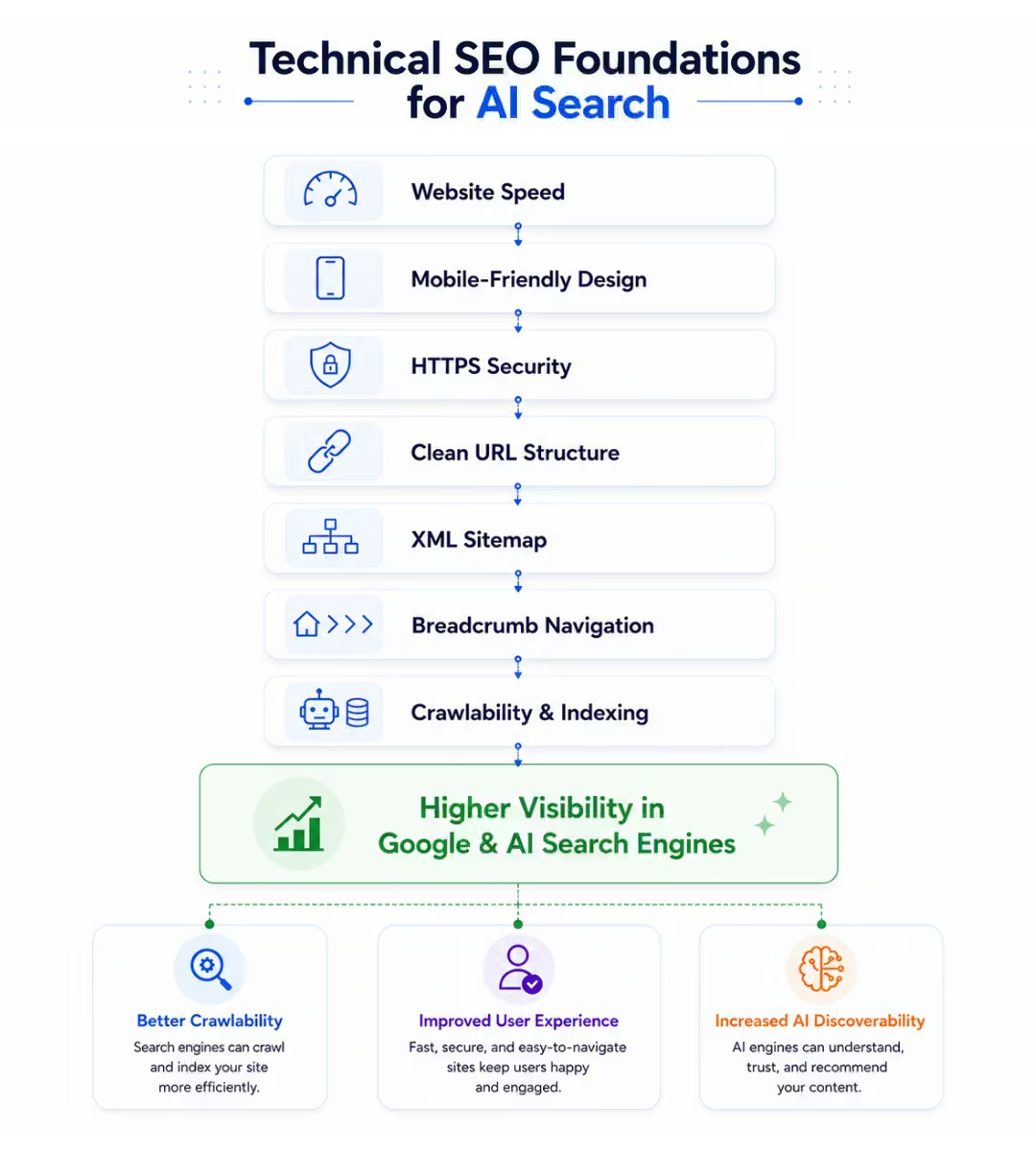
Speed has always been important for SEO, but it’s equally important for AI search because it affects how easily users and search engines interact with your website.
A slow WooCommerce store can lead to:
- Higher bounce rates
- Lower user satisfaction
- Reduced conversions
- Poorer search performance
Google also evaluates websites using Core Web Vitals, a set of metrics that measure the real-world user experience.
The three key metrics are:
- Largest Contentful Paint (LCP): Measures how quickly the main content loads.
- Interaction to Next Paint (INP): Measures how responsive your website is to user interactions.
- Cumulative Layout Shift (CLS): Measures how visually stable your pages remain while loading.
To improve performance:
- Use high-quality hosting optimized for WordPress and WooCommerce.
- Compress and serve images in modern formats like WebP.
- Enable page caching and browser caching.
- Minify CSS and JavaScript where appropriate.
- Remove unused plugins and scripts.
- Use a Content Delivery Network (CDN) if you serve customers globally.
A fast website not only improves rankings but also builds trust with visitors, supporting the overall quality signals that search engines and AI systems value.
Design for Mobile-First Users
More than half of ecommerce traffic now comes from mobile devices, making mobile optimization essential.
Google primarily uses the mobile version of your website for indexing, and many AI-powered search experiences are accessed through smartphones.
Your WooCommerce store should:
- Load quickly on mobile networks.
- Display product images correctly on all screen sizes.
- Use readable fonts without requiring users to zoom.
- Have buttons and navigation that are easy to tap.
- Provide a smooth checkout experience on mobile devices.
Always test your product pages on multiple devices rather than relying solely on desktop previews.
A great mobile experience improves usability, supports Google’s people-first approach, and increases customer satisfaction.
Use HTTPS to Build Trust
Security is a fundamental requirement for every ecommerce website.
Customers trust online stores that protect their personal information, payment details, and browsing activity.
Ensure your WooCommerce store:
- Uses HTTPS across the entire website.
- Redirects all HTTP URLs to HTTPS.
- Keeps SSL certificates up to date.
- Avoids mixed-content warnings.
HTTPS is a long-established ranking signal and also reinforces the trustworthiness component of Google’s E-E-A-T framework. Secure websites are more likely to earn user confidence and maintain a positive reputation.
Create a Clear URL Structure
Your URLs should clearly describe the page they’re linking to.
For example:
✅ Good:
https://example.com/wireless-gaming-mouse❌ Avoid:
https://example.com/product?id=2485Descriptive URLs help users understand the page before clicking and make it easier for search engines to interpret the content.
For WooCommerce stores, keep URLs:
- Short and descriptive.
- Focused on the primary topic.
- Consistent across the website.
- Free from unnecessary parameters whenever possible.
Simple URL structures also make it easier to share product pages across social media, email campaigns, and other marketing channels.
Implement Breadcrumb Navigation
Breadcrumbs improve both user navigation and search engine understanding.
For example:
Home → Furniture → Office Chairs → Ergonomic Office Chair
This hierarchy helps users quickly understand where they are within your store and makes it easier to navigate back to broader categories.
For AI systems and search engines, breadcrumbs provide additional context about the relationship between categories and products.
WooCommerce supports breadcrumb navigation through many themes and SEO plugins, making it a simple but valuable improvement.
Keep Your XML Sitemap Updated
An XML sitemap acts as a roadmap for search engines, helping them discover new and updated pages on your website.
A WooCommerce sitemap should include:
- Product pages
- Product categories
- Blog posts
- Important informational pages
Whenever you add new products or publish fresh content, your sitemap should update automatically.
After generating your sitemap, submit it to:
- Google Search Console
- Bing Webmaster Tools
This helps search engines discover new content more efficiently, especially for large stores with frequently changing inventories.
Optimize Your WooCommerce Product Pages for AI Search
Your product pages are more than just sales pages. They are also one of the primary sources AI search engines use to understand what you’re selling, who it’s for, and when it should be recommended.
When someone asks an AI assistant:
- “What’s the best ergonomic office chair for working from home?”
- “Recommend a lightweight camping tent for two people.”
- “Which mechanical keyboard is best for programming?”
The AI needs enough context to confidently recommend a product. If your product page only includes a title, a few specifications, and a short manufacturer description, there’s very little information for AI to understand.
A high-quality WooCommerce product page should answer the same questions a knowledgeable salesperson would answer in a physical store. It should explain the product clearly, highlight its strengths, address common concerns, and help customers decide whether it’s the right choice.
Let’s look at the elements that make a product page both AI-friendly and customer-friendly.
Write Descriptive Product Titles
Your product title is often the first piece of information both users and AI systems see.
Avoid generic names that provide little context.
❌ Poor Example
Wireless Mouse
✅ Better Example
Wireless Ergonomic Mouse with Bluetooth 5.3, Rechargeable Battery & Silent Clicks
A descriptive title helps communicate:
- What the product is
- Key features
- Intended use
- Important differentiators
Well-written product titles also improve search relevance without relying on keyword stuffing.
Best Practices
- Clearly describe the product.
- Include important features naturally.
- Keep titles readable.
- Avoid unnecessary promotional words like “Best” or “Amazing.”
Create Original and Helpful Product Descriptions
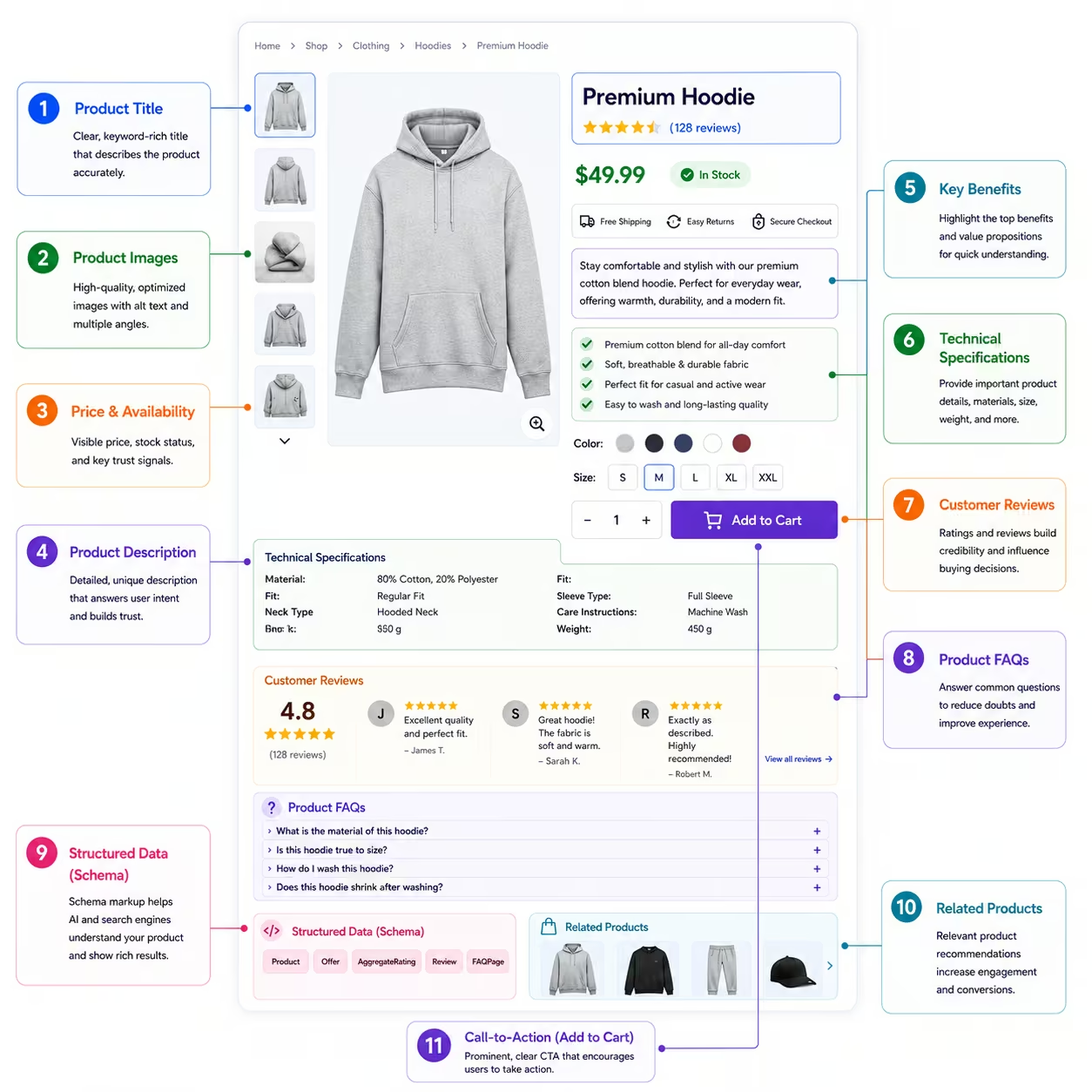
One of the biggest mistakes WooCommerce store owners make is copying product descriptions from manufacturers.
While this saves time, it creates duplicate content that offers little value to customers or search engines.
Instead, write descriptions that answer questions customers actually have.
A great product description should explain:
- What the product does
- Who it’s designed for
- Why should someone choose it
- How it solves a problem
- What makes it different from similar products
For example, instead of writing:
“This office chair features lumbar support and adjustable armrests.”
Expand it into something more helpful:
“Designed for professionals who spend long hours at a desk, this ergonomic office chair features adjustable lumbar support, customizable armrests, and breathable mesh fabric to improve comfort throughout the workday. Whether you’re working from home or in the office, the chair helps reduce back strain while promoting better posture.”
This approach provides context that benefits both customers and AI systems.
Add Detailed Product Specifications
Specifications are valuable because they’re factual, structured, and easy for machines to interpret.
Depending on your products, include details such as:
- Dimensions
- Weight
- Materials
- Colors
- Compatibility
- Battery life
- Capacity
- Warranty
- Included accessories
- Certifications
- Country of origin
Avoid placing all specifications inside product images. Important information should also appear as searchable text on the page.
This improves accessibility, SEO, and machine readability.
Focus on Benefits, Not Just Features
Many product pages list technical features but never explain why they matter.
Compare these examples:
Feature
5000mAh Battery
Benefit
Enjoy up to two full days of typical use without needing to recharge.
Or:
Feature
Waterproof IP68 Rating
Benefit
Use your device confidently in the rain, at the beach, or during outdoor adventures without worrying about accidental water exposure.
Benefits help customers understand the real-world value of a product and give AI systems richer context about its intended use.
Include Real-World Use Cases
AI platforms perform better when they understand how products fit into real situations.
Instead of only describing the product, explain where and how it can be used.
Examples:
- Perfect for remote workers.
- Ideal for beginner photographers.
- Suitable for small apartments.
- Great for camping and hiking.
- Recommended for students.
These practical examples help AI match products to more specific user queries.
Use High-Quality Images and Videos
Visual content improves the shopping experience and increases buyer confidence.
Include:
- Multiple product angles
- Lifestyle images
- Close-up photos
- Packaging images
- Size comparison images
- Demonstration videos
While AI primarily processes text and structured data, visual assets improve user engagement, reduce uncertainty, and support better product understanding.
Remember to optimize image filenames and alt text with descriptive, human-readable language.
Answer Common Questions with Product FAQs
Every product page should anticipate the questions customers are most likely to ask.
Examples include:
- Is this product compatible with my device?
- What’s included in the box?
- How long is the warranty?
- Can it be used outdoors?
- Is assembly required?
- How should it be cleaned?
Adding FAQs provides valuable information that users appreciate and increases the depth of your product page.
It also supports Google’s helpful content principles and strengthens your store’s E-E-A-T by demonstrating expertise and transparency.
Improve Product Discovery with Smart WooCommerce Features
complementary items that match their needs.
Features such as Frequently Bought Together, Product Bundles, Product Brands, Featured Products, and Quick View improve the shopping experience by making it easier for customers to explore your catalog. These features also strengthen your site’s internal linking, helping search engines and AI systems better understand the relationships between your products.
While you can install separate plugins for each feature, managing multiple extensions can increase maintenance and impact performance. An all-in-one WooCommerce solution like Store One brings these essential ecommerce features together in a modular plugin, allowing you to enable only the functionality your store needs.
By improving product discovery and creating stronger connections between products, you not only enhance the customer experience but also support many of the SEO and AI optimization best practices discussed throughout this guide.
Keep Product Information Accurate and Updated
AI systems rely on accurate information to generate reliable answers.
Outdated pricing, discontinued products, incorrect availability, or obsolete specifications can reduce trust and create a poor customer experience.
Regularly review:
- Prices
- Inventory status
- Product images
- Specifications
- Shipping details
- Warranty information
- Compatibility information
Keeping product pages current improves customer confidence while reinforcing your store’s trustworthiness.
Showcase Authentic Customer Reviews
Customer reviews provide valuable insights that neither product descriptions nor technical specifications can fully capture.
They demonstrate real-world experience, which aligns closely with the Experience component of Google’s E-E-A-T framework.
Encourage customers to leave reviews that describe:
- How they use the product
- What they liked
- Any limitations they noticed
- Tips for future buyers
Detailed, authentic reviews help shoppers make informed decisions and add valuable context that AI systems can use when understanding your products.
Avoid publishing fake or manipulated reviews, as authenticity is essential for building long-term trust.
📌 Best Practices Checklist
Before publishing a product page, ask yourself:
- Is the title descriptive and easy to understand?
- Is the description original and genuinely helpful?
- Have you explained both features and benefits?
- Are the specifications complete and accurate?
- Does the page include FAQs?
- Are images high quality with descriptive alt text?
- Are reviews enabled and actively collected?
- Is all information current and trustworthy?
If you can answer “yes” to these questions, your product page is well positioned to serve both customers and AI search systems.
Optimize Your WooCommerce Category Pages for AI Search
Product pages help AI understand individual products, but category pages provide the bigger picture. They help search engines and AI systems understand how your products are organized, what your store specializes in, and which topics you have expertise in.
Unfortunately, many WooCommerce stores treat category pages as simple product listings with little or no descriptive content. While this may work for browsing, it doesn’t provide enough context for search engines or AI assistants to understand the purpose of the category.
A well-optimized category page acts as both a landing page and a buying guide. It introduces the category, answers common questions, explains important differences between products, and helps shoppers find the right option more quickly.
For AI-powered search, these pages can become valuable sources of information that support product recommendations and strengthen your site’s topical authority.
Write Unique and Helpful Category Descriptions
The first thing users and AI systems should see is a clear introduction to the category.
Instead of adding a generic sentence like:
“Browse our collection of office chairs.”
Provide useful information that explains:
- What products the category includes.
- Who the products are designed for.
- Common use cases.
- Important buying considerations.
- What makes your collection unique.
For example, if you have an Ergonomic Office Chairs category, your introduction might explain:
- Why ergonomic chairs are important.
- Who benefits from using them.
- Key features to consider before buying.
- How to choose the right model.
This type of content immediately demonstrates expertise while giving AI systems more context about the category.
Help Customers Choose the Right Product
One of the biggest advantages of category pages is the ability to educate shoppers before they begin comparing products.
Consider adding sections that answer questions such as:
- Which product is best for beginners?
- What’s the difference between premium and budget options?
- Which features matter most?
- Which products are most popular?
- What mistakes should buyers avoid?
This turns your category page into a helpful buying resource instead of just another product listing.
It also aligns with Google’s Helpful Content principles and strengthens your site’s E-E-A-T by demonstrating real expertise.
Add Buying Guides Within Category Pages
Many customers aren’t ready to purchase immediately. They first want to understand their options.
Including a short buying guide within your category page helps answer these questions without requiring visitors to leave the page.
For example, a category selling gaming monitors might include:
What Screen Size Should You Choose?
Explain the differences between 24-inch, 27-inch, and ultrawide monitors.
IPS vs VA vs OLED Panels
Describe the strengths and limitations of each panel type.
Refresh Rate Explained
Help users understand whether they need 144Hz, 240Hz, or higher.
Providing educational content alongside your products increases the overall value of the page and gives AI systems more useful information to reference.
Strengthen Internal Linking
Internal links help both users and AI systems understand how different pages relate to one another.
A well-structured category page should naturally link to:
- Individual product pages.
- Related categories.
- Buying guides.
- Comparison articles.
- Frequently asked questions.
- Brand pages.
For example:
A category page for Wireless Earbuds might link to articles such as:
- How to Choose Wireless Earbuds
- Wireless Earbuds vs Over-Ear Headphones
- Best Wireless Earbuds for Running
This creates topical clusters that reinforce your expertise while helping AI understand the relationships between your content.
Avoid Thin Category Pages
A common mistake is publishing category pages that contain nothing except a grid of products.
These pages offer very little value beyond navigation.
Instead, aim to include:
- A helpful introduction.
- Buying advice.
- Frequently asked questions.
- Internal links.
- Clear filtering options.
- High-quality category images.
- Updated product collections.
Even a few hundred words of genuinely useful content can significantly improve the quality of a category page.
Use Structured Data (Schema Markup) to Help Search Engines and AI Understand Your Store
When someone visits your WooCommerce store, they can easily recognize a product’s name, price, reviews, and availability.
Search engines and AI systems can’t interpret this information the same way unless it’s clearly defined.
This is where structured data, commonly known as schema markup, becomes essential.
Schema markup adds machine-readable information to your pages, allowing search engines to accurately identify products, prices, ratings, brands, FAQs, breadcrumbs, and other important elements. Instead of guessing what a page contains, machines receive structured information in a standardized format.
For WooCommerce stores, implementing the right schema markup improves content clarity, supports rich search results, and helps search engines process your product information more efficiently.
What Is Schema Markup?
Schema markup is standardized vocabulary developed through Schema.org that helps websites describe their content in a way machines can understand.
Instead of simply displaying:
Nike Air Running Shoes
Schema can provide additional context such as:
- Product Name
- Brand
- SKU
- GTIN
- Price
- Currency
- Availability
- Product Images
- Customer Ratings
- Reviews
This information is typically added using JSON-LD, which is Google’s recommended implementation method.
Because the structured data is embedded in the page’s source code, it doesn’t change how visitors see your website. Instead, it provides additional context for search engines and other systems that process web content.
Essential Schema Types for WooCommerce Stores
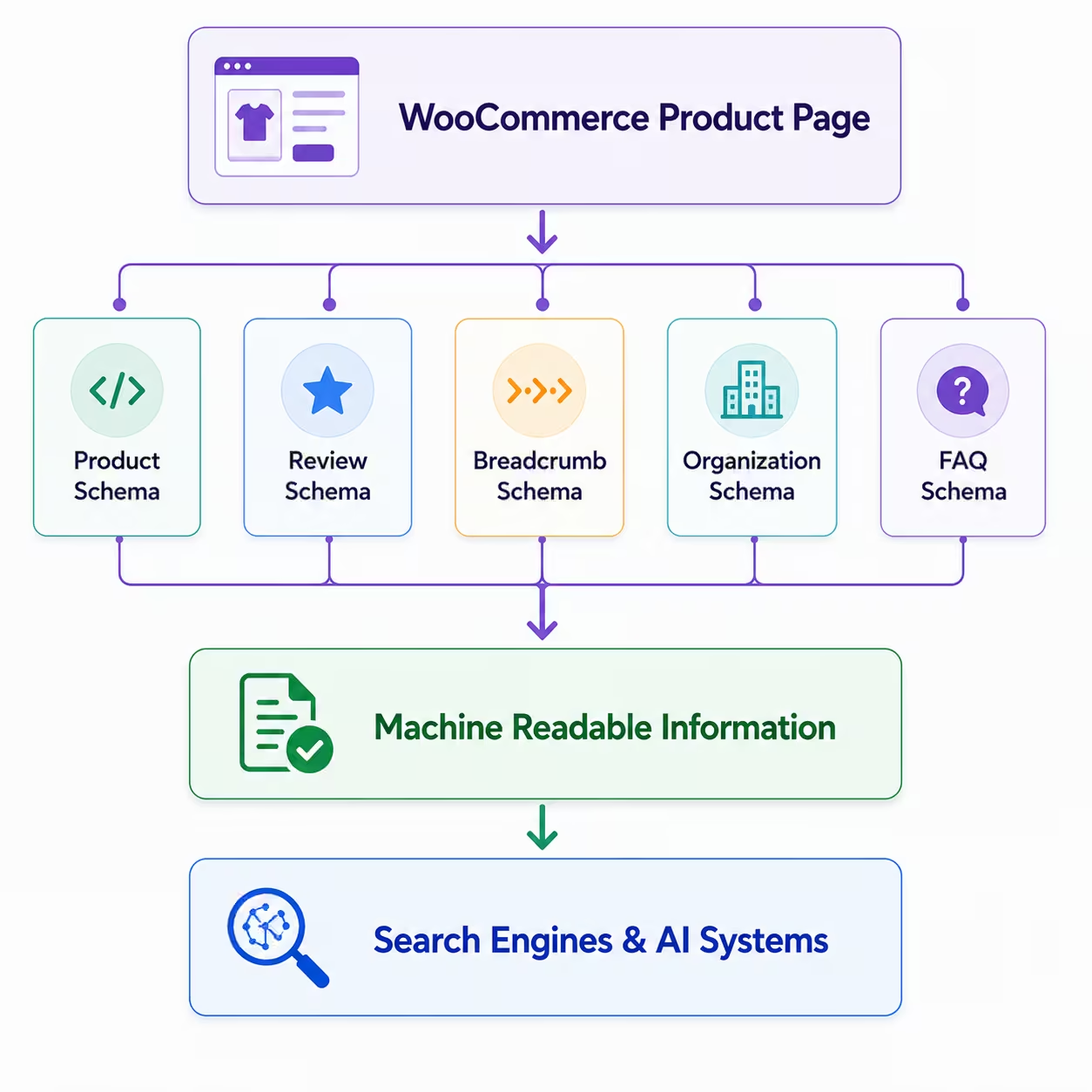
Not every schema type is necessary, but several are particularly valuable for ecommerce websites.
Product Schema
Product Schema provides detailed information about individual products.
Include properties such as:
- Product Name
- Brand
- Description
- SKU
- GTIN or MPN (if available)
- Images
- Price
- Currency
- Availability
- Product Condition
This should be implemented on every product page.
Review and Aggregate Rating Schema
Customer reviews are valuable for both shoppers and search engines.
Review Schema communicates:
- Individual reviews
- Overall rating
- Total number of reviews
Whenever possible, use genuine customer reviews collected through your WooCommerce store.
Avoid generating artificial reviews or marking up ratings that aren’t visible to users.
Breadcrumb Schema
Breadcrumbs help search engines understand how pages are connected within your store.
Example:
Home
→ Electronics
→ Wireless Earbuds
→ Noise Cancelling Earbuds
Breadcrumb Schema also improves navigation and can enhance how your pages appear in search results.
Organization Schema
Organization Schema provides information about your business.
Include details such as:
- Business name
- Website
- Logo
- Contact information
- Social profiles
This helps establish your brand identity across search engines.
FAQ Schema
If your product or category pages include frequently asked questions, marking them up appropriately helps search engines better understand the content.
Only add FAQ Schema when the questions and answers are actually visible on the page.
WebSite Schema
This schema describes your overall website.
It can include:
- Website name
- Homepage URL
- Internal search functionality
- Publisher information
Many SEO plugins generate this automatically, but it’s worth verifying that it’s implemented correctly.
Use JSON-LD Instead of Older Formats
There are several ways to implement schema markup, including Microdata and RDFa.
Today, JSON-LD is the preferred format because it’s easier to maintain, separates structured data from your HTML, and is recommended by Google.
Most modern WooCommerce SEO plugins and themes support JSON-LD automatically, reducing the need for manual implementation.
Validate Your Structured Data
Adding schema isn’t enough. It also needs to be valid.
Incorrect or incomplete structured data can prevent search engines from interpreting your content correctly.
Before publishing important pages, validate your markup using Google’s Rich Results Test and Schema Markup Validator.
These tools can help identify:
- Missing required properties
- Invalid values
- Syntax errors
- Unsupported schema types
Regular validation is especially important after changing themes, installing plugins, or updating WooCommerce.
Common Schema Mistakes to Avoid
Even well-designed WooCommerce stores sometimes make schema implementation mistakes.
Watch out for issues such as:
- Missing product prices.
- Incorrect availability status.
- Outdated ratings.
- Broken image URLs.
- Duplicate schema generated by multiple plugins.
- Marking up information that isn’t visible on the page.
- Forgetting to update structured data after product changes.
Keeping your structured data accurate is just as important as adding it in the first place.
Let WooCommerce and the Right Tools Handle the Heavy Lifting
Most modern WooCommerce themes and SEO plugins automatically generate basic schema markup, including Product, Organization, and Breadcrumb schema.
However, adding structured data is only one part of creating a well-optimized store.
The quality of your product information, customer reviews, FAQs, internal linking, and overall shopping experience still determines how useful your pages are.
If you’re already using plugins like Store One to enhance product pages with modules such as Frequently Bought Together, Product Brands, Featured Products, and Product Bundles, those improvements can also contribute to richer, more connected product pages that complement your structured data strategy.
Think of schema as the technical layer and your product content as the human layer. Both work together to create a better shopping experience.
AI Crawlers, robots.txt & llms.txt
As AI-powered search continues to grow, many website owners are asking the same questions:
- Can ChatGPT crawl my WooCommerce store?
- Should I allow AI crawlers?
- Do I need an llms.txt file?
- How are AI crawlers different from Googlebot?
The answers aren’t always straightforward because different AI companies use different methods to discover, retrieve, and access web content.
Some AI systems rely on traditional search indexes, while others use their own crawlers or retrieve information through live search. Understanding how these systems work can help you make informed decisions about how your WooCommerce store is accessed.
Let’s break down the key concepts.
Understanding AI Crawlers
Just as Google uses Googlebot and Microsoft uses Bingbot, AI companies operate their own crawlers for different purposes.
Some crawlers discover publicly available web pages, while others fetch content in real time to answer user queries. Others may be used to improve AI models, depending on each company’s published policies and your site’s permissions.
It’s important to remember that not every AI-generated answer comes from a crawler visiting your website directly. Some AI services retrieve information through search indexes or other retrieval systems.
This is why maintaining a technically healthy website remains essential, even if an AI platform doesn’t crawl every page itself.
Common AI Crawlers You Should Know
Several AI companies have publicly documented web crawlers and user agents.
OpenAI
OpenAI documents multiple user agents with different purposes, including:
- GPTBot: Used according to OpenAI’s published documentation for improving future models, subject to site permissions.
- OAI-SearchBot: Used to help retrieve web content for search experiences.
- ChatGPT-User: Used when a ChatGPT user explicitly requests information from a webpage or performs an action that requires retrieving content.
Each user agent serves a different purpose, so blocking one doesn’t necessarily affect the others.
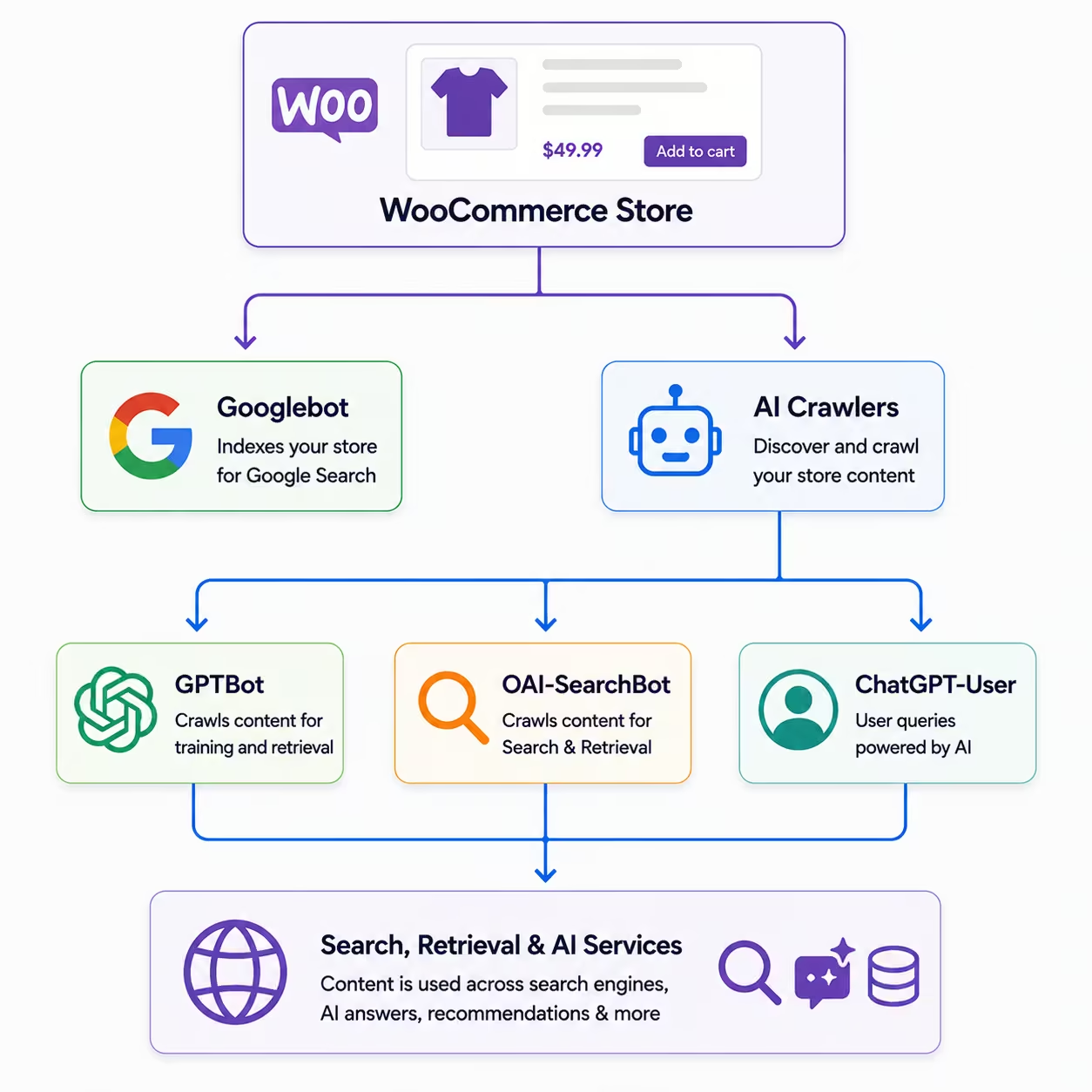
Google continues to rely primarily on Googlebot for crawling and indexing websites.
For AI-related experiences, Google also provides controls such as Google-Extended, which allows publishers to manage whether their content may be used for certain AI-related purposes, as described in Google’s documentation.
Anthropic
Anthropic provides documentation for its crawler and explains how website owners can manage access using standard web controls such as robots.txt.
Perplexity
Perplexity has also documented its crawler and provides guidance for website owners who want to allow or restrict access.
As AI search evolves, additional crawlers and user agents may be introduced by other providers.
How robots.txt Works
The robots.txt file is one of the simplest ways to communicate crawling preferences to automated bots.
Located in your website’s root directory, it allows you to specify which parts of your website crawlers should or shouldn’t access.
For example, you might allow product pages while blocking administrative areas or temporary directories.
A typical WooCommerce store should avoid blocking:
- Product pages
- Category pages
- Blog posts
- Images
- CSS and JavaScript files required for rendering
Blocking important content may reduce discoverability in both search engines and AI-powered search experiences.
Remember that robots.txt is a request, not a security mechanism. It relies on compliant crawlers respecting your instructions.
Should You Block AI Crawlers?
There isn’t a universal answer.
Your decision depends on your business goals, publishing strategy, and how you want your content to be used.
Some businesses choose to allow AI crawlers because they want greater visibility across AI-powered search experiences.
Others may restrict certain crawlers due to licensing, proprietary content, or internal policies.
Before making changes, consider questions such as:
- Do you want your products to appear in AI-generated recommendations?
- Does your content rely on advertising revenue from page visits?
- Are you publishing proprietary research or premium content?
- Have you reviewed the documentation provided by each AI company?
Avoid blocking crawlers simply because they’re labeled as “AI.” Understand what each crawler does before deciding whether to allow or restrict access.
What is llms.txt?
llms.txt is a proposed standard that allows website owners to provide AI systems with a structured overview of important content on their website.
Think of it as a guide that points AI systems toward valuable resources such as:
- Product documentation
- Knowledge base articles
- Buying guides
- API documentation
- Support content
Unlike robots.txt, which focuses on crawl permissions, llms.txt is designed to help AI systems understand where important information is located.
At the time of writing, llms.txt is not an official web standard, and adoption varies across AI platforms.
Because support continues to evolve, it should be viewed as an optional enhancement rather than a replacement for good website architecture, structured data, and technical SEO.
Should WooCommerce Stores Use llms.txt?
For most WooCommerce stores, implementing llms.txt isn’t essential today.
Your priority should remain:
- Publishing comprehensive product information.
- Maintaining accurate structured data.
- Keeping your XML sitemap updated.
- Ensuring important pages are crawlable.
- Building a logical site structure.
If llms.txt becomes more widely adopted in the future, implementing it may provide additional benefits. However, it shouldn’t distract from the fundamentals that have a much greater impact today.
Best Practices for AI Accessibility
Whether you’re optimizing for search engines or AI-powered search, these practices remain valuable:
- Keep important pages publicly accessible.
- Use structured data consistently.
- Maintain accurate product information.
- Publish original, high-quality content.
- Avoid unnecessary crawl restrictions.
- Review crawler documentation before making changes.
- Monitor updates from major AI providers as the ecosystem evolves.
By focusing on openness, accuracy, and transparency, you make it easier for both search engines and AI systems to understand your WooCommerce store.
Build Brand Authority Beyond Your Website
AI search engines don’t evaluate your WooCommerce store in isolation.
When deciding which brands, products, or businesses to mention in AI-generated responses, they may also consider the broader information available across the web. A business that is consistently mentioned by reputable sources is generally easier to verify than one that exists only on its own website.
For WooCommerce store owners, this means your visibility isn’t determined solely by your product pages. Your overall digital presence also plays an important role in establishing credibility.
Let’s look at practical ways to strengthen your brand authority.
Get Mentioned on Trusted Websites
One of the strongest authority signals is being referenced by reputable websites within your industry.
These mentions help establish your business as a legitimate source and expose your products to new audiences.
Examples include:
- Industry blogs
- News publications
- Product review websites
- Buying guide websites
- Partner websites
- Community resources
Focus on earning mentions naturally by creating products, resources, or content that others genuinely find valuable.
Build a Recognizable Brand
AI systems are better at understanding established brands than anonymous websites.
Create consistency across your online presence by using the same:
- Brand name
- Logo
- Business description
- Website URL
- Contact information
This consistency reduces ambiguity and helps both users and machines identify your business correctly.
Encourage Discussions About Your Brand
Not every brand mention needs to come from a major publication.
Organic discussions across the web also contribute to your overall visibility.
Examples include:
- Customers sharing their experiences
- Product reviews
- Forum discussions
- Community recommendations
- Industry conversations
Rather than trying to manufacture discussions, focus on delivering products and customer experiences that people naturally want to recommend.
Publish Original Research and Resources
One of the best ways to establish authority is by publishing content that others reference.
Examples include:
- Industry statistics
- Annual trend reports
- Original surveys
- Benchmark studies
- Free tools and calculators
- Downloadable checklists
- Templates
Unlike standard blog posts, these resources are more likely to earn citations because they provide unique value.
For example, if you sell fitness equipment, publishing an annual Home Gym Trends Report gives journalists, bloggers, and creators a reason to reference your website.
Think Long-Term, Not Algorithm-First
Brand authority isn’t built overnight.
It grows through consistent quality, helpful content, excellent customer service, and positive customer experiences.
Instead of chasing every new AI trend, invest in becoming a business that people genuinely trust and recommend.
That’s a strategy that remains valuable regardless of how search technology evolves.
The Future of AI Shopping and Agentic Commerce
The way people shop online has changed dramatically over the past two decades.
Customers first moved from physical stores to ecommerce websites. Then they shifted from desktop to mobile shopping. Today, we’re entering another major transformation driven by artificial intelligence.
Instead of browsing dozens of websites, comparing products manually, and reading countless reviews, shoppers are increasingly turning to AI assistants for recommendations, comparisons, and purchasing advice.
This shift is laying the foundation for what’s often called Agentic Commerce, where AI doesn’t just answer questions but actively helps users research, compare, and even complete purchases on their behalf.
For WooCommerce store owners, this means optimizing your website isn’t just about improving search rankings anymore. It’s about preparing your store to communicate effectively with intelligent systems that assist customers throughout the buying journey.
From Search Engines to Shopping Assistants
Traditional search engines have always acted as discovery tools.
Users entered a query, reviewed multiple search results, visited several websites, and eventually made a purchase decision.
AI is changing this process.
Instead of simply pointing users toward information, AI assistants increasingly provide:
- Personalized product recommendations.
- Side-by-side comparisons.
- Buying advice.
- Compatibility checks.
- Follow-up questions based on user preferences.
For example, a customer might ask:
“I’m looking for a lightweight laptop for graphic design under $1,200.”
Rather than displaying links, an AI assistant may narrow the options, explain the differences between models, highlight important specifications, and recommend the best choice based on the user’s priorities.
The role of ecommerce websites is evolving from simply attracting visitors to becoming reliable sources of information that AI assistants can confidently reference.
The Rise of Agentic Commerce
One of the most exciting developments in ecommerce is the emergence of AI agents.
Unlike traditional chatbots that answer isolated questions, AI agents are designed to complete multi-step tasks.
In the future, an AI shopping agent may:
- Research products across multiple websites.
- Compare prices and specifications.
- Check stock availability.
- Recommend the best option based on a user’s preferences.
- Add products to a shopping cart.
- Complete a purchase with the user’s approval.
- Track delivery status.
- Suggest complementary products after the purchase.
This represents a significant shift from search-driven shopping to assistant-driven shopping.
While this technology is still evolving, the direction is clear: ecommerce stores will increasingly interact with AI systems acting on behalf of customers.
Personalization Will Continue to Evolve
AI assistants are becoming better at understanding individual preferences.
Instead of asking:
“What’s the best office chair?”
Customers may ask:
“Recommend an office chair for someone who works eight hours a day, has lower back pain, and prefers breathable mesh.”
This level of personalization requires more descriptive product information than ever before.
The better you describe who a product is designed for, where it works best, and what problems it solves, the easier it becomes for AI systems to match your products with the right customers.
AI Will Reward Specialized Stores
General marketplaces offer enormous product catalogs, but niche WooCommerce stores have an opportunity to compete by demonstrating deep expertise.
For example:
A store specializing exclusively in coffee equipment can provide:
- Brewing guides.
- Equipment comparisons.
- Maintenance tutorials.
- Coffee recipes.
- Expert buying advice.
This depth of knowledge helps establish authority within a specific niche and creates richer information for AI systems to reference.
Rather than trying to compete on the number of products, many WooCommerce businesses will benefit more by becoming recognized experts in their category.
Frequently Asked Questions (FAQs)
Q: Can ChatGPT crawl WooCommerce websites?
Ans: Yes, ChatGPT can access publicly available web content in certain situations through OpenAI’s search and retrieval systems. However, how content is accessed depends on the specific service and user request. The most important step is ensuring your WooCommerce store is publicly accessible, technically optimized, and contains accurate, well-structured information.
Q: Does schema markup improve AI search visibility?
Ans: Schema markup helps search engines and AI systems better understand your products by providing structured, machine-readable information. While schema alone doesn’t guarantee AI recommendations, it’s an important part of a well-optimized WooCommerce store.
Q: Is llms.txt required?
Ans: No. At the time of writing, llms.txt is an emerging standard and isn’t required for AI visibility. Most WooCommerce stores will benefit far more from strong technical SEO, structured data, and high-quality content.
Q: Are product reviews important for AI optimization?
Ans: Yes. Authentic customer reviews provide valuable context about real-world product experiences. They help shoppers make informed decisions and strengthen the overall quality of your product pages.
Q: How often should I update my WooCommerce store?
Ans: Review your store regularly. Update product information whenever specifications, pricing, availability, or images change. Refresh buying guides and evergreen content periodically to ensure accuracy.
Final Words
Artificial intelligence is reshaping how customers discover, compare, and purchase products online. As AI-powered search becomes a bigger part of the shopping journey, WooCommerce store owners have an opportunity to reach customers in entirely new ways.
The encouraging news is that preparing your store for AI search doesn’t require abandoning everything you already know about SEO. Instead, it builds on the same principles that have always mattered: creating helpful content, maintaining accurate product information, providing a fast and secure shopping experience, and earning customer trust.
Throughout this guide, we’ve explored how to strengthen every layer of an AI-ready WooCommerce store, from technical optimization and structured data to product pages, category pages, brand authority, and AI crawler management.
While AI technologies will continue to evolve, these fundamentals are unlikely to change because they’re centered on delivering the best possible experience for your customers.
If you’re feeling overwhelmed, don’t try to implement everything at once. Start with the improvements that will have the greatest impact:
- Improve your product and category pages.
- Validate your structured data.
- Keep product information accurate.
- Publish helpful, original content.
- Review your technical SEO.
- Audit your store using the checklist in this guide.
Small, consistent improvements will always outperform chasing the latest trend.
Finally, remember that optimizing for AI isn’t just about increasing visibility. It’s about creating a WooCommerce store that customers trust, understand, and enjoy using.
If you’re looking to simplify that process, Store One can help by bringing together essential WooCommerce features, and if you want a good, feature-rich, and fast WooCommerce theme, then Shop Mania will be a good option for you.
The future of ecommerce will continue to evolve, but one principle will remain the same:
Stores that provide the most helpful, trustworthy, and complete experience will always have the greatest opportunity to succeed, whether customers find them through Google, ChatGPT, Gemini, Claude, or the next generation of AI-powered shopping assistants.
More to read:


