
Overview ➣ Flipkart is a popular website. You can also create a website like Flipkart in a few simple steps. It is not as tough as people think. In fact, very few clicks and a couple of minutes are required to create a website.
Creating an ecommerce website is not a big deal in today’s world. But if the website needed is specific then it can be challenging.
Flipkart is a well-known ecommerce multivendor site that operates all over the world. If one wants to build a site like Flipkart, it doesn’t seem easy but in actuality, it is.
With the WordPress CMS, website building is super easy with themes and plugins. Likewise, there is a theme for building a website like Flipkart.
This blog can help you with your next project to create a website like Flipkart. In this blog, we will be using the WordPress theme template Flipkart, built with the Shop Mania ecommerce theme.
First, let’s see what will needed in building the site.
What We Need To Create A Website Like Flipkart
We need several plugins and a theme for this.
Shop Mania Theme – Shop Mania is an e-commerce theme well-known for its lightning speed. It is capable of creating any kind of website easily. We can create a multivendor website like Flipkart too with this.
Shop Mania Pro Plugin – Shop Mania Pro is a plugin that adds some premium features and functionalities to websites. It also unlocks access to premium website templates, Flipmart is one of them.
Woocommerce – We all know the significance of woocommerce. Woocommerce is the most important plugin when it comes to building an e-commerce website.
Elementor – Elementor is one of the most considered page builders for WordPress websites. Its drag-and-drop builder eases designing the website.
WCFM – WCFM is a WordPress plugin responsible for multivendor websites. Although there are many WordPress plugins that help in building multivendor websites, we are considering it because WCFM’s features are needed here.
All In One Woo Cart – TH All In One Woo Cart is a cart plugin that has some advanced functionalities that make it stand out from the crowd. It lets you add a Cart icon, floating and fixed, to pages.
Advance Search – TH Advance Search Pro is needed to add a search bar to the header. It is not only to add a search bar but furthermore, it is fast, responsive, and highly customizable with AJAX-based search.
How To Create A Website Like Flipkart
Here, we will see every step in building the website.
Step 1) Open your dashboard

First login to your WordPress website and open your dashboard.
Step 2) Go to Appearance > Add New Theme
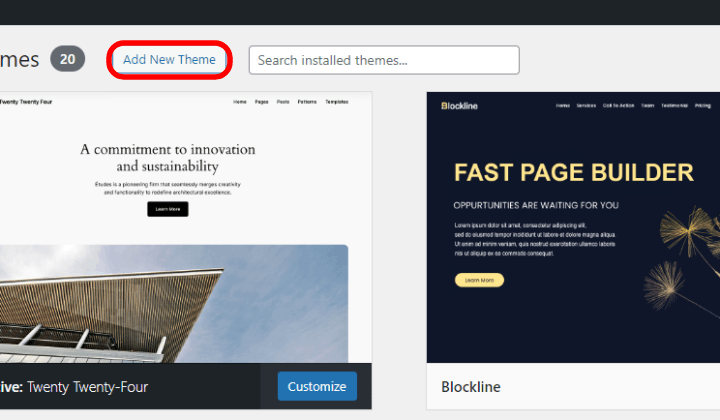
Click on appearance. Here you will see your downloaded themes. Go to the top left corner and click on Add New Theme.
Step 3) Go to the Search Bar and search for the Shop Mania theme
Go to the left side and find the Search bar. Search for a Shop Mania theme.
Step 4) Install and Activate the theme

After searching Shop Mania, you can find the theme in the list, click on Install, and then activate once installed.
Step 5) Purchase Shop Mania Pro Plugin
As the Flipmart is a premium demo, we need to upgrade the theme.
Go to themehunk.com > Shop Mania > pricing > pick a plan > Click on Buy Now.
Now, complete the formalities and get your Shop Mania Pro zip file.
Step 6) Upload Shop Mania Pro to your WordPress dashboard
Go to Appearance > Add Plugin > Upload Plugin
Now upload the Shop Mania Pro and then install and activate it.
Step 7) Go to Appearance > License
You will see a Box where the License Key is to be entered, to find the License Key, click on Find Your License Key.
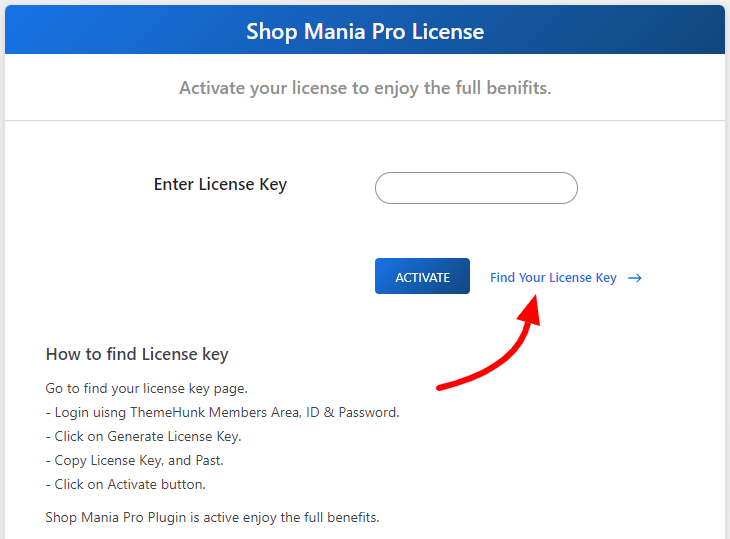
You will see another page, where the login ID and Password are to be filled.

Login using the same credentials that you entered while purchasing the theme.
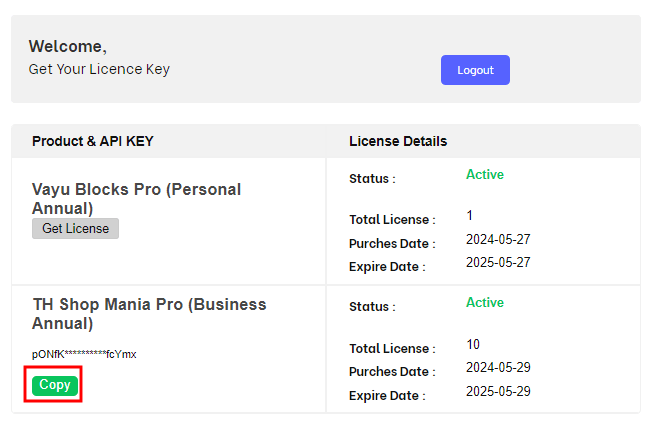
On the above page, click on Get License and once the license key appears, click on Copy.

Paste the License Key into the box and click on Activate.
This will activate the Shop Mania Pro and will unlock your access to premium templates.
Step 8) Go To Appearance > Demo Site Import
Hover your cursor on Appearance and click on Demo Site Import. Once the page opens, click on View All Starter Sites.
Here you will see all the templates of the Shop Mania theme.

On this page, you can scroll down to explore all templates. You can also filter the templates by page builder and category.
Step 9) Search for the Flipmart

You can search from the search bar for the Flipmart template. Once found, click on it.
Step 10) Click on Continue

On this page, you can view the full site including pages. After exploring the site, click on Continue at the bottom.
Step 11) Click on Build My Website
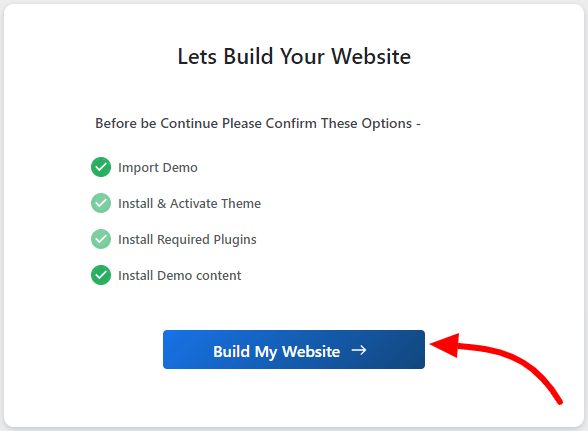
Click on Build My Website to proceed further.
Once the website is built, this page will appear.
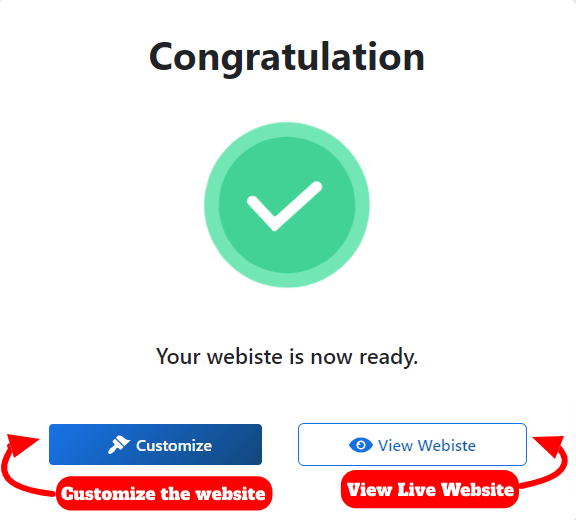
If you want to customize the site with Page Builder, click on Customize. Otherwise, click on View Website.
When you click on Customize the site will open with Elementor for customization.

Here, you can make any changes you want and then publish all changes.
After customization, go to the previous page and click on View Website.

The website is ready.
You can download the template from the button below.
FAQ
Q. Can I make an exact copy of the Flipkart website?
Ans. You can create an exact site with this theme template, but it’s up to you how you manage the site and update it with the latest Flipkart updates.
Q. Do I need to write code to build and customize the site?
Ans. No code is needed to build a website or customize it. But if you want to add some additional CSS, you can do so, as there is a dedicated section for this purpose.
Q. How multivendor sites are created?
Ans. There are several plugins on WordPress that help to create multivendor sites.
Conclusion
So, we have seen the complete process of building a website like Flipkart in detailed steps. It is so easy that it does not take more than 5 minutes.
Additionally, you can customize the site with Elementor Page Builder. the Elementor’s drag-and-drop builder simplifies the whole process with its easy and beginner-friendly tools.
It was not easy to build an exact website with this easiness but ThemeHunk made it even without writing a single line of code.
The process of building a site is automatic, and relevant plugins are also installed automatically into your site.
So if you are technical or non-technical, you can build your website.
I hope this blog will help you. Still, if you have any queries or suggestions then let me know in the comment section.
You can Subscribe to our YouTube Channel, we also upload great content there, also Do Follow us on Facebook and Twitter.
Discover More Articles


