
Overview ➣ This article explains how WooCommerce product bundles can increase Average Order Value (AOV) using smart pricing strategies, fixed and mix-and-match bundles, pricing psychology, stock management, and the Store One Product Bundle module.
Getting more traffic is not the only way to grow a WooCommerce store. Sometimes, the bigger opportunity is getting more value from the customers who are already ready to buy.
That is where product bundling becomes useful.
Instead of selling products individually, you can combine complementary items into an attractive package and give customers a reason to purchase more in a single order.
A skincare store might bundle a cleanser, serum, and moisturizer. An electronics store could combine a laptop, mouse, and laptop bag. A fashion store might sell a shirt, trousers, and belt as a complete outfit.
The strategy can increase Average Order Value (AOV) while also making product discovery easier for customers.
However, simply putting several products together is not enough. The pricing, product combination, inventory rules, and perceived value of the offer all determine whether a bundle actually works.
In this guide, we will explain how WooCommerce product bundles can raise AOV, including:
- A worked AOV calculation
- Fixed vs mix-and-match bundles
- Bundle pricing strategies
- Stock and inventory considerations
- Pricing psychology
- How to create bundles using Store One
What is a Product Bundle in WooCommerce?
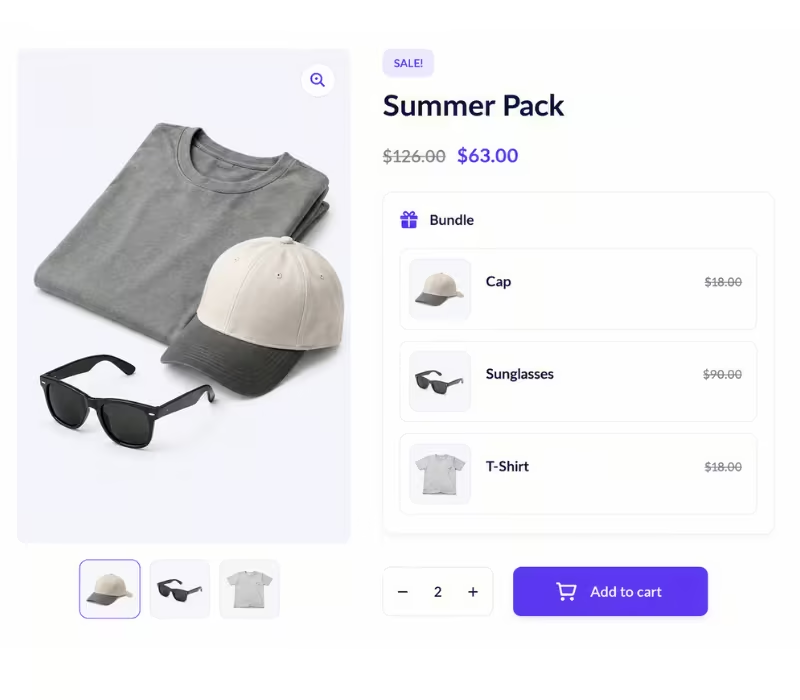
A product bundle combines two or more products and presents them as a single purchasing opportunity.
Instead of asking customers to find and add each product individually, the store offers a ready-made combination.
For example, individual prices:
| Item | Pricing |
|---|---|
| Running Shoes | $80 |
| Sports Socks | $15 |
| Water Bottle | $20 |
Total individual price: $115
The store could offer:
Runner Essentials Bundle- $99
The customer sees a $16 saving, while the store increases the amount purchased in one transaction.
Bundles do not always need a discount, either. Convenience, exclusivity, products, or a curated combination can also create enough perceived value to make the bundle attractive.
Why WooCommerce Product Bundles Can Increase Average Order Value
Average Order Value measures how much customers spend, on average, each time they place an order. The basic formula is:
AOV = Total Revenue ÷ Number of Orders
Suppose your WooCommerce store generates $10,000 from 200 orders.
Your AOV is: $10,000 ÷ 200 = $50
If you can encourage customers who normally spend $50 to purchase a $65 or $75 bundle instead, you can grow revenue without needing the same percentage increase in traffic.
Bundles help because they shift the customer’s decision from:
“Should I buy another product?” to “Should I choose the regular option or get the bundle?”
The difference matters.
The second decision focuses on value, rather than requiring the customer to independently justify another purchase.
AOV Math: A Worked Product Bundle Example
Let’s look at a practical example. Imagine a WooCommerce electronics store receives 1,000 orders per month.
Before introducing bundles:
| Metric | Value |
|---|---|
| Monthly Orders | 1,000 |
| Average Order Value | $50 |
| Monthly Revenue | $50,000 |
Now the store introduces a Work-from-Home Bundle containing:
- Keyboard
- Mouse
- Laptop stand
The bundle sells for $75.
Suppose 20% of customers choose the bundle instead of making the typical $50 purchase.
That gives us:
800 regular orders × $50 = $40,000
200 bundle orders × $75 = $15,000
Total monthly revenue becomes:
$40,000 + $15,000 = $55,000
The new AOV is: $55,000 ÷ 1,000 = $55
Monthly revenue increased by $5,000.
And this happened without increasing the number of orders.
This is why AOV deserves attention. Even in reality, small improvements can produce meaningful revenue gains on scale.
The important point, however, is that revenue is not the same as profit. If the discount is required to achieve the higher AOV and destroys your product margin, the bundle may look successful while contributing very little additional profit.
How to Price WooCommerce Product Bundle
There is no universal best bundle discount.
The right pricing strategy depends on your margins, product costs, purchasing behavior, and the role each item plays in the bundle.
Here are several approaches worth testing.
Percentage Discount Bundles
This is one of the easiest offers for customers to understand.
For example:
Individual total: $120
Bundle discount: 15%
Bundle price: $102
The shopper immediately understands the value proposition:
Buy together and save 15%.
Percentage discounts work particularly well when customers already understand the normal prices of the individual products.
With Store One, merchants can apply percentage discounts to the entire bundle or configure discounts at the product level.
Fixed-Amount Discount
Instead of displaying a percentage, offer a specific monetary saving.
For example:
Buy the Complete Photography Kit and save $30
If the product normally costs $249 together, the bundle could be priced at $219.
For some offers, “$30 off” can feel more concrete than “12% off.”
Store One supports fixed as well as percentage-based discounts, giving merchants flexibility over how the offer is structured.
Discount the Add-on, Not the Hero Product
You don’t necessarily need to discount everything.
Suppose you sell items separately:
| Item | Pricing |
|---|---|
| Coffee Machine | $150 |
| Coffee Grinder | $50 |
| Coffee Beans | $20 |
Normal total = $220
Instead of reducing the price of the coffee machine, you might offer bundle:
| Item | Pricing |
|---|---|
| Coffee Machine | $150 |
| Coffee Grinder | $40 |
| Coffee Beans | $15 |
Bundle total = $205
This protects the margin of your primary product while making the accessories more appealing.
It is particularly useful when the main product already sells well without a discount.
Store One supports per-product discounts, so the main product can remain at full price while selected bundle items receive different fixed or percentage discounts.
Use Tiered Bundle Value
Another strategy is to make the value improve as customers purchase more.
For example:
But 2 products: Save 5%
Buy 3 products: Save 10%
Buy 4 products: Save 15%
The increasing discount creates an incentive to move towards a larger cart.
But always calculate the margin before increasing the discount. A larger order with an excessive discount is not automatically more profitable.
Fixed Bundles vs Mix-and-Match Bundles
One of the most important decisions is how much control customers should have over what goes into their bundle.
There are two common approaches.
Fixed Bundles
A fixed bundle contains a predetermined group of products.
For example:
| Bundle Name | Items | Bundle Pricing |
|---|---|---|
| Gaming Starter Kit | Gaming Keyboard, Gaming Mouse, Mouse Pad, and Headset | $149 |
Customers buy the combination as configured.
Fixed bundles work particularly well when the products naturally belong together.
Examples include:
- Skincare routines
- Camera starter kits
- Computer accessory packages
- Fitness starter packs
- School supply kits
- Gift boxes
- Complete outfits
Advantages of Fixed Bundles
- They are easy for customers to understand and reduce decision fatigue.
- They also allow merchants to carefully control margins because the exact products included in every order are known.
- Fixed bundles are particularly useful for shoppers who want a complete solution rather than individual components.
Mix-and-Match Bundles
Mix-and-match bundles give customers more freedom.
Instead of forcing everyone to purchase the same products, selected items can be optional.
For example:
Build Your Own Coffee Bundle
Choose your:
Coffee Beans
Syrup Optional
Coffee Mug Optional
Filters Optional
Milk Frother Optional
Customers create a package that matches their needs.
Store One supports optional bundle products along with minimum and maximum quality controls, making it possible to create build-your-own bundle experiences. It also supports specific product variations, such as size or colors.
Advantages of Mix-and-Match Bundles
Customer can greater control over their purchase.
This can be particularly useful for:
- Food boxes
- Clothing
- Beauty products
- Gift boxes
- Subscription-style packages
- Product variations
- Accessories
The trade-off is complexity. Too many choices can turn a convenient bundle into another difficult shopping decision.
A useful rule is to provide meaningful choice without overwhelming the shopper.
Fixed vs. Mix-and-Match: Which Should You Use?
| Factor | Fixed Bundle | Mix-and-Match |
|---|---|---|
| Customer choice | Limited | High |
| Setup complexity | Lower | Higher |
| Pricing control | Low | Moderate |
| Margin predictability | High | Depends on selection |
| Best for | Complementary kits | Customizable packages |
| Shopping experience | Fast and simple | Flexible |
| Inventory planning | Easier | More dynamic |
Neither model is inherently better.
Use fixed bundles when you know which combination solves the customer’s problem. Use mix-and-match when personalization itself adds value.
Product Bundle Pricing Psychology
Bundle pricing is not just mathematics. It also influences how customers perceive the offer.
A customer needs to quickly understand:
Several psychological pricing principles can make that clear.
Show the Reference Price
Consider these two offers:
Bundle:$79
versus:
Normally $99 – Bundle Price $79 – Save $20
The second offer provides a reference point.
Without the original price, $79 is simply a number. With the $99 comparison, customers can immediately see the economic benefit of purchasing the bundle.
Make the Saving Easy to Understand
Avoid making customers calculate the discount themselves.
Instead of:
Individual items total: $147.85
Bundle: $126.64
Consider highlighting:
Bundle Price: $126.64 – You Save $21.21
Or simplify the promotional presentation where appropriate:
Save 15% when purchased together.
The faster customers understand the benefit, the less friction the offer creates.
Use Price Anchoring
A higher reference price can make the bundle price appear more attractive when the comparison is legitimate.
For example:
Buy Separately: $180
Complete Bundle: $149
The $180 figure acts as the anchor against which customers evaluate $149.
The comparison should always reflect genuine product pricing rather than an artificially inflated reference price.
Protect the Value of Your Main Product
Constantly discounting your flagship product can train customers to wait for sales.
Instead, keep the primary product at its regular price and offer stronger savings on complementary products.
For example:
Laptop – regular price
Laptop bag – 20% off in bundle
Wireless mouse – 25% off in bundle
The customer still sees meaningful savings while the store protects the perceived value and margin of its core product.
Store One’s per-product discount controls are especially useful for this type of strategy.
Sell the Outcome, Not Just the Product
Compare:
Shampoo + Conditioner + Hair Serum Bundle
with:
Complete Hair Care Routine
The second communicates an outcome.
Similarly:
Keyboard + Mouse + Stand
can become:
Work-from-Home Essentials Kit
And:
Resistance bands + yoga mat + bottle
could become:
Home Workout Starter Kit
Good bundling is partly merchandising. You are packaging products around a customer goal, not merely placing several SKUs together.
Stock Handling for WooCommerce Product Bundle
Pricing gets most of the attention, but inventory management is equally important.
A bundle is made up of real products, and those products may also be sold individually.
Suppose your bundle contains:
Product A – 20 units available
Product B – 12 units available
Product C – 5 units available
If every bundle requires one unit of each product, Product C effectively limits how many complete bundles you can fulfill.
That means your practical bundle capacity is 5 bundles.
This is sometimes called the bottleneck SKU.
Selling 10 bundles when only five units of Product C exist creates fulfillment problems.
Pay Attention to Bundle Quantities
Stock planning becomes more important when multiple units of an item are required.
Suppose one bundle contains:
2 x Product A
1 x Product B
3 x Product C
And inventory is:
Product A = 20
Product B = 15
Product C = 18
Maximum bundles supported by each SKU:
Product A: 20 ÷ 2 = 10
Product B: 15 ÷ 1 = 15
Product C: 18 ÷ 3 = 6
Your actual bundle capacity is therefore: 6 complete bundles
Product C is the constraint.
This calculation is worth monitoring whenever bundles contain products that are also being purchased individually.
Use Quantity Rules to Protect Margins and Availability
Quantity limits are useful for more than inventory.
They can also prevent customers from using an aggressive bundle discount in ways you did not intend.
Store One provides minimum and maximum quantity settings for bundles and supports limited on individual bundle items.
For example, you might allow:
Minimum: 3 products
Maximum: 6 products
This works particularly well with customizable bundles where customers select their preferred items.
How to Create WooCommerce Product Bundles With Store One
Store One Product Bundle module provides product bundling as part of the broader Store One WooCommerce toolkit rather than requiring a separate standalone bundle plugin.
The module supports bundle-wide and per-product discounts, fixed and percentage discounts, optional products, quantity controls, product variations, cart display controls, and the ability to control discounts from either regular or sale price.
Step 1: Enable Bundle Product
Open the Store One Dashboard and find the Bundle Product module.

Enable the addon and select Create Bundle.

Step 2: Create Your Bundle Product
Enter your product name and select:
Product Data > Bundle Product

The bundle configuration options will then become available.
Step 3: Add Products
Search for the products or specific variations you want to include.
You can reorder selected products and configure which items should be optional.
Step 4: Choose Your Discount Scope
Store One allows you to apply pricing at two levels:
Bundle-Wide Discount: Apply one discount across the complete package.
Per-Product Discount: Configure different discounts for individual products.
You can then choose between a fixed amount and a percentage discount.
Step 5: Configure Quantity Rules
Set minimum and maximum quantities according to how customers should purchase the bundle.
Optional products can also have their own quantity restrictions.

Step 6: Configure Product Page Presentation
You can control whether the bundle displays:
- Product thumbnails
- Product descriptions
- Quantities
- Individuals prices
- Clickable product links

The bundle can also appear before or after the Add to Cart button.
Step 7: Configure the Cart
Store One lets you decide whether bundled items appear separately or whether shoppers primarily see the bundle as a single product.
Individual bundle prices and quantities can also be hidden to keep the cart presentation cleaner.
Step 8: Preview and Publish
Use the live review to check how the bundle appears on both the product and cart pages before publishing it.

Check out the video below for a clearer understanding:
Which Products Should You Bundle
Randomly combining slow-selling products is rarely the best strategy. Look for products that have a logical relationship.
A simple framework is:
Main Product + Necessary Accessory + Useful Upgrade
For example:
| Main Product | Accessory | Upgrade |
|---|---|---|
| Laptop | Laptop Bag | Wireless Mouse |
| Camera | Memory Card | Tripod |
| Smartphone | Case | Screen Protector |
| Coffee Maker | Filters | Coffee Beans |
| Running Shoes | Socks | Water Bottles |
| Face Cleanser | Moisturizer | Serum |
The bundle should make intuitive sense.
Ideally, when customers see it, their reaction should be, “I am probably going to need these anyway.”
That is much stronger than offering unrelated products simply because you want to clear inventory.
Bundle Pricing Mistake to Avoid
Product bundles can raise AOV, but poorly structured offers can also reduce profitability.
- Discounting too aggressively: AOV can rise while profit per order falls. Always calculate gross margin after the bundle discount.
- Bundling unrelated products: Customers should immediately understand why the products belong together.
- Offering too many choices: Mix-and-match is valuable until customers face dozens of decisions.
- Hiding the saving: Make the difference between the regular total and bundle offer easy to recognize.
- Ignoring inventory: A single low-stock component can prevent an otherwise popular bundle from being fulfilled.
- Discounting products customers already buy together: Check order data first. If customers already purchase two products together at full price, offering an unnecessary discount simply gives away margin.
Major More Than AOV
AOV should not be the only metric you monitor after launching bundles. Track:
- Bundle Conversion Rate: How many visitors who see a bundle actually purchase it?
- Bundle Attach Rate: What percentage of relevant orders contain the bundle?
- AOV Lift: How much higher is the average value of bundle orders?
- Gross Margin Per Order: Does the additional revenue still produce worthwhile profit after discounts?
- Product Mix: Which items are most commonly selected in customizable bundles?
A bundle that increases AOV by 15% but significantly reduces gross margin may be less valuable than one that increases AOV by 8% while maintaining healthy profitability.
FAQ
Q: What is a product bundle in WooCommerce?
Ans: A product bundle combines two or more related products into a single purchasing offer. Bundles can provide convenience, discounts, or additional value while encouraging customers to purchase more products in one order.
Q: How do product bundles increase Average Order Value?
Ans: Product bundles increase AOV by encouraging customers to purchase complementary items together instead of buying only one product. Even when a bundle includes a small discount, the total order value can be higher than a typical individual purchase.
Q: What is the difference between fixed and mix-and-match bundles?
Ans: A fixed bundle contains a predefined set of products selected by the store owner. A mix-and-match bundle gives customers more flexibility to choose products, variations, or optional items within the bundle.
Q: How much discount should I offer on a product bundle?
Ans: There is no single ideal discount for every store. Your discount should depend on product margins, customer behavior, and bundle value. The goal is to make the offer attractive enough to increase AOV without significantly reducing profit margins.
Q: Which products should I include in a WooCommerce bundle?
Ans: Choose products that naturally complement each other. A useful approach is Main Product + Necessary Accessory + Useful Upgrade. For example, a camera could be bundled with a memory card and tripod.
Q: Can I apply different discounts to individual products in a bundle?
Ans: Yes, you can apply using Store One, which supports per-product discounts, allowing you to keep a main product at its regular price while offering fixed or percentage discounts on selected complementary products.
Q: How can I create product bundles in WooCommerce?
Ans: You can use the Store One Product Bundle module to create and manage bundles in WooCommerce. It provides options for adding products and variations, setting discounts and quantity rules, making products optional, and controlling how bundles appear on product and cart pages.
Final Words
WooCommerce product bundles are an effective way to increase Average Order Value while offering customers greater convenience and value.
The key is to bundle complementary products, apply smart pricing, and maintain healthy profit margins.
With the Store One Product Bundle module, WooCommerce store owners can create fixed, percentage-based, per-product, optional, and quantity-controlled bundle offers while controlling how those bundles appear on product and cart pages.
A well-crafted product bundle can transform a standard purchase into a higher-value order that benefits both customers and your business.
Thanks for reading this blog. If you find this article helpful, do share it with your friends. If you have any questions, do not hesitate to comment below. We will help you to solve your problem.
We hope this article helped you understand WooCommerce Product Bundles Pricing Strategies that Raise AOV.
Please subscribe to our YouTube Channel. We also upload great content there. Do follow us on Instagram, Facebook, and Twitter.
More Helpful Reads –


