
Overview➣ This article explains which WordPress.com paid plan to choose now that plugin support is available, helping you decide between Personal, Premium, Business, and Commerce based on your website goals.
Disclosure: This post contains affiliate links. We may earn a commission if you purchase at no extra cost to you.
One of the greatest hurdles to using WordPress.com in previous years was the unavailability of plugins unless you were subscribed to a higher-tier plan.
This was an unavoidable barrier to many early-stage creators, small businesses, and independent freelancers.
As a result, many users had to either change their budgets or shift to an alternate platform altogether.
With a drastic change taking place on April 2, 2026, this problem seems to have been put to bed by Automattic.
Now, themes and plugins will be available to everyone regardless of which WordPress.com paid plan they subscribe to, starting at the $4 monthly Personal plan, all the way to the costly Commerce plan.
However, now that things have changed, it is more important to choose the right paid plan on WordPress.com.
Let’s look at what each plan offers, who it is best for, and which one is the choice for people using WordPress.com today.
Why Plugin Support Changes Everything
Plugins are really important because they make a simple website a lot more useful. With plugins, you can do a lot of things like:
- Add advanced SEO tools
- Improve site speed and performance
- Build membership areas
- Integrate marketing automation
- Customize design beyond default themes
Before, if you wanted these features, you had to pay for a Business plan or use a self-hosted WordPress site.
Now Automattic has made things much easier, especially for businesses that are getting bigger. Plugin support is a deal, and it makes a big difference for websites and businesses.
Overview of WordPress.com Paid Plans
Before choosing, let’s quickly understand the structure. WordPress.com usually has plans including the following:
- Personal
- Premium
- Business
- Commerce
Every plan comes with additional benefits compared to the one preceding it. Add more flexibility, monetization options, and performance features.
Depending on the plan, different prices will be charged. It is always possible to have discounts during the first year from WordPress.com promotions.
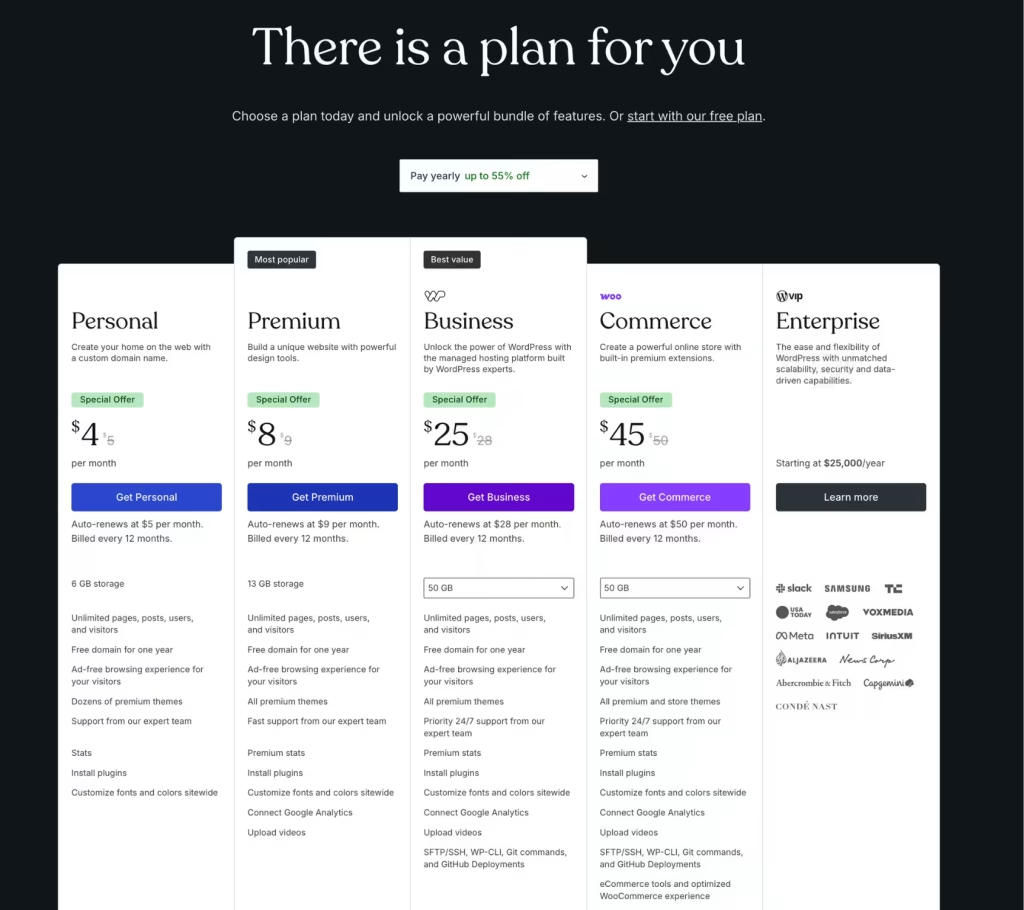
Breakdown the WordPress.com Paid Plans
Personal Plan
Price: $4 per month (billed annually)
The Personal plan is where you start on WordPress.com if you want your domain name and you do not want the WordPress.com branding on your site. This plan is simple and easy to use. It does not cost as much as you might think.
What You Get
- Custom domain name
- WordPress hosting
- 6 GB storage
- Ad-free browsing experience
- Basic design customization
- AI website builder (limited uses)
- Access to themes and plugins (limited use cases)
- Email and chat support
Limitation
- Limited monetization tools
- No advanced analytics
- Minimal customization compared to higher plans
Who Should Choose This
- Bloggers just getting started
- Personal portfolio sites
- Hobby websites
- Writers who want a clean, distraction-free platform
Final Verdict
If you’re looking to create a straightforward website that does not consider monetization or more sophisticated features, then this process will work great. Now that this plan offers plugins, even basic users can try adding some extras. However, if you want to grow, then this is not the way to go.
Premium Plan
Price: $8 per month (billed annually)
The Premium plan offers extra features. You get more space to store, you can chat live with someone when you need help, and you can monetise your content through the built-in WordAds program (WordPress.com’s ad network). The Premium plan is intended for creators who are taking their content more seriously than before.
What You Get
- Everything in Personal
- 13 GB storage
- AI website builder
- Monetization options (ads, memberships, subscriptions)
- All premium plugins
- Enhanced plugin compatibility
- Google Analytics integration
- Video support
- Payment buttons
Limitation
- Not offer eCommerce functionality
- Advanced development features are limited
Who Should Choose This
- Bloggers who want to grow an audience
- Content creators (YouTube, podcasts, writers)
- Freelancers building a personal brand
- Small websites with monetization goals
Final Verdict
For people looking to grow their website without dealing with complexity, Premium is a great value plan for most users.
Business Plan
Price: $25 per month (billed annually)
If plugins and themes are now available on the $4 and $8 plans, why should anyone upgrade to the Business tier? The answer lies in infrastructure, security, and developer-level control.
What You Get
- Everything in the Premium plan
- Full plugin flexibility
- 50GB storage
- Advanced customization tools
- Developers’ tools (SSH, WP-CLI, SFTP, and direct database access)
- Staging environment
- Analytics and SEO tools
- AI Assistant and tools
- Use VideoPress with 250GB storage
- Email marketing
- Free business email account for one year
- Free advertising credits worth $200
- Automated backups and enhanced security
- Priority support (24/7)
Limitation
- Higher cost compared to Personal and Premium
- May feel overpowered for beginners
Why It’s Worth It
The WordPress.com Business plan is where your site moves from basic to fully customizable. In lower-tier plans, installing plugins is possible, but this plan gives full control, where you have permission to edit plugins, add custom code to your themes, and access databases.
A staging environment that lets you test any changes you want to make without causing any damage is an additional feature.
More importantly, it removes limitations. You can use advanced plugins, optimize performance and SEO, integrate marketing and CRM tools, and build scalable websites exactly to your needs.
Who Should Choose This
- Small businesses
- Agencies and consultants
- Professional bloggers
- Service-based websites
Final Verdict
Best overall value for most users. If your business website is generating leads or revenue, then this plan will give you everything you need to grow without any technical hassles.
Commerce Plan
Price: $45 per month (billed annually)
Commerce is the power-packed plan specifically designed for retail businesses. You can install WooCommerce even in the Personal plan; however, the Commerce plan is made to help increase conversions and optimize the shopping cart experience.
What You Get
- Everything in the Business plan
- Premium WooCommerce store themes
- Product listings and inventory management
- Included premium extensions, including product variations, advanced product search filtering, subscription management, and shipping integrations without paying for each extension individually.
- Payment gateway integrations
- No platform transaction fees
- Dynamic pricing control
- Sell in 60+ countries
Limitation
- Highest pricing tier
- Not necessary unless you’re selling products
Why It’s Different
While the Business plan supports eCommerce plugins, the Commerce plan is built specifically for selling, offering a smoother, more scalable store experience. You can utilise WooCommerce and the native shopping blocks, both of which provide easy integrations as well.
From dropshipping to dynamic pricing and even advanced inventory management features, this plan gives you the tools you need to run and grow your online store with full customization.
Who Should Choose This
- Online store owners
- Dropshipping businesses
- Digital product sellers
- Subscription-based businesses
Final Verdict
Choose the Commerce plan only if your main objective is selling products online, and you need built-in eCommerce tools, payment integrations, and scalable store management features.
WordPress.com Paid Plans: Quick Comparison Table
| Feature | Personal | Premium | Business | Commerce |
|---|---|---|---|---|
| Custom Domain | Yes | Yes | Yes | Yes |
| Ads Remove | Yes | Yes | Yes | Yes |
| Plugin Access | Yes | Yes | Yes (Full) | Yes (Full) |
| Themes Access | Yes (Limited) | Yes (All Premium Themes) | Yes (All Premium Themes) | Yes (All Premium and Store Themes) |
| Monetization | No | Yes | Yes | Yes |
| Advanced SEO Tools | No | Limited | Yes | Yes |
| SFTP / Database Access | No | No | Yes | Yes |
| Staging Environment | No | No | Yes | Yes |
| eCommerce Features | No | No | Limited with Plugins | Yes |
| Daily Backups | No | No | Yes (Automated) | Yes (Automated) |
| Support | Standard | Fast | Priority (24/7) | Priority (24/7) |
Which One Should You Choose?
Here is a simple breakdown to decide:
Choose Personal If
- You want a basic website
- You don’t need monetization
- You’re just starting out
Choose Premium If
- You want to grow your content
- You plan to monetize your site
- You need better design and customization
Choose Business If
- Your website supports your business
- You need advanced plugins and integrations
- You want full control and scalability
Choose Commerce If
- You are selling products or services online
- You need eCommerce tools
- You want a complete online store solution
When Should You Upgrade
Although plugins are now available in all the plans, upgrading still makes sense when:
- Your site traffic increases
- You need advanced analytics
- You want deeper integrations
- You’re generating revenue from your site
The recommended strategy would be to start with the Premium plan; if this is not sufficient, upgrade to the Business plan for growth, and finally switch to the Commerce plan when you launch an online store.
Pair Your Upgrade With a High-Conversion Theme

Once you upgrade to the WordPress.com Business or Commerce plan, you gain access to upload custom themes. To maximize your sales, pair your plan with the Shop Mania theme.
Shop Mania is a fast, conversion-focused WooCommerce theme packed with advanced eCommerce features, including AJAX live search, variation swatches, product comparison, frequently bought together, wishlist support, quick view, mobile optimization, and streamlined checkout functionality.
These features are built in, helping you reduce plugin costs while creating a better shopping experience for your customers.
FAQ
Q: Is WordPress.com worth considering after the update?
Ans: Yes, WordPress.com now offers plugins in all paid plans. This makes it more valuable for those who are just starting out and for small businesses.
Q: Can I switch to any plan later?
Ans: You can change your plan anytime. It does not matter if you want to upgrade or downgrade. You can do it based on what you need.
Q: Do I need the Business plan for plugins?
Ans: No, you do not. WordPress.com supports plugins in all paid plans. The Business plan has more features.
Q: Which is the best plan for beginners?
Ans: The Premium plan is good for beginners. It gives you what you need without being complicated.
Final Thought
Choosing the right WordPress.com paid plan is no longer about unlocking features; it’s about aligning the platform with your goal.
Thanks to plugin support across all paid plans, you now have the freedom to:
- Start small
- Experiment with customization
- Scale your website at your own pace
This is a clear sign that WordPress.com is making it easier to use and also giving you more control over building your website.
If you’re not sure where to start, the Premium plan is a good choice because it’s affordable and flexible. As your needs change, you can upgrade to a higher-tier plan when it makes sense. You’re not forced to do it.
If you find this article helpful, do share it with your friends. If you have any questions regarding this, do not hesitate to comment below. We will help you solve your problem. Thanks for reading this blog.
Please subscribe to our YouTube Channel, we also upload great content there and follow us on Facebook and Twitter.
Explore More Article –


