
Overview ➣ This article reviews top search plugins for WooCommerce designed to enhance user experience, improve product discovery, and boost conversions using responsive, customizable tools in WooCommerce stores.
Are you looking for the best search plugins for WooCommerce? This blog will help you find the best WooCommerce search plugins for your online store.
The search function is an integral part of any eCommerce store. It helps visitors quickly and easily find information about any product that they are looking for.
So you need a powerful and feature-rich search system for your WooCommerce website that takes your visitors’ search experience to the next level.
Why Use WooCommerce Search Plugin
The default WooCommerce search offers limited functionality and often delivers inaccurate results, as it lacks advanced capabilities such as live suggestions, filters, autocomplete, and typo correction. This makes it harder for customers to quickly find the exact products they want. A dedicated search plugin can:
- Improve product discovery and navigation
- Increase conversions by helping users find products faster
- Reduce bounce rates and abandoned sessions
- Provide analytics to optimize your catalog and search user experience
That’s why the need for search plugins are important for any eCommerce website that not only provides accurate search results but also gives some essential information about products, including images and prices. So it will increase user engagement and help boost sales on your site.
There are various search plugins for WooCommerce available in the market, but you need to choose the one that increases product search speed and accuracy.
Don’t worry, we are here to suggest some of the top search plugins for WooCommerce that extend the default search functionality and amplify your customers’ search experience.

Before diving too deep into the subject, let’s take a quick look at our list of WooCommerce search plugins we compared.
| Plugin | Free Version | Padi form | Active installs | Rating | Best for |
|---|---|---|---|---|---|
| Advance Product Search Plugin | Yes | $39/yr | 9,000+ | 5.0 (5 reviews) | Voice search, fuzzy matching, SKU search |
| FiboSearch | Yes | $59/yr | 100,000+ | 4.9 (1,815) | Large WooCommerce catalogs |
| Sokol: Smart WooCommerce Search | Yes | $49/yr | 6,000+ | 4.4 (24) | Add to cart inside search results |
| Motive Commerce Search | Yes | €7/month | 400+ | 4.6 (10) | AI search, synonyms |
| JetSearch | No | $43/yr | – | – | Elementor and Bricks sites |
| Advanced Woo Search | Yes | $79/yr | 70,000+ | 4.8 (248) | Multilingual stores, Dokan and WCFM |
| YITH WooCommerce Ajax Search | Yes | $89.99/yr | 30,000+ | 3.0 (42) | Stores already using YITH plugins |
| Ivory Search | Yes | $19.99/yr | 90,000+ | 4.9 (1,561) | Budget pick, unlimited custom search forms |
| SearchWP | Yes | $99/yr | 50,000+ | 4.7 (33) | Searching PDFs, custom fields, content-heavy sites |
How to Choose the Right WooCommerce Search Plugin
The best search plugin depends on how many products you sell, how shoppers search, and your budget. Use these six questions to narrow the list in a couple of minutes.
1. How big is your catalog?
With fewer than 1,000 products, almost any AJAX search plugin is fast enough. Above 10,000 products, pick a plugin that builds its own search index instead of querying the WordPress database on every keystroke. Advance Product Search, FiboSearch Pro, Advanced Woo Search and SearchWP all use a dedicated index, which keeps results fast on large stores.
2. Do shoppers search by SKU, brand or attributes?
Default WooCommerce search does not match SKUs or product attributes on the storefront. If customers type part numbers, model codes, sizes or colors, make sure the plugin searches SKU (including variation SKUs), attributes and custom fields. All plugins in this list support SKU search, but attribute and custom field search is often a Pro feature.
3. Do you need typo tolerance (fuzzy search)?
Shoppers misspell product names all the time. Fuzzy matching returns “sneakers” when someone types “sneekers”. Advance Product Search, FiboSearch and Ivory Search offer fuzzy matching. Without it, a typo shows “No products found” and the shopper often leaves.
4. Do you want AI or natural-language search?
If shoppers search in full sentences (“waterproof jacket for hiking under $100”), a keyword plugin will struggle. AI search tools such as Motive understand intent and synonyms and suggest alternatives when there are no exact results. They cost more and usually bill monthly, so they suit larger stores.
5. What is your budget over time?
Compare the renewal price, not just the first-year price. Ivory Search Pro starts at $19.99/yr, Advance Product Search at $39/yr and FiboSearch at $59 in the first year ($50.15/yr to renew). If you only need live AJAX results and SKU search, a free version is often enough to start.
Best Search Plugins for WooCommerce
Advance Product Search Plugin

| Ratings | |
| Active Installation | 9,000+ |
| Free Version | Yes |
| Paid Version | Starting at $39 per year |
Advance Product Search Plugins is one of the best search plugins for WooCommerce. It is a freemium plugin that improves the default search functionality.
It is designed especially for WooCommerce websites. It comes with an advanced Ajax search bar that allows the user to search products, posts, and pages. Users can easily search product titles, descriptions, images, categories, IDs, and even SKUs. You use a shortcode or widget to place the search bar wherever you want.
It gives you the freedom to edit color and styling as per your requirements. As it supports Google Search Analytics, you can easily monitor website visitors and their search behaviour.
With fuzzy matching, the plugin intelligently handles typos and partial keywords to deliver more accurate results. Multiple search styles and layouts let you choose how results appear, while an optimized and refreshed index structure boosts search speed and relevance for better performance, even on larger stores.
You can display the search bar anywhere on your website according to your needs. For instance, with the help of a shortcode, you can display the search bar in multiple types and styles. Alternatively, if you want to show the search bar in the footer or sidebar, use the search widgets.
Key Features
- Fast and quick search results: Its lightning-fast search results help users instantly find products without delays or interruptions.

- AJAX-based live search: Shows real-time search results as users type, eliminating page reload and creating a smooth, modern shopping experience.

- Fully responsive and mobile-friendly: Ensures the search bar and results work perfectly across all devices, including desktops, tablets, and smartphones.

- Fuzzy matching support: Intelligently handles spelling mistakes and partial keywords, ensuring relevant results even when search terms are incorrect.

- Multiple search styles: Offers three different search bar designs and result layouts, which you can choose according to your website design.
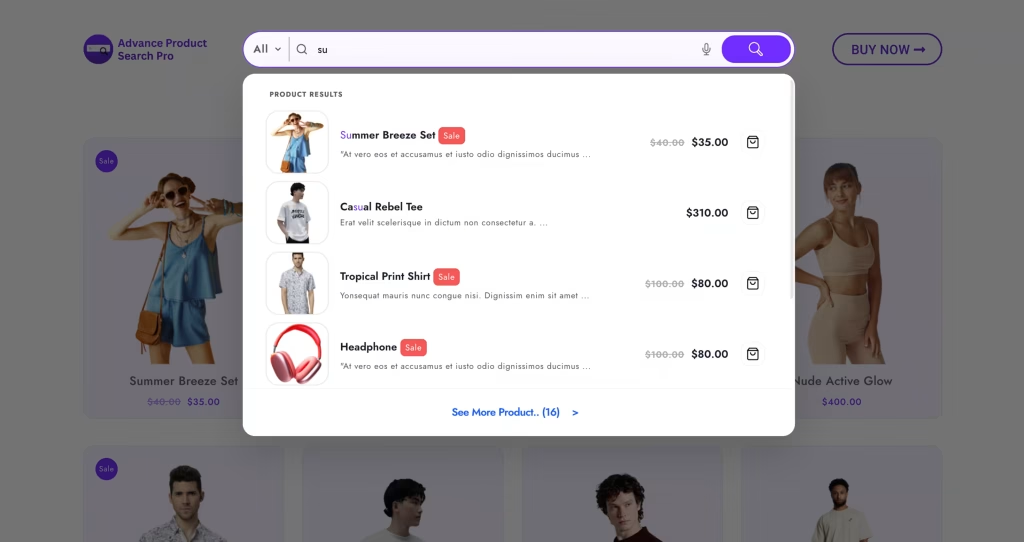


- Autocomplete search suggestions: Displays instant keywords and product suggestions while typing, helping users find desired items quickly.

- Unlimited color options for search elements: Provides complete control over the colors of search elements to match your website design.

- Boosted search performance: It uses an enhanced and refreshed index structure to deliver faster and more accurate search results.

- Search Analytics Support: Integrates with Google Analytics to track real-time searches, user behavior, and user information to improve sales performance.

- Advanced Search for WooCommerce Products: Allows searching products by categories, descriptions, images, prices, SKUs, and other attributes for precise results.
- Advanced Search for Posts: Allows users to search blog posts by titles, descriptions, and categories for better content discovery.
- Advanced Search for Pages: Helps visitors quickly find pages by searching page descriptions and images with accurate and relevant results.
- Voice Search: Provides voice-based search queries, making product discovery easier, quicker, and more accessible for all users.
- Display Search Forms Anywhere: You can place the search bar anywhere in your site using shortcodes, widgets, menus, and PHP code.
- Supports Multilingual: Works perfectly with multilingual websites, allowing users to search content in multiple languages.
FiboSearch

| Ratings | |
| Active Installation | 100,000+ |
| Free Version | Yes |
| Paid Version | Starting at $59 per year |
FiboSearch is a fantastic WordPress search plugin for WooCommerce websites. It replaces the default search bar with its advanced AJAX search bar that provides ultra-fast live search suggestions.
It doesn’t matter how many products are on your website; it gives the fastest search results that help to increase sales and user conversion rates. It gives simple search options; you can search by product title, long and short description, and SKU.
Your customers can search for products by categories, tags, attributes, and brands. When customers type any product in the live search bar, the product results appear with an image, price, and description. It will help them quickly make their decision.
The mobile-friendly nature gives a better user experience on any mobile device. It is also integrated with the WordPress theme.
Key Features
- Specially built for WooCommerce
- Instantly display search results using AJAX without reloading a page
- Gives a high-performance search experience for users
- Mobile-first search mode for better UX
- Easy integration with the WordPress theme
- Supports WooCommerce search results
- Fuzzy search
- Search in a custom field, attributes, category, tags, brand, and more
- Search by variation product SKU
Sokol: Smart WooCommerce Search

| Ratings | |
| Active Installation | 6,000+ |
| Free Version | Yes |
| Paid Version | Starting at $49 per year |
Smart WooCommerce Search is an amazing and efficient search plugin that provides an ultimate search experience to your visitors.
With the Ajax live search, your customers will find quick product search results with images and prices, which takes the customer’s search experience to the next level.
It is fully customizable, giving you full control to edit your search form as you need. Also, this plugin is deeply integrated with the WooCommerce Product Search widgets. So, it will help you to display search widgets anywhere on your site, including pages and the sidebar.
This plugin is fully compatible with famous page builders, such as Elementor, Divi, WPBakery, and more. It is also mobile-friendly, so it works well on all mobile devices.
Key Features
- Simple integration into default search widgets
- Search in variation
- Search by product SKU
- Search by product categories and tags
- Search through product attributes
- Exclude out-of-stock products from search results
- Search results with the add to cart button
- Highly customizable
- Page builder compatible
- ACF plugin compatible
- Mobile-friendly
- Multilingual support
Motive Commerce Search

| Ratings | |
| Active Installation | 400+ |
| Free Version | 30-day free trial |
| Paid Version | Starting at €7 per month |
Motive Commerce Search is an AI-powered ecommerce search plugin for Woocommerce.
Motive’s AI connects search queries with your catalogue to create dynamic AI overviews that increase add-to-carts and conversions. When searches return low or no results, shoppers see helpful AI pivots that reduce bounce rates.
You can also access conversational AI analytics that let you ask your shop anything on any device for unique AI-powered insights. The plugin also gives you access to the Motive Playboard, where you have total control over how your products are displayed, ordered, filtered, and found.
Key Features
- Gen AI for your search with AI overviews and AI questions for low and no results
- Conversational AI analytics so you can chat directly with your shop
- Business rules to boost products, set redirections, and show promotional banners
- Visual customisations
- Customisable filters
- Synonyms
- Mobile first search
- AI-powered search built with the Empathy AI private and sustainable cloud
JetSearch

| Ratings | |
| Active Installation | 40,000+ |
| Free Version | No |
| Paid Version | $43 per year |
JetSearch, a powerful WordPress plugin crafted by Crocoblock, elevates your search experience. The plugin integrates with the WordPress editor, Elementor page builder, and Bricks Builder theme. It introduces dynamic AJAX search capabilities, ensuring efficiency and ease for users.
With JetSearch, you have full control over your search bar’s customization, effortlessly filtering results by titles, descriptions, authors, and more across your entire site or specific categories. Its extensive parameters empower you to fine-tune result arrangements, whether by relevance, post ID, creation date, or other criteria.
You have the flexibility to tailor the appearance of your search results page with grid, list, or masonry layouts, complementing your site’s design. JetSearch allows for site-wide searches or narrowing down to specific parameters like custom post types or WooCommerce products.
Its intuitive interface simplifies search settings management, highlighting search text in results and enabling users to sort results conveniently. JetSearch offers an efficient solution for optimizing WordPress search functionality, benefiting both you and your site visitors.
Key Features
- AJAX search tools
- Search the site for content by various parameters – taxonomies, user-generated content, posts, tags, and categories
- Arrange the results by relevance
- Ability to design search results and results pages
- Easy site search management
- Search suggestions
- Capability to sort results by relevance
Advanced Woo Search

| Ratings | |
| Active Installation | 70,000+ |
| Free Version | Yes |
| Paid Version | Starting at $79 per year |
Advanced Woo Search is a powerful WooCommerce product search plugin. It supports shortcodes and widgets, so you can place your search bar anywhere on your site.
It allows visitors to easily search for products, like titles, content, excerpts, IDs, categories, SKUs, etc. In the premium version, you have more search options, like WooCommerce product attributes, custom taxonomies, custom field search, tax, attribute page search, and more.
Each search result shows the image and price of the product, which gives users a clear picture of the product. You can also display an add-to-cart button for each search result.
It is compatible with page builders and plugins like WooCommerce Multilingual, WPML, Polylang, and more.
The advanced features of this plugin make it one of the best search plugins for WooCommerce stores.
Key Features
- Supports AJAX search and the search result product page
- Search all WooCommerce products
- It uses smart ordering to display search results
- Customize the look of your search results
- Variable product support
- It uses filters to exclude some products from the search-based results
- Multilingual support
- Compatible with page builder plugins
- Supports ACF, WCFM, and Dokan plugins
YITH WooCommerce Ajax Search

| Ratings | |
| Active Installation | 30,000+ |
| Free Version | Yes |
| Paid Version | Starting at $89.99 per year |
YITH WooCommerce Ajax Search is another powerful and feature-rich search plugin for WooCommerce that can help visitors find any product quickly.
It provides real-time product search results to customers without loading other pages. Your visitors can find the products on the basis of categories, tags, and filters.
It gives you the option to add product badges and prices, and also highlight particular discounts and promotions in search results that help your customers to know more information about the particular products.
This plugin is highly customizable and compatible with other WooCommerce plugins, such as YITH WooCommerce Quick View, YITH WooCommerce Ajax Product Filter, and more.
Key Features
- You can display the search form anywhere on your site with the help of Shortcodes and Widgets
- Options for displaying the WooCommerce search results
- Show filters for search fields
- Exclude out-of-stock products from the search
- SKU search including variable products
- Search by product categories and tags
- Extend search in WooCommerce product excerpt and product content
- Multiple customization options
Ivory Search

| Ratings | |
| Active Installation | 90,000+ |
| Free Version | Yes |
| Paid Version | Starting at $19.99 per year |
Ivory Search is an advanced and versatile WordPress search plugin that enhances the functionality of the default WordPress search. It gives you the freedom to create your own custom search form.
It allows you to search WooCommerce products, such as product category, product type, custom field, and product Attributes such as color, size, etc. It also gives you the option to exclude out-of-stock products from the search.
It also allows you to create unlimited search forms and customize each one individually. You can display a custom search form anywhere on your site, including the header, footer, sidebar, widget area, custom post types, and more.
You can search any content on your site, including post types, categories, taxonomy, terms, custom fields, post status, comments, date, and many more.
Ivory Search is available in both free and premium versions.
Key Features
- Create unlimited search forms
- Display search from anywhere on the site
- Search using Ajax
- Search WooCommerce products, SKUs, and product variations
- Exclude ‘out of stock’ WooCommerce products
- Exclude specific content from the search, like posts, pages, categories, taxonomy, terms, etc
- Search images, audio files, videos, pdf, documents, and more
- Highlight search term
- Fuzzy matching and Keyword stemming
- Supports multilingual search
- Integrates with WooCommerce, bbPress, Weglot, WPML, and more
- Multilingual search
SearchWP

| Ratings | |
| Active Installation | 50,000+ |
| Free Version | No |
| Paid Version | Starting at $99 per year |
SearchWP is the most popular WordPress search plugin that only comes in the premium version. It is easy to use, feature-rich, flexible, and runs on over 50,000 websites.
It is a well-coded plugin with advanced features and works perfectly with all the famous page builders, including Elementor, Avada, Beaver Builder, Divi, and more.
It can search everything from the existing page, eCommerce product details (attributes, variations, taxonomies, and more), categories, text, shortcodes, documents (like PDF, Office, and text), custom database table content, and more.
It is easy to customize and includes custom fields from various plugins like ACF, Meta Box, Toolset, and more.
Key Features
- Integrates with native search forms and result templates
- Search everything, such as custom fields, product details, shortcodes, document content, and more.
- Redirection after the search
- Uses keyword stemming to give better results
- Excluding specific content from the search
- Customized the search algorithm
- Ajax Live search to display results instantly without a page being loaded
- Integrates with WooCommerce, BigCommerce, Easy Digital Downloads, and more.
- Compatible with all the famous WordPress page builders
- Supports Search analytics
How to Install a Search Plugin For WooCommerce
Among the above options, we chose the Advance Product Search Plugin for installation. Here’s a step-by-step guide to install and enable it on your WordPress store:
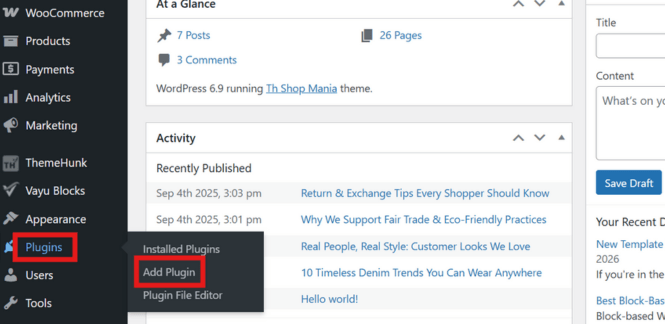
- Log in to your WordPress dashboard.

- Navigate to Plugins > Add New.
- Navigate to the plugin search box and type Advance WordPress Search Plugin.
- When the plugin appears, click the Install Now button.

- Once the installation is complete, click Activate to enable it.

- After activation, you will see the plugin in the Installed Plugins list and under the ThemeHunk section in your dashboard.

FAQ
Q: What is the best search plugin for WooCommerce?
Ans: FiboSearch is the most widely used WooCommerce-only search plugin, with 100,000+ active installs and a 4.9-star rating on wordpress.org. Advance Product Search is the best budget option with the most features.
Q: Is there a free WooCommerce search plugin?
Ans: Yes. Advance Product Search, FiboSearch, Advanced Woo Search, Ivory Search, Sokol Smart WooCommerce Search and YITH WooCommerce Ajax Search all have free versions on wordpress.org with live AJAX search and SKU search. JetSearch and SearchWP are premium-only.
Q: How do I search products by SKU in WooCommerce?
Ans: Default WooCommerce search does not match SKUs on the storefront. Install a search plugin that supports SKU search (all plugins in this list do), enable SKU in its search sources, and rebuild the search index if the plugin uses one. See our guide on how to add search product by SKU in WooCommerce.
Q: Can I customize the appearance of the search bar?
Ans: Search plugins offer customization options such as layout control, colors, result styles, and drop-down design, allowing you to match the search UI with your store’s branding.
Q: Why is my WooCommerce search not showing the right results?
Ans: Default search only matches words in the product title and content, has no typo tolerance and uses very basic ranking. It also ignores SKUs and attributes. A search plugin fixes this with better relevance ranking, fuzzy matching and extra search sources.
Q: Does a search plugin slow down my WooCommerce store?
Ans: A well-built plugin should not. Live search sends small AJAX requests only while a shopper types. On large catalogs, choose a plugin with its own search index, and use a caching plugin for the rest of the site. Avoid running two search plugins at the same time.
Final Words
So, this was our list of the best search plugins for WooCommerce websites. You can choose any plugin from the list to enhance the functionality of your search system.
If you find this article helpful, do share it with your friends. If you have any questions regarding this, do not hesitate to comment below. We will help you to solve your problem. Thanks for reading this blog.
We hope this article will help you find the best search plugins for WooCommerce websites.
Please subscribe to our YouTube Channel; we also upload great content there. Also, follow us on Facebook and X
Explore More Articles –
- WooCommerce Variation Swatches Plugins (Free & Paid)
- Best Astra Theme Alternatives [Free & Paid]
- Best WordPress WooCommerce Block Themes [Free & Premium]
- Best WooCommerce Shopping Cart Plugins for WordPress
Recommended WooCommerce Themes
| WooCommerce Theme | Get Deals |
|---|---|
| Shop Mania | Get Discount |
| Zita | Get Discount |
| Divi | Get Discount |
| Astra | Get Discount |


