
Overview ➣ This comparison blog helps beginner WordPress users choose the best WooCommerce search plugin by evaluating ThemeHunk Advance Product Search and Advanced Woo Search. It breaks down their core features, user interfaces, accuracy, pricing models, and settings dashboards, offering a balanced verdict to help store owners maximize their e-commerce sales.
Imagine walking into a grocery store where the items are randomly piled up, and there are no signs. You would probably walk out immediately.
That is exactly how customers feel when they use the default WordPress search bar. It is slow, rigid, and often fails to find products if the user makes a small typo.
For WordPress beginners running a WooCommerce store, upgrading your search bar is one of the easiest ways to boost sales. When customers find what they want in seconds, they buy faster.
Two of the most popular tools for this job are TH Advanced Product Search and Advanced Woo Search. Both plugins replace your standard WordPress search bar with a smart search box that suggests products instantly as the user types
What is TH Advance Product Search?
TH Advance Product Search is a clean, user-friendly, and responsive Ajax-powered search plugin designed specifically for woocommerce stores. It can be used on any type of website where search functionality is required.
Instead of typing a word, clicking “Enter,” and waiting for a whole new page to load, this plugin uses AJAX technology. This means as soon as a customer type letters into the search bar, a visual dropdown menu drops down instantly with matching results, images, and prices. It is incredibly easy to set up, making it a favorite for beginner WordPress users who do not want to touch code.
Key Features
- Ultra /Fast Live Ajax Result – The search bar works in real-time. Results pop up instantly without refreshing the page, keeping customers engaged and stopping them from leaving your store out of frustration
- Broad Search Scope – Unlike the default WordPress tool, this plugin digs deeper, allowing customers to find items by searching through product titles, short and long descriptions, product categories, tags, and SKUs.
- Built-in Color Manager – You do not need to know any CSS or styling code to match the search bar to your store’s branding. The plugin features an easy-to-use Color Manager inside the customizer panel, allowing you to change the colors of text, backgrounds, and buttons with a few clicks.
- Fully Mobile Responsive – More than half of online shopping happens on phones. This plugin is fully optimized for touchscreens, ensuring the live results dropdown layout looks clean and functions perfectly on mobile devices.
- Search Analytics Support – The plugin tracks what your customers are typing into the search bar. This gives beginners data on what items are popular or what items customers want that you might not stock yet.
What is Advanced Woo Search?
Advanced Woo Search plugin is one of the most popular search plugins in the WordPress repository. It replaces the standard WooCommerce search bar with a live autocomplete search box.

However, Advanced Woo Search is built with a heavy emphasis on complex, enterprise-level technical configurations. While it offers a powerful engine, it often comes with a steeper learning curve, an overwhelming settings dashboard, and restricted features in its free version.
Key Features
- Relevance-Based Sorting Algorithm – Advanced Woo Search calculates priority scores to sort search results based on where a keyword is found. While this data-heavy approach works for large catalogs, it can feel unnecessary for smaller shops.
- Multilingual Compatibility – Advanced Woo Search features native integrations with translation platforms like WPML and Polylang to handle multi-currency and international setups.
- Custom “Stop Words” Filtering – The plugin allows you to define a list of common words (like “and” or “the”) for the search engine to ignore. While a nice technical feature, it adds another layer of manual setup to your dashboard.
- Variable Products Tracking – Advanced Woo Search indexes separate product variations like specific sizes and colors. However, visual style changes to this dropdown menu are quite limited from the dashboard. TH Advanced Product Search matches your variation details beautifully while giving beginners complete design control through its built-in Live Color Manager.
- Comprehensive Taxonomy Scanning – This plugin scans deeply through categories, tags, and custom fields to find products. While it is a helpful search scope, setting up these parameters in the backend can quickly get confusing for a novice.
TH Advance Product Search vs Advanced Woo Search: Feature Comparison
To help you decide which tool fits your online shop best, here is a breakdown of how TH Advanced Product Search and Advanced Woo Search stack up against each other across essential e-commerce features:
| Feature | TH Advance Product Search | Advanced Woo Search |
|---|---|---|
| AJAX Live Search | ✅ | ✅ |
| Search Content Scope | Products, Posts, and Pages | Products, Categories, and Tags |
| Visual Customization | Built-in Live Customizer | Basic Layouts (may require CSS) |
| Built-in Voice Search | ✅ | ❌ |
| Variable Products Support | ✅ | ✅ |
| SKU & Metadata Search | ✅ | ✅ |
| Multilingual Support | ✅ | ✅ |
| Typo Correction (Fuzzy Search) | ✅ | ✅ |
| Database Search Indexing | Lightweight Search Index | Heavy Inverted Indexing Engine |
| Beginner Friendliness | Extremely Easy | Deep Technical Settings |
Factors Affecting the Website
Search Speed & Performance
In e-commerce, every second counts. If your search bar takes more than two seconds to load, your customers will likely leave and shop elsewhere. Both plugins are built on AJAX technology, meaning they load results instantly without forcing the user to refresh the browser page. However, they handle this speed in different ways:
- TH Advanced Product Search: This plugin is highly optimized and incredibly lightweight. It creates a streamlined search index table directly within your WordPress database. Because it does not add heavy background processes to your server, it keeps your website nimble, fast, and light on resource usage. It is perfect for small to medium shops that want maximum speed without bloating their site.
- Advanced Woo Search: This tool uses an independent search database engine that builds a dedicated index of your product data. This indexing system allows it to pull matching terms instantly, even across deep custom fields. However, running these indexing loops on a massive catalog can occasionally put extra background processing strain on smaller, shared web hosting servers.
User Interface & Ease of Use
As a WordPress beginner, you want a plugin that works out of the box without requiring a degree in web development.
- TH Advanced Product Search: This plugin shines when it comes to simplicity. The backend settings dashboard is clean, flat, and easy to navigate. Turning features on or off takes a single click. Adding the search bar to your website is incredibly straightforward, you can use simple WordPress Blocks, Elementor widgets, or copy-and-paste shortcodes.
- Advanced Woo Search: This dashboard is clean, but it contains a significantly higher number of technical query rules and priority sliders. It includes a helpful feature that automatically attempts to swap out your theme’s default search bar. While powerful, the sheer volume of advanced data options means it comes with a slightly steeper learning curve for a complete beginner.
Search Accuracy
A search bar is only good if it actually finds what the shopper is looking for. A great search tool must look past simple titles and understand user intent.
- TH Advanced Product Search: This tool delivers highly accurate results by searching through titles, short and long descriptions, categories, tags, and product SKUs (unique item codes). It is also versatile because it can search through your regular blog posts and pages alongside products. It also features built-in Voice Search, allowing users to speak their queries into their microphones for effortless, hands-free accuracy.
- Advanced Woo Search: Accuracy is where this plugin shines for data-heavy stores. It utilizes a relevance-based sorting algorithm that scores search terms. If a keyword appears in a product title, it ranks higher in the dropdown than if it appears in a description. It also supports word stemming and stop-word filtering, making it incredibly precise for stores with complex technical specs or massive attribute lists.
Customization Options
Your search bar needs to look like a natural part of your online shop, matching your logo, fonts, and brand colors perfectly.
- TH Advanced Product Search: This plugin makes design changes effortless for beginners through its built-in Live Color Manager. Without typing a single line of code or CSS, you can open the customizer and quickly change the colors of text, result boxes, buttons, and backgrounds. The dropdown display is naturally clean, modern, and perfectly responsive on mobile screens right from the start.
- Advanced Woo Search: The plugin generates a highly professional live dropdown that cleanly displays product images, current prices, and eye-catching sale badges. However, making custom changes to the visual layout from the free backend panel is somewhat limited. If you want to change specific font sizes, container shapes, or custom button paddings, you will often need to write custom CSS code or upgrade to their premium version.
How to Add Advance Product Search?
Step 1: Install Advance Product Search to your WordPress Dashboard
Open your WordPress dashboard and go to Plugins and click on Add Plugin
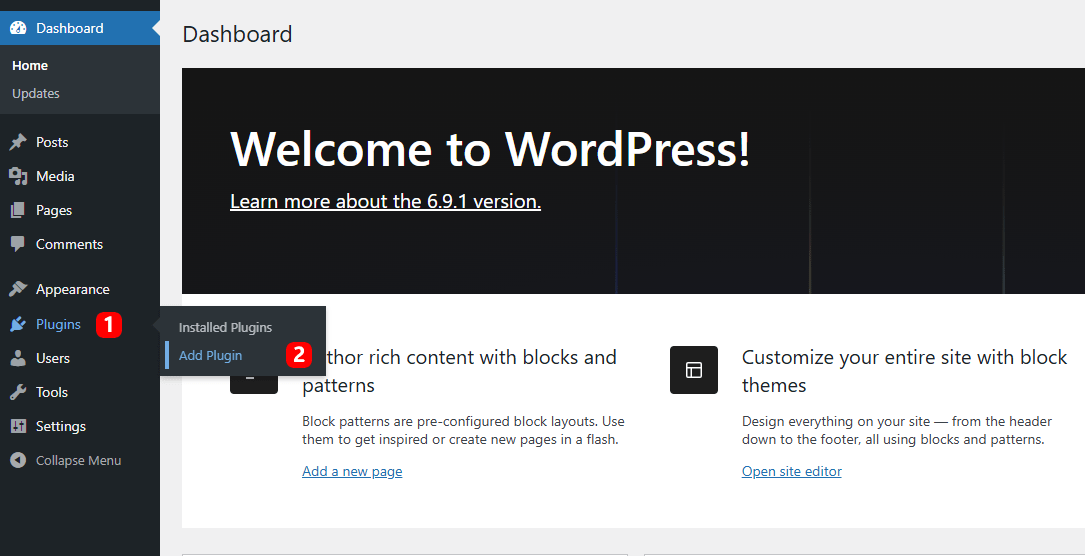
Search for Advance Product Search

Install and Activate the plugin.
After activation, it will appear in your dashboard in ThemeHunk menu.

Free Plugin Features
Integration
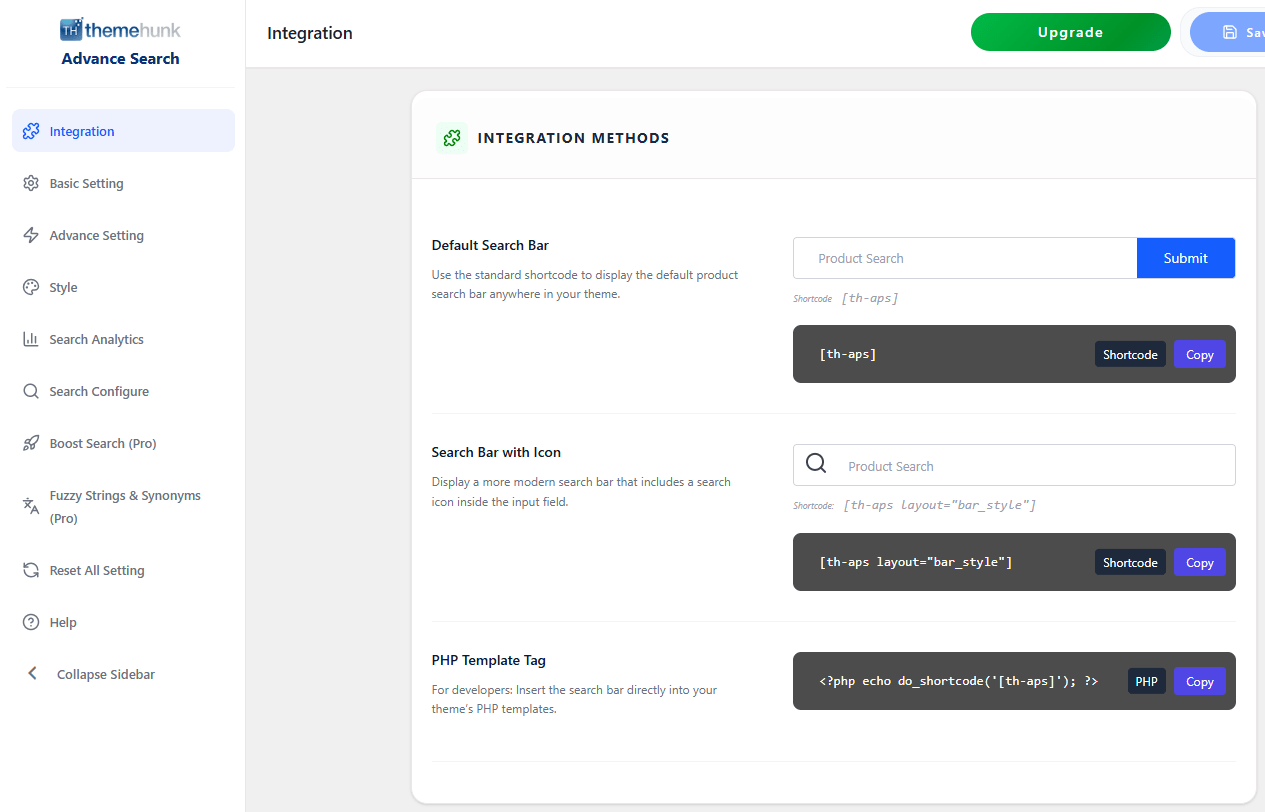
The Integration tab offers three simple ways to add the search bar to your store. Beginners can copy single-click shortcodes for a classic layout with a submit button or a modern style with an embedded icon. Advanced users can use the provided PHP tag to code it directly into theme files
Basic Settings
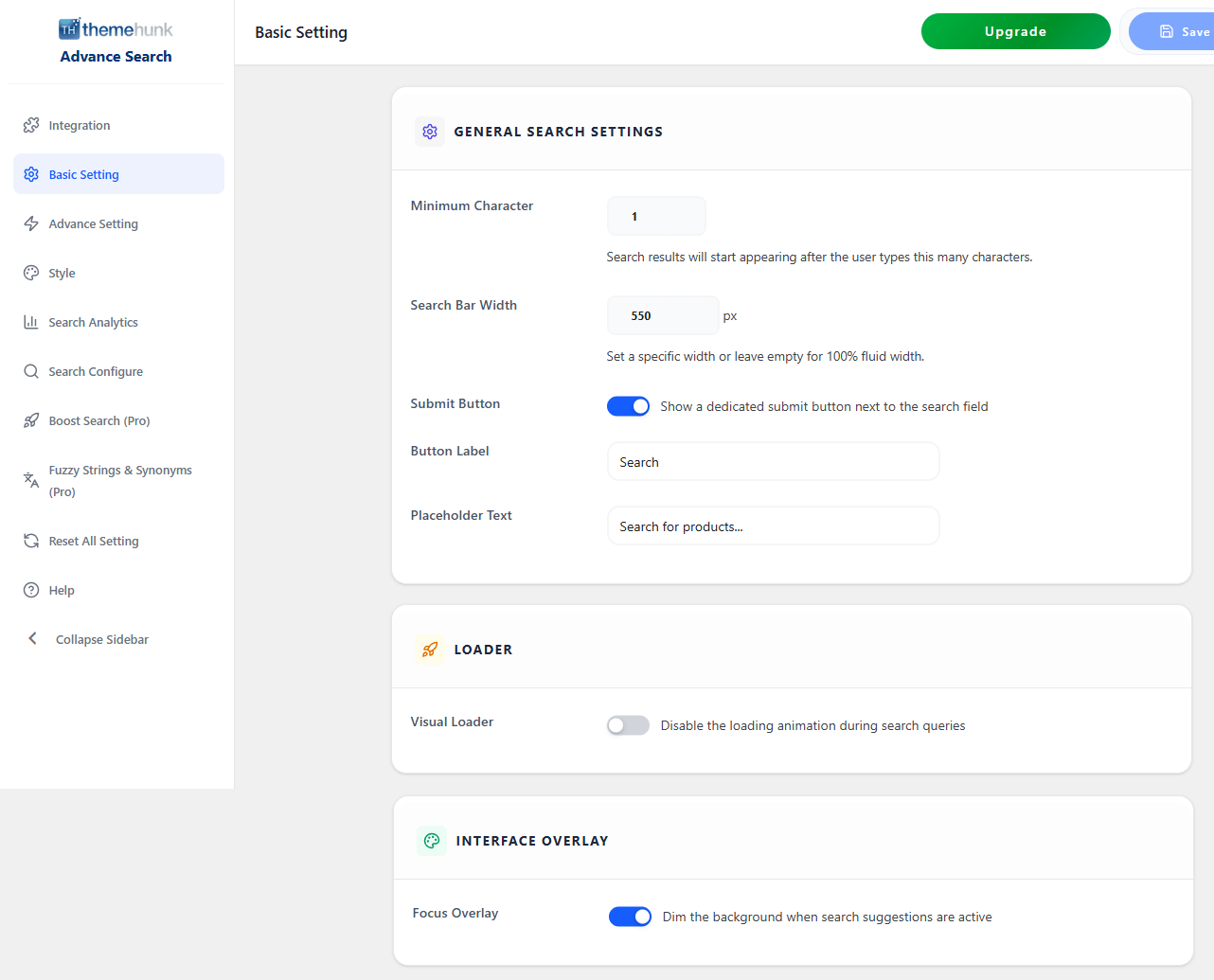
The Basic Setting tab manages your search bar’s layout and core behavior. You can set the minimum character count to trigger live suggestions, adjust the search box width, customize placeholder texts, and toggle a visual loading animation. It also includes an interface overlay option that dims your background to highlight live search results.
Advanced Settings

The Advance Setting tab controls search content and display rules. You can select the search type, limit the number of visible live results, and customize “no results” or “more results” text labels. It also lets you toggle category group headings, set description character lengths, and activate built-in voice search.
Style

The Style tab features a built-in color picker and a live preview panel. You can easily customize background, border, and text colors for the search bar, alongside distinct background and hover colors for your submit button. It ensures your search box perfectly matches your store branding without touching code
Search Analytics
Search Configure
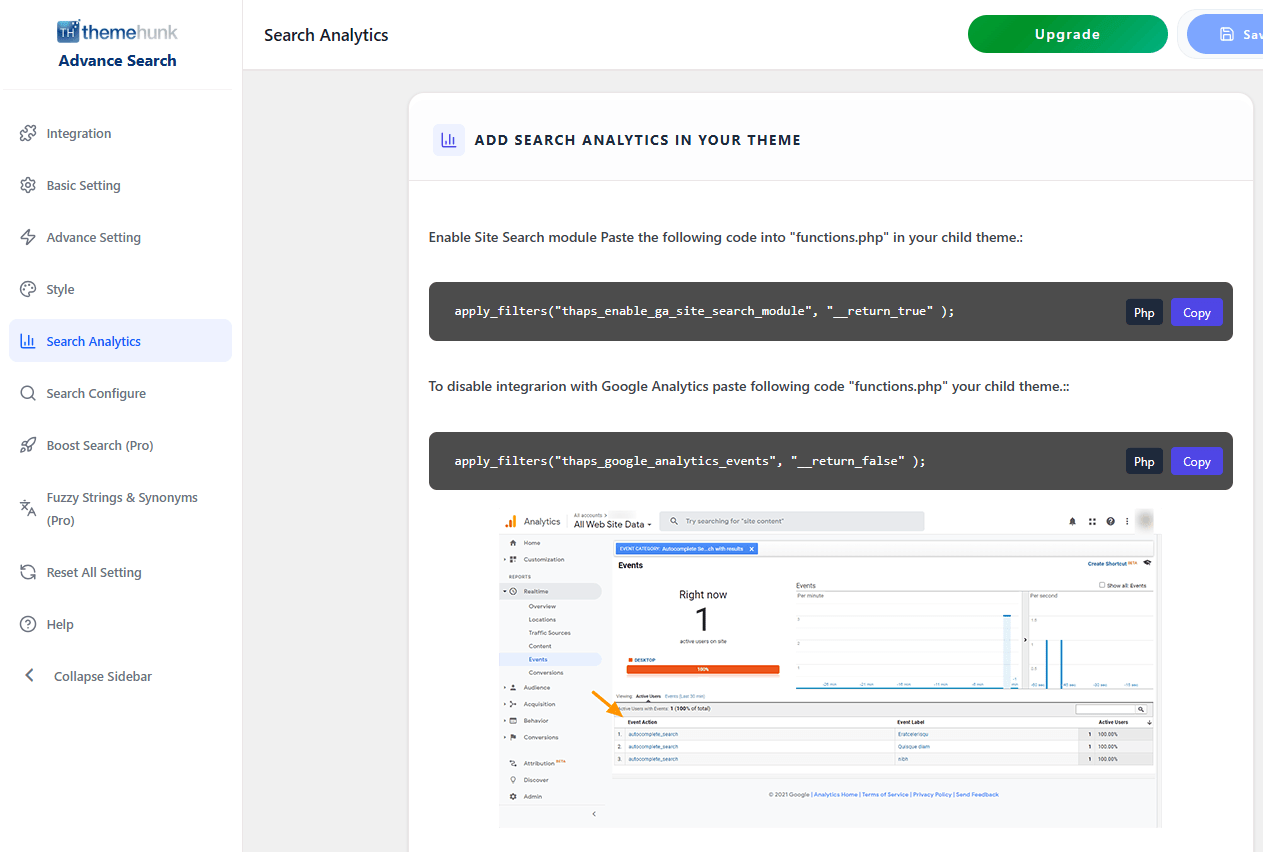
The Search Analytics tab provides code snippets to connect your search bar directly with Google Analytics. By pasting the provided PHP code into your theme’s backend files, you can track customer search trends, terms, and behaviors inside your external analytics account to understand user shopping patterns.
Search Configure

The Search Configure tab defines your search bar’s tracking parameters. It features clean toggles to determine exactly where the search engine scans, allowing you to activate index matching across categories, tags, brands, attributes, descriptions, and product SKUs. Premium input fields also let you connect custom database fields and specific post types.
Step 2: Upgrade to the Pro plugin
Click on the Upgrade button at the top of the search plugin dashboard
This will take you to Advance Search Plugin’s official page, pick your plan, and purchase the plugin.
Then log in to ThemeHunk’s members’ area dashboard and install the Advance Search Pro.
Step 3: Upload the Advance Search Pro to your WordPress dashboard.
Open your WordPress Dashboard > click on Add Plugin > click on Upload Plugin button (on the top left corner)
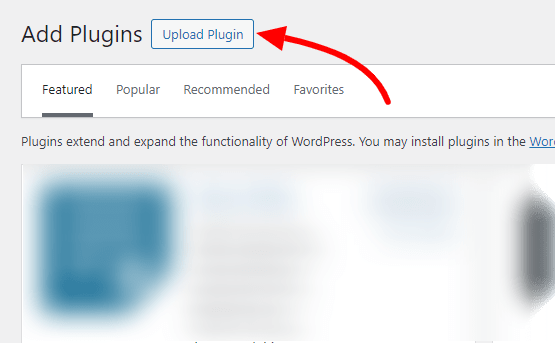
Upload the Advance Product Search Pro and Install & Activate it.
Open Advance product Search plugin’s dashboard.
This will unlock all premium features now.
Boost Search

The Boost Search tab optimizes database scanning speed for large catalogs. It features actions to manually build or disable your product data index table, ensuring newly added items appear instantly. It also includes an input box.
Fuzzy Search

The Fuzzy Strings & Synonyms tab optimizes search intelligence. It features a toggle to activate typo correction, ensuring customers find items despite spelling mistakes. You can adjust the matching sensitivity percentage to control results accuracy, while a dedicated text panel allows you to manually group custom word synonyms like “sofa” and “couch”.
Search Querries

The Search Queries tab gives you a live dashboard to track exactly what shoppers are typing into your store. It features a toggle to instantly enable frontend logging, custom string filters, and a calendar date-range picker. The log displays vital analytics like total query hits, dates of first and last searches, and a quick-view button to see the matching products.
Reset All Settings
The Reset All Settings and Help tabs handle system maintenance and user assistance. The reset option features a clear button to wipe custom modifications and instantly restore the search bar to the original plugin defaults if configuration mistakes happen.
Help
The Help tab functions as a central resource center for user assistance and community engagement. It features five distinct panels that provide direct links to the official plugin documentation, technical support channels, and premium upgrade paths. Store owners can also use this area to leave user feedback or quickly share their experiences on social media platforms.
Pricing Comparison
To make your decision easier, here is a direct comparison of the free options, annual plans, and lifetime licenses for both tools.
| Plan Tier | TH Advance Product Search | Advanced Woo Search |
|---|---|---|
| Free | Yes | Yes |
| Starting Plan | $29 per year | $59 per year |
| Product Limit Restrictions | Unlimited products on all plans | Unlimited products on all plans |
| Advance Plan | $59 per year (All 10 premium plugins included) | $129 per year |
| Agency Plan | $249 lifetime bundle (Includes multiple themes and plugins) | $199 per year |
| Lifetime License Option | Available (With $249) | Available (With $249) |
Pros and Cons
TH Advance Product Search
| Pros | Cons |
|---|---|
| Highly lightweight code structure that will not slow down your web hosting server performance. | Database indexing uses a manual batch limit configuration that requires careful adjustment on massive catalogs. |
| Includes an advanced built-in Voice Search feature for modern hands-free mobile shopping. | Lacks an integrated search analytics to track the searches. |
| Features a comprehensive Live Color Manager to customize design layouts easily without custom CSS code. | |
| Highly versatile tool that allows customers to search across your standard blog posts and informational pages. | |
| Offers highly affordable entry-level pricing tiers alongside a budget-friendly one-time lifetime license. |
Advanced Woo Search
| Pros | Cons |
|---|---|
| Deep taxonomy crawling capabilities that target categories and tags directly inside the store archive structure. | Features a significantly higher annual premium entry price compared to other market alternatives. |
| Utilizes an integrated relevance-based sorting algorithm to rank matching dropdown items by data priority scores. | The core backend options dashboard includes complex setting parameters that can easily confuse beginners. |
| Includes robust native multilingual compatibility out of the box with premium systems like WPML and Polylang. | Visual adjustments to the search form containers and result blocks often require manual custom CSS coding. |
| Does not place any artificial limits or caps on the total number of searchable inventory items inside your catalog. | Advanced search logic features like word stemming and stop-word filtering come with a steep learning curve. |
| Features a dual-panel layout display option that can show product short descriptions alongside item prices. | Key features like product attribute scanning and custom field matching are completely stripped from the free tier. |
Free Plugin Feature Comparison
This table highlights what features you can access without paying a single dollar, helping budget-conscious store owners see which plugin offers more value out of the box.
| Feature | TH Advance Product Search | Advanced Woo Search |
|---|---|---|
| Unlimited Product Scanning | ✅ | ✅ |
| Search by Title, SKU, and Content | ✅ | ✅ |
| Search by Categories and Tags | ✅ | ✅ |
| Multilingual Compatibility | ✅ | ✅ |
| Synonyms Support | ✅ | ✅ |
| Search by Product Attributes | ✅ | ❌ |
| Search by Custom Fields | ✅ | ❌ |
| Built-in Voice Search | ✅ | ❌ |
| Custom Style and Color Customizer | ✅ | ❌ |
| Search Results Filtering Layouts | ✅ | ❌ |
| Add to Cart Button in Dropdown | ✅ | ❌ |
Final verdict
Upgrading your WooCommerce search box is one of the smartest changes you can make to improve store conversion rates. Both tools replace the standard, sluggish WordPress tools beautifully, but they serve completely distinct audiences.
Advanced Woo Search is a powerful option if you run a highly complex store with unique custom fields, require native multilingual translation setups, and do not mind paying a premium annual fee to unlock advanced priority-sorting logic.
However, for the vast majority of small businesses and WordPress beginners, ThemeHunk Advanced Product Search is the definitive winner. It cuts through overwhelming database setups by remaining incredibly lightweight and fast. It includes high-converting features like built-in voice search and a visual color editor without forcing you to write code. Combined with its budget-friendly pricing structure and highly economical lifetime license tier, it gives you full control to expand your store catalog without strict product limits or hidden costs.
FAQ
Q. Do I need to manually configure the settings, or do these plugins work perfectly right after activation?
Ans. It works smoothly right after activation. Although you can customize its settings however you want them to be.
Q. Will switching to a new search plugin delete or alter any of my existing WooCommerce product descriptions or titles?
Ans. No, it doesn’t affects you woocommerce products.
Q. If I buy the lifetime license for ThemeHunk Advanced Product Search, do I still get customer support if something breaks next year?
Yes. The lifetime license from ThemeHunk guarantees that you receive ongoing customer support and software updates for the lifetime of the product. There are no hidden fees or expiration dates on your support access.
Q. Can I hide entire categories from appearing in the search dropdown?
Ans. Yes, TH Advance Product Search plugin allows you to exclude a product category from appearing in the search bar.
Q. Does the search bar show the discounted sale price or just the regular price?
Ans. The Advance Product Search plugin’s dropdown is smart enough to detect active WooCommerce discounts. If an item is on sale, it will display the lower sale price right next to the original regular price
Conclusion
Upgrading your store search is not just about changing a box in your website header. It is a critical business strategy that directly transforms casual visitors into paying customers. When shoppers can find exactly what they want in milliseconds, your site bounce rates drop, your average order values go up, and your overall user experience feels premium and professional.
Choosing the right search solution depends on looking at your business model as a whole. A growing store needs a tool that matches its current budget, server resources, and technical comfort level. You must balance the need for deep search intelligence with simple, visual configuration tools that do not require hiring a developer or writing complex code.
Investing in a modern, automated search setup sets your ecommerce platform up for long-term scalability. By giving your customers typo corrections, instant visual previews, and seamless mobile layouts, you bridge the gap between a basic website and a high-converting digital storefront. Select the tool that aligns with your specific operational scale, and let your search bar drive your store growth.
If you find it helpful, you can subscribe to our YouTube Channel, where we also upload great content, and follow us on Facebook and Twitter.
Browse More Articles


