Click on “Add new” button and then click on “Upload theme” button. Here upload theme zip file.
Activate the theme.
Adding Logo and Favicon
To add Logo and Favicon Navigate to Appearance > Customize > General Settings.
Here you can upload your favicon image and logo image.
Header Settings
To add Header Settings Navigate to Appearance > Customize > Header Settings.
Change your header settings here like ‘Floating Menu’ And ‘Normal Menu’
Home Page Slider Option
In slider settings you can manage how many post you want to show in home page.
Just Navigate to Appearance > Customize > Home Page Slider Options and select your details.
Home Page Settings
Using this section you can choose the layout of page such as “Two Grid Layout” or “Standard layout”.
Social Icon Options
Social icons in theme were given in footer. In this section you can add link of your social icon in respective field.
Just Navigate to Appearance > Customize > Social Icon options and select your option here.
Custom CSS
In this section you can put your extra CSS code to manage your site.
Just Navigate to Appearance > Customize > Custom CSS and put your code here.
Adding Static Front Page
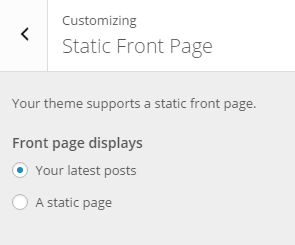
By default the front page of your website will display latest posts,if you can set static “home” page you need to go Appearance > Customize > Static front page.
Click “A static page” radio button and set your Front page.
Thanks for reading our documentation, still you need any help related to the theme then you can contact our support forum.
We use cookies on our website to give you the most relevant experience by remembering your preferences and repeat visits. By clicking “Accept”, you consent to the use of ALL the cookies.
This website uses cookies to improve your experience while you navigate through the website. Out of these, the cookies that are categorized as necessary are stored on your browser as they are essential for the working of basic functionalities of the website. We also use third-party cookies that help us analyze and understand how you use this website. These cookies will be stored in your browser only with your consent. You also have the option to opt-out of these cookies. But opting out of some of these cookies may affect your browsing experience.
Necessary cookies are absolutely essential for the website to function properly. This category only includes cookies that ensures basic functionalities and security features of the website. These cookies do not store any personal information.
Any cookies that may not be particularly necessary for the website to function and is used specifically to collect user personal data via analytics, ads, other embedded contents are termed as non-necessary cookies. It is mandatory to procure user consent prior to running these cookies on your website.