
Running a WooCommerce store? You already know that product listings are the heartbeat of your business.
Let’s be real, writing product descriptions isn’t fun for most store owners.
Still, you understand. A good product description doesn’t just inform; it sells. It makes the difference between a browser and a buyer.
The real problem? Creating fresh, engaging copy for every product when your catalogue is overflowing. That’s where WooCommerce AI copywriting tools come in.
In this guide, we will show you how to use AI to write product descriptions that not only grab attention but also rise in search rankings and boost sales quickly.
Your products deserve more than dull copy, and so do your customers. Stay tuned to the blog to know more.
Why should I use AI to create product descriptions in WooCommerce?
AI helps generate product descriptions faster, ensures consistency, and can improve SEO by using relevant keywords. It’s especially useful for stores with large inventories.
By ensuring consistency in tone and messaging across all product listings, AI helps maintain a professional and cohesive brand image.
Additionally, AI can enhance search engine optimization (SEO) by strategically incorporating relevant keywords, which can lead to increased visibility in search results.
How to Create Engaging Product Description Using AI
Understand What Makes a Great Product Description

Before releasing the AI, let’s review the structure of a product description to ensure clarity and effectiveness. A well-crafted product description should:
- Explain the features clearly.
- Discuss the benefits and value for the buyer.
- Use engaging and human-sounding phrases.
- Evoke emotions and paint a picture.
- Utilize SEO keywords.
Now, let’s set the AI to accomplish all the tasks listed above.
Choose the Right AI Tool

Before choosing from the many options available, it’s critical to assess your unique needs and objectives.
While the wrong choice can result in frustration and resource waste, the right tool can increase efficiency, improve results, and streamline your processes.
We’ll go over important things to think about in this guide when choosing an AI tool that fits your goals.
ChatGPT– perfect for brainstorming and custom generation.
Jasper.ai – ideal for scalable product copy with templates.
Writesonic or Copy.ai – fast and simple for quick bursts of content.
Feed AI the Right Info

When communicating with your AI for product description, it’s best to provide only a few key details.
There’s no need to write extensive information, as concise input can lead to more effective responses. By focusing on the essentials, you can help ensure clarity and improve the quality of the interaction.
- Product: Oversized T-Shirt
- Features: 100% cotton material, unisex fitting, oversized cut, five color options.
- Desired Tone: Friendly and Inspiring
- Target Audience: Shoppers who love comfort clothing and are style-conscious
Polish with a Human Touch

Some of the best AI out there can still sound redundant and robotic. If this is your concern, you need not stress, as you don’t have to be a professional copywriter to assist in the editing.
All you need to do is give the following checklist:
- Is it simple to understand and read?
- Does it fall under the company’s criteria and brand characteristics?
- Does it contain misplaced words that require correcting?
- Put more USPs or customer reviews into the sections that need them in order to make the presentation more persuasive.
Keep in mind that you should not treat AI as the final result. Use it as a starting point.
Optimize for SEO

Want your oversized tees to get found in search results? Just add a few SEO essentials:
- Use keywords like “oversized t-shirt”, “100% cotton tee”, or “unisex streetwear”
- Include variations like “relaxed fit”, “sustainable style”, or “everyday comfort”
- Add alt text for product photos (e.g., “Model wearing black oversized t-shirt”)
- Write a short, catchy meta description (or let AI generate one for you!)
No need to overthink it, AI for product description tools can take care of most of this if you feed them the right prompt.
A step-by-step tutorial showing exactly how to use ChatGPT to generate WooCommerce product descriptions:
Step 1: Open ChatGPT
Visit chat.openai.com and log in to your account.
Step 2: Prepare Your Product Info
Write down a few basic details:
- Product Name: e.g., Oversized T-Shirt
- Features: 100% cotton, unisex fit, oversized cut, five color options
- Tone: Friendly and inspiring
- Target Audience: Comfort-seekers, casual streetwear fans
Step 3: Use This Prompt in ChatGPT
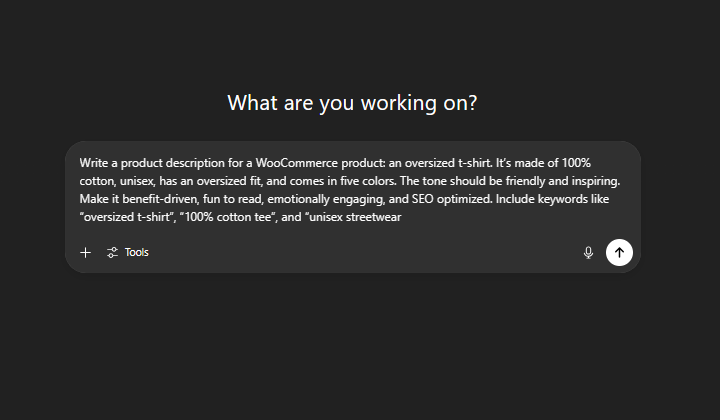
Paste the following into ChatGPT:
“Write a product description for a WooCommerce product: an oversized t-shirt. It’s made of 100% cotton, unisex, has an oversized fit, and comes in five colors. The tone should be friendly and inspiring. Make it benefit-driven, fun to read, emotionally engaging, and SEO optimized. Include keywords like “oversized t-shirt”, “100% cotton tee”, and “unisex streetwear”.
Step 4: Review the Output
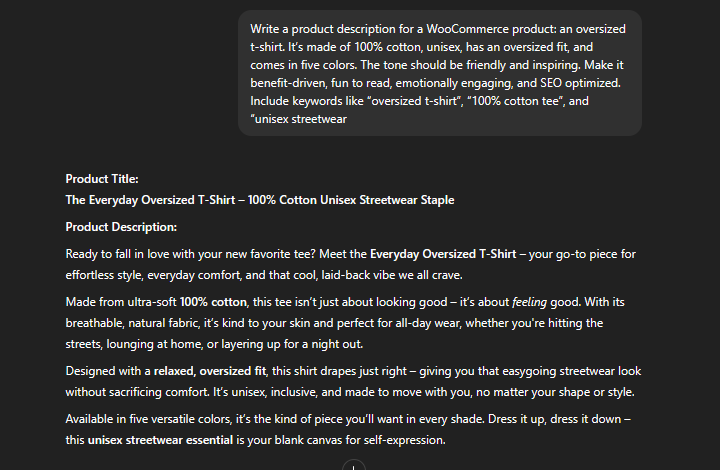
ChatGPT will return something like:
“Ready to fall in love with your new favorite tee? Meet the Everyday Oversized T-Shirt – your go-to piece for effortless style, everyday comfort, and that cool, laid-back vibe we all crave. Made from ultra-soft 100% cotton, this tee isn’t just about looking good – it’s about feeling good. With its breathable, natural fabric, it’s kind to your skin and perfect for all-day wear, whether you’re hitting the streets, lounging at home, or layering up for a night out. Designed with a relaxed, oversized fit, this shirt drapes just right – giving you that easygoing streetwear look without sacrificing comfort. It’s unisex, inclusive, and made to move with you, no matter your shape or style. Available in five versatile colors, it’s the kind of piece you’ll want in every shade. Dress it up, dress it down – this unisex streetwear essential is your blank canvas for self-expression.”
Step 5: Edit If Needed
Ask ChatGPT follow-up questions, like:
- “Make it shorter.”
- “Add a bullet list of features.”
- “Include a customer quote.”
- “Use a more casual tone.”
Example follow-up prompt:
“Can you rewrite it in a more casual tone and add a short list of key features?”
Step 6: Ask for SEO Help
You can also request:
“Give me a meta description and some SEO keywords for this product.”
ChatGPT might return:
Meta Description: Stay comfy in our oversized unisex t-shirt, made with 100% cotton and perfect for laid-back streetwear style.
Keywords: Oversized t-shirt, unisex streetwear, 100% cotton tee, relaxed fit clothing.
That’s It!
Your product description is now ready to copy and paste into your WooCommerce product listing.
FAQ
Q: How do I make sure the AI-generated descriptions sound human and engaging?
Ans: Use prompts that include your brand tone and target audience.
Always review and lightly edit AI content.
Add product-specific details like size, use cases, and benefits.
Q: Can AI help with SEO for my WooCommerce products?
Ans: Yes, AI can optimize descriptions with keywords, meta descriptions, and tags to improve visibility in search engines.
Q: Is it safe to rely on AI for all product descriptions?
Ans: AI is a helpful assistant, but human oversight is essential. Use AI to streamline content creation, then customize to ensure accuracy and brand alignment.
Wrapping It Up
You’re neither a writer nor are you required to be glued to a screen for hours. Overwhelm is no longer something you have to deal with.
With AI, creating engaging, persuasive, and SEO product descriptions for WooCommerce has never been easier. Just input your information, select the appropriate tone, and out comes the finished product.
So go ahead, reclaim your time, reignite your inspiration, and transform your store beyond your expectations. Boost your business right now!
If you find this article helpful, please share it with your friends. If you have any questions, do not hesitate to comment below. We will help you solve your problem. Thanks for reading this blog.
Please subscribe to our YouTube Channel, where we also upload great content. Additionally, follow us on Facebook and Twitter.
More Helpful Reads:


