
When creating websites with WordPress, Elementor has become a well-known tool for web designers and content creators.
This popular page builder enables users to develop stunning, responsive websites without extensive coding knowledge.
However, as with many tools in the digital landscape, Elementor comes in two versions: the free Elementor and the premium Elementor Pro.
Understanding the differences between these versions is crucial for selecting the right one for your needs.
In this blog post, we’ll dive into both versions’ features, helping you decide which is right for you.
Understanding Elementor

Elementor is a WordPress page builder plugin that empowers users to create stunning websites through a drag-and-drop interface.
It features a live editing experience, enabling you to see changes in real time as you design your page. The base version, Elementor, is free and provides essential functionalities suitable for many users.
For those seeking more advanced features, Elementor also offers a Pro version that enhances the design capabilities significantly.
With the Pro version, users gain access to a variety of premium widgets, templates, and advanced design options, allowing for greater customization and flexibility in creating unique layouts.
Additionally, Elementor Pro includes powerful functionalities such as the theme builder, which lets users customize their entire website, from headers to footers, without needing to touch a line of code.
Whether you’re a beginner or an experienced developer, Elementor provides a robust platform to bring your web design visions to life.
Quick Comparison
This comparison table highlights the impressive range of features offered by Elementor Pro, showcasing how upgrading can unlock advanced tools and customization options that take your website to the next level, all while building on the solid foundation provided by Elementor’s free version.
Elementor Free vs. Elementor Pro Features
| Feature | Elementor (Free) | Elementor Pro |
|---|---|---|
| Visual Drag and Drop Builder | ✅ | ✅ |
| Mobile Editing | ✅ | ✅ |
| Template Library | ✅ | ✅ |
| Shape Divider | ✅ | ✅ |
| Background Overlay | ✅ | ✅ |
| Hover Animation | ✅ | ✅ |
| Testimonial Widget | ✅ | ✅ |
| Google Maps | ✅ | ✅ |
| Maintenance Mode | ✅ | ✅ |
| Social Icons | ✅ | ✅ |
| Drag & Drop Editor | ✅ | ✅ |
| Theme Builder | ❌ | ✅ |
| WooCommerce Builder | ❌ | ✅ |
| Popup Builder | ❌ | ✅ |
| Motion Effects & Interactions | ❌ | ✅ |
| Dynamic Content Integration | ❌ | ✅ |
| CRM Integration | ❌ | ✅ |
| Form Widget | ❌ | ✅ |
| Form Submissions | ❌ | ✅ |
| Built-in Form Builder | ❌ | ✅ |
| Sticky Elements | ❌ | ✅ |
| Call To Action Widget | ❌ | ✅ |
| Custom CSS and Code | ❌ | ✅ |
| 60+ Additional Widgets | ❌ | ✅ |
| Display Conditions | ❌ | ✅ |
| Sliders & Carousels | ❌ | ✅ |
| Single Post Design | ❌ | ✅ |
| Contact Forms | ❌ | ✅ |
| Social Proof Widgets | ❌ | ✅ |
| Social Buttons & Integrations | ❌ | ✅ |
| Header & Footer Customization | ❌ | ✅ |
| Sticky Header | ❌ | ✅ |
| Pro Templates & Blocks | ❌ | ✅ |
| Custom Fonts & Icons | ❌ | ✅ |
| Role Manager | ❌ | ✅ |
| Subscription Forms | ❌ | ✅ |
| Premium Support | ❌ | ✅ |
| Login Form | ❌ | ✅ |
| 404 Page | ❌ | ✅ |
Elementor vs. Elementor Pro: Which Version Is Right for You
The main differences lie in the features offered. Elementor Pro includes advanced functionality like theme builder, WooCommerce builder, more widgets, templates, and support for custom CSS, while the free version has limited features and fewer widgets.
The Free Version: Elementor

Elementor’s free version offers a solid foundation for users who want to create professional-looking web pages without diving too deep into complex functionalities.
This user-friendly interface allows for easy drag-and-drop customization, enabling even those with minimal technical skills to bring their visions to life.
With a variety of pre-designed templates and widgets, users can quickly assemble stunning layouts that cater to diverse needs, from personal blogs to small business sites.
Moreover, the responsive design capabilities ensure that pages look great on any device, allowing content to shine whether viewed on a desktop, tablet, or smartphone.
In summary, Elementor’s free version serves as a perfect gateway for aspiring designers, combining simplicity with enough versatility to inspire creativity and innovation.
Key features include:
Drag-and-Drop Editor:
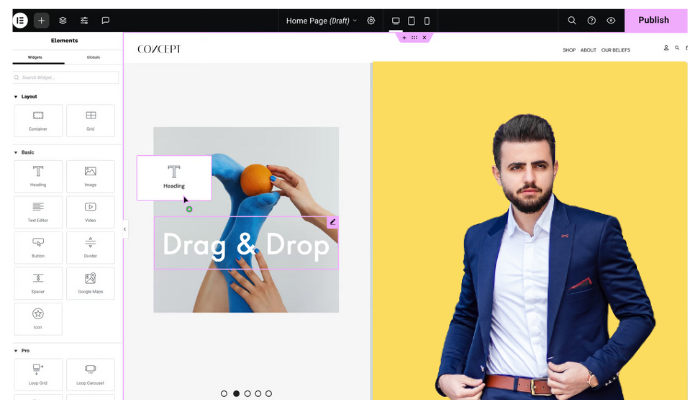
Easily build pages by dragging elements around.
Basic Widgets:
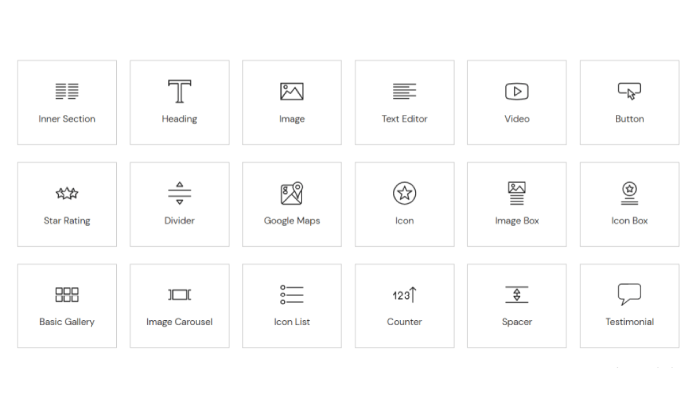
Access to fundamental widgets like headings, text, images, videos, buttons, and galleries.
Responsive Design:

Create mobile-friendly pages with ease since the tool allows you to preview your design for different devices.
Template Library:
Use a range of pre-designed templates to kickstart your designs.
Global Styling:
Apply global styles for consistency across your website.
The free version is ideal for beginners, personal projects, or simple business websites. However, it may lack the advanced functionalities needed for more complex sites.
The Pro Version: Elementor Pro
Elementor Pro is the plugin’s premium version, offering various advanced features designed for professional designers and developers.
This enhanced edition elevates the design capabilities and streamlines the workflow, allowing users to create stunning websites with unparalleled ease.
With features like a theme builder, WooCommerce integration, and advanced widget options, Elementor Pro empowers creators to customize every aspect of their sites.
Additionally, including a visual form builder, dynamic content capabilities, and premium support further distinguishes it as a top choice for those seeking to design professional-grade websites.
The intuitive drag-and-drop interface, coupled with responsive editing tools, ensures that every design is optimized for multiple devices, making it an indispensable tool for modern web development.
Here’s what sets it apart:
Advanced Widgets:
In addition to the basic widgets, Pro includes advanced modules like forms, sliders, and custom post types.
Theme Builder:
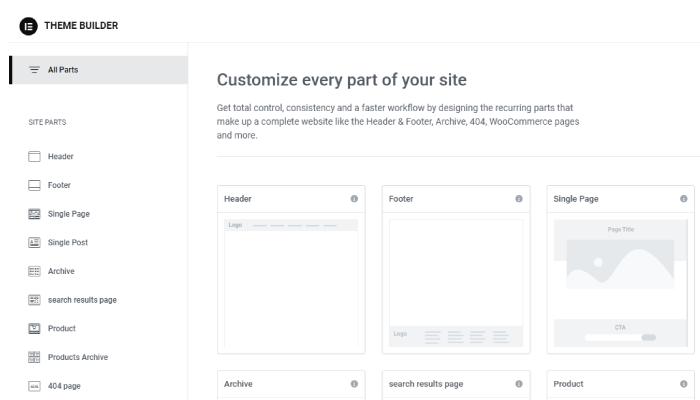
Take control of your entire website’s design with the theme builder, allowing you to customize headers, footers, and archive pages.
WooCommerce Integration:
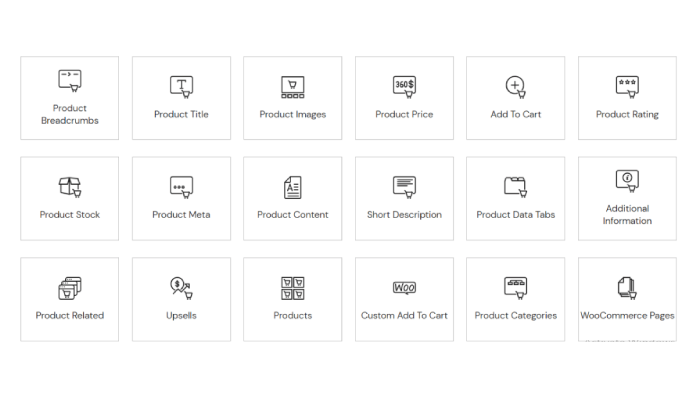
For eCommerce sites, Elementor Pro provides the tools to design product pages, category pages, and other WooCommerce elements visually.
Dynamic Content:
Leverage dynamic content options to pull in custom fields and other dynamic data, making complex designs possible.
Popup Builder:
Create eye-catching pop-ups for lead generation, promotions, or announcements seamlessly.
More Template Options:
Access premium templates and blocks that enhance design possibilities and speed up the creation process.
Custom CSS:
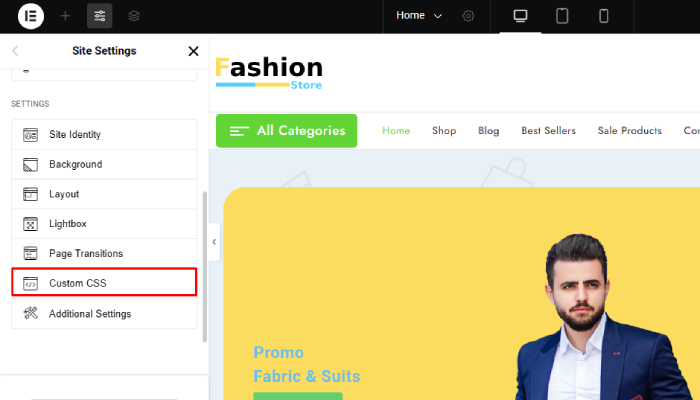
For advanced users, the option to add custom CSS directly within the editor can take designs to the next level.
Pricing:
The Essential plan is perfect for users who want to build a simple, visually appealing website without the need for E-Commerce features.
The Advanced plan is geared towards those creating up to three professional websites, offering more advanced customization options, integrations, and eCommerce support.
The Expert plan is designed for professional web creators overseeing up to 25 websites, offering extensive customization, integration features, and eCommerce capabilities.
The Agency plan caters to larger teams managing up to 1,000 websites, providing complete customization, integration options, and eCommerce support.
By upgrading from Elementor Free to Elementor Pro, you will gain access to a wide range of advanced features.
- Pro Widgets
- Theme Builder
- Popup Builder
- Custom CSS
- Dynamic Content
- Form Builder
- WooCommerce Builder
- Motion & Animation Effects
- Global Widgets
- Premium Support
Elementor Pro offers multiple pricing plans, each catering to different website-building needs, especially for WordPress users.
| Plan | Price (Monthly) | Number of Sites | Support |
|---|---|---|---|
| Essential | $4.92 | 1 | 24/7 Support |
| Advanced | $8.25 | Up to 3 | 24/7 Support |
| Expert | $16.58 | Up to 25 | 24/7 Premium Support |
| Agency | $33.25 | Up to 1,000 | 24/7 Premium Support |
Which Version Is Right for You?
Selecting between Elementor and Elementor Pro largely depends on your specific needs, technical skills, and project requirements. Here are some scenarios to consider:
- Beginners: If you’re new to web design or working on a personal blog, the free version of Elementor is sufficient. It provides all the necessary tools to create a beautiful website without the complexity of advanced features.
- Small Business Owners: For small businesses needing a professional online presence, Elementor’s free version can get you started. However, if you plan to expand your site, implement membership systems, or sell products, investing in Elementor Pro will save you time and provide additional functionalities.
- Professional Designers and Developers: If you are a web designer or developer working on multiple client projects, Elementor Pro is essential. The advanced features allow you to create complex, customized sites efficiently and easily meet diverse client needs.
- E-Commerce Store Owners: Running an online store with WooCommerce? Elementor Pro is a must. Its capabilities to customize product pages and create sales funnels can significantly enhance your customer’s shopping experience.
- Non-Profits and Membership Sites: If you’re building membership sites or want to create custom user experiences, the dynamic content feature in Pro can be invaluable in tailoring user interactions to different segments.
FAQ
Q: What additional widgets are available in Elementor Pro?
Ans: Elementor Pro includes various advanced widgets such as posts, portfolios, slides, global widgets, and custom form elements that aren’t available in the free version.
Q: Can I use Elementor Pro with any WordPress theme?
Ans: Yes, Elementor Pro is compatible with most WordPress themes. It is designed to work seamlessly with any theme, providing complete control over the design and layout.
Q: Can I upgrade from Elementor to Elementor Pro later?
Ans: Yes, users can start with the free version of Elementor and upgrade to Elementor Pro at any time, preserving their existing designs and settings.
Conclusion
Elementor provides an excellent platform for building websites, but choosing between the free version and Elementor Pro depends on your needs and future goals.
For beginners or simple projects, the free version is a solid choice. However, if you aim to create professional websites with advanced tools and a more efficient workflow, Elementor Pro is a worthwhile investment.
Regardless of your selection, Elementor will improve your web design experience, making it easier for anyone to create beautiful, functional sites.
If you find this article helpful, do share it with your friends. If you have any questions regarding this, do not hesitate to comment below. We will help you to solve your problem. Thanks for reading this blog.
We hope this article will help you to make the right choice.
Please Subscribe to our YouTube Channel, we also upload great content there and also Do Follow us on Facebook and Twitter
Read more:
- 82+ Best Elementor Themes and Templates To Use in 2024 (Free + Premium)
- 6 Best Shopping Cart Plugins for Elementor 2024 (Top Picks)
- 9+ Best WordPress Themes for Portfolio Websites


