
Overview ➣ This article reviews Kinsta managed WordPress hosting, covering performance, security, pricing, support, pros and cons, and whether it’s the right hosting solution for businesses, agencies, and developers.
Kinsta is a premium managed WordPress hosting provider known for its speed, security, and excellent customer service.
Utilizes high-performance cloud infrastructure to deliver innovative solutions for beginners and experienced developers.
In this review, we provided a comprehensive analysis of Kinsta’s hosting service, focusing on key areas such as performance, security, customer support, pricing, and the overall user experience.

Kinsta Overview
Kinsta was founded in 2013 to create a WordPress hosting platform focused on performance and scalability.
Kinsta utilizes an enterprise-grade hosting environment to deliver quicker page load speeds, reliable uptime, automated backups, free site migrations, robust security, and a smooth, user-friendly experience for its customers.
Its user-friendly dashboard and extensive features, such as staging environments and CDN integration, make it ideal for developers and businesses needing dependable hosting solutions.
With 24/7 expert support, Kinsta ensures sites remain optimized, secure, and scalable, making it a popular choice for high-traffic websites, eCommerce stores, and agencies.
Over 140,000 businesses and brands, from agencies and high-traffic eCommerce stores to Fortune 500 companies, rely on Kinsta for fast, secure, and reliable hosting.
Unlike traditional hosting providers, Kinsta focuses solely on managed WordPress hosting, which allows them to specialize in optimizing the platform for WordPress users.
| Rating | 4.8 |
| Price | Start from $35 per month |
| Uptime | 99.9% |
| Hosting | Managed WordPress, Web Application, Database |
| Server Locations | USA, Canada, Australia, Germany, Netherlands, UK, France, Italy, Poland, Finland, Switzerland, Belgium, Singapur, India, Japan, Taiwan, Hong Kong, South Korea, Indonesia, Africa, Saudi Arabia, Chile, Brazil, and Israel |
| Live Support | Yes, 24/7/365 |
| Coupon Code | Get Code |
Pros and Cons
Pro’s ✅
- High-performance cloud infrastructure
- Easily handles traffic spikes
- Intuitive dashboard for easy site management
- Free Migrations
- Strong security features
- Excellent customer support
- Daily backups to protect data
- Global CDN and Edge Caching
Con’s 🚫
- Higher price point
- No email hosting
- Plans come with a specific tariff limit
- No Free Domain
Features
Kinsta offers a variety of features specifically designed for WordPress users. Some of the key highlights include:
Performance and Infrastructure
Kinsta has built its hosting infrastructure on high-performance cloud infrastructure, utilizing the latest technologies to deliver top-tier website speed and performance.
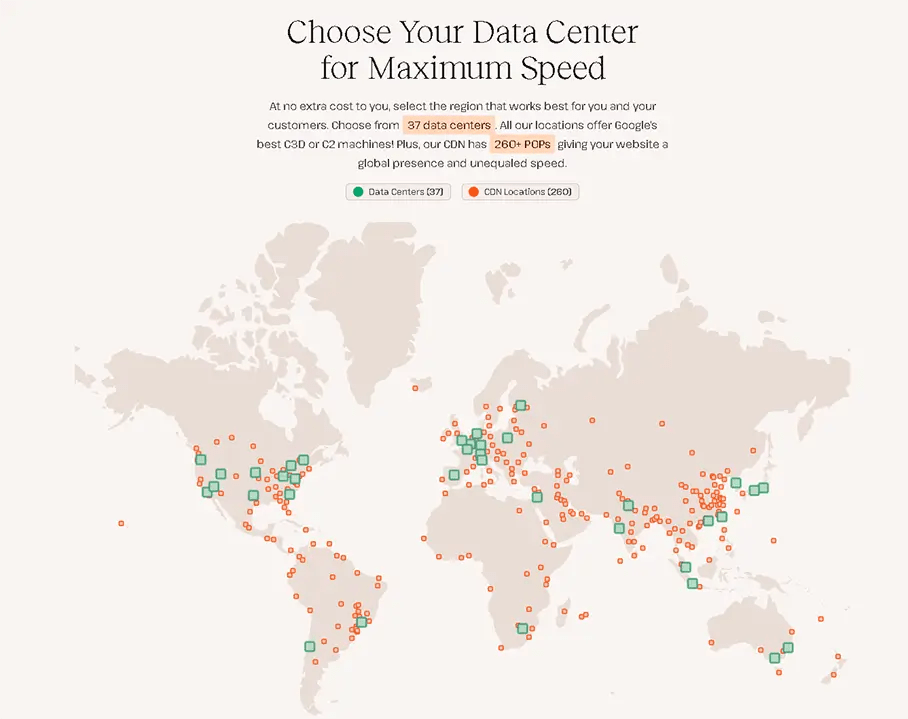
The company takes advantage of Google Cloud’s extensive global network, featuring 37 data center locations worldwide.
This global reach ensures that no matter where your audience is located, they can experience fast load times.
Kinsta’s infrastructure is built on container technology, ensuring that each WordPress site is hosted in its own isolated environment.
This setup allows for flexible resource scaling and strengthens security. Kinsta uses LXD-managed hosts and LXC software containers to segregate each site with its resources, such as PHP, Nginx, MySQL, and Linux operating systems.

Key Performance Features
- Optimized Server Environment: Ensures low latency, high availability, and fast content delivery across the global network.
- Nginx and MariaDB: These are optimized to handle high traffic without slowdowns.
- Server Level Caching: Kinsta uses server-level caching specifically optimized for WordPress sites, ensuring fast load times and improved performance without needing third-party caching plugins.
- CDN (Content Delivery Network): Kinsta offers a free CDN powered by Cloudflare, enhancing content delivery speeds by caching static resources like images and CSS files across more than 260 locations worldwide.
- HTTP/3 Support: This ensures quicker loading times and better connection stability for modern browsers.
- PHP Support: Kinsta supports the latest version of PHP, and you can switch between PHP versions in your dashboard, ensuring compatibility and speed.
- Automatic Database Optimization: Kinsta includes automated database optimization, ensuring your WordPress site’s performance is continually improved.
- APM Tool: Kinsta’s APM tool helps monitor, analyze, and troubleshoot performance issues on your WordPress site for faster loading times.
Aditionally, Kinsta offers a powerful Edge Caching feature that stores website content on servers closer to users’ locations, reducing load times and improving performance by delivering data quickly from geographically distributed edge servers.
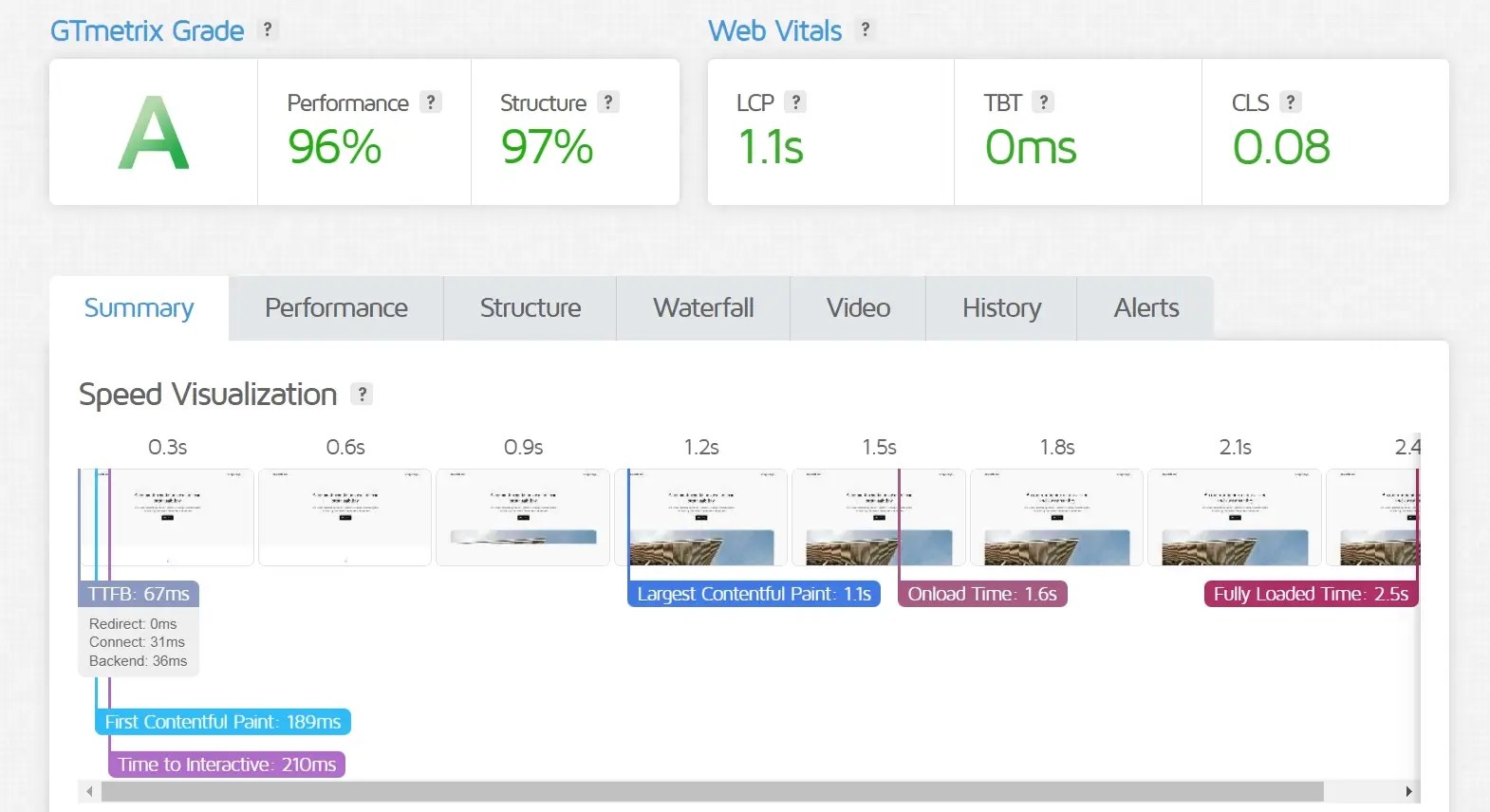
What do we achieve? When testing the performance of the site on PageSpeed Insights and GT Matrix, we get the following results:
PageSpeed Insights

GT Matrix
Security
Kinsta has earned ISO 27001, 27017, and 27018 certifications, showing its commitment to strong security standards and better data protection for cloud-based services.
Kinsta prioritizes security by implementing numerous proactive measures to protect your site from external threats.
Their infrastructure follows a zero-trust security model, which means no part of the system is trusted by default and all communications are carefully monitored unless specifically authorized.
Key Security Features
- Firewalls and DDoS Protection: With its partnership with Cloudflare, Kinsta includes free Firewalls and DDoS protection to guard against malicious traffic before it reaches your site.
- Daily Backups: Kinsta provides automatic daily backups, stored for up to 30 days, and allows for easy restoration with one click.
- Uptime Monitoring: Every site hosted on Kinsta is monitored 480 times daily for uptime. If an issue is detected, their system automatically alerts the engineering team.
- SSL Certificates: Free SSL certificates are provided through Cloudflare, with automatic renewal to ensure continuous security.
- Isolation via Container Technology: Every site on Kinsta is isolated in its container, protecting it from attacks on other websites on the same server.
- Automatic Healing Technology: Kinsta’s server architecture includes self-healing capabilities. If any server component crashes, the system automatically detects and fixes the problem.
- Extended Hack-Fix Guarantee: If your website is compromised while hosted on Kinsta, their security team will work to fix the hack and restore the site at no additional cost.
Ease of Use
Kinsta’s custom-built dashboard is a key feature that simplifies site management.
Unlike many other hosting providers that use the traditional cPanel, Kinsta offers a sleek, modern interface known as MyKinsta.
Key Features of MyKinsta
- Site Management: Easily manage multiple sites from one centralized location. You can switch between different WordPress installations with just a few clicks.
- Analytics: Kinsta provides detailed analytics on site performance, visitor behavior, and resource usage, including bandwidth, disk space, and CPU usage.

- One-Click Staging: Kinsta allows you to create staging environments with a single click, making it easy to test new features, updates, and changes without affecting your live site.
- Site Migrations: Kinsta offers free premium migrations with their team of migration experts, ensuring a seamless transition to their platform.
- One-Click Cloning: Create clones of your WordPress site for testing purposes or to create new versions.
Developers Features
Kinsta provides developers with numerous tools tailored to enhance workflows and simplify the management of complex tasks.
Developer-Friendly Features
- SSH Access and Git Integration: Kinsta offers SSH access for managing files and databases, as well as built-in Git for version control and managing code deployments.
- WP-CLI: Kinsta supports WP-CLI, a command-line tool for WordPress that allows developers to automate tasks such as updates, backups, and content management.
- Customizable PHP Versions: Developers can choose between multiple PHP versions (7.4, 8.0, 8.3, 8.4, etc.) to ensure compatibility with plugins and themes.
- Application Performance Monitoring (APM): Kinsta has a built-in APM tool that helps developers identify performance issues in their applications, eliminating the need for external tools like New Relic.
- Staging Environments: Kinsta offers unlimited free staging environments for all its hosting plans. Developers can quickly create a staging site to test new code or plugin updates before pushing them to production.
- Database Access: Kinsta offers direct database access through tools like phpMyAdmin, HeidiSQL, Sequel Pro, and MySQL, providing greater control over data management.
Customer Support
Kinsta provides 24/7/365 support through live chat, featuring a team of WordPress experts who are skilled in addressing issues related to WordPress hosting. Kinsta uses the Chat Routing System for customer support, ensuring fast response times and a helpful, interactive chat experience.
Kinsta offers an impressive average response time of under 2 minutes, outperforming many other hosting providers. Their live chat support is multilingual (10 languages), making it accessible to a global audience. Additionally, Kinsta’s team actively monitors customer sites, often identifying and resolving issues before clients are even aware of them.
A key feature of Kinsta’s support is its availability directly in the MyKinsta dashboard, allowing users to reach support effortlessly without leaving the platform. Additionally, an extensive collection of tutorials, articles, and documentation is available to help with troubleshooting.
Pricing
Kinsta’s pricing structure is more premium than that of other hosting providers. However, considering the high-performance infrastructure of its managed WordPress hosting, the cost is well worth it.
Kinsta offers several pricing plans, from single-site to multi-site and enterprise-level to agency programs.
- Single-Site – Starting from $35 per month
Bandwidth-Based Pricing
| Plan | Single 20GB | Single 40GB | Single 65GB | Single 125GB | Single 250GB | Single 500GB |
|---|---|---|---|---|---|---|
| Price | $35/month | $50/month | $90/month | $170/month | $290/month | $375/month |
| WordPress Installs | 1 | 1 | 1 | 1 | 1 | 1 |
| Server Bandwidth | 20 GB | 40 GB | 65 GB | 125 GB | 250 GB | 500 GB |
| Storage Space | 10 GB | 10 GB | 10 GB | 10 GB | 15 GB | 15 GB |
| Free CDN | 125 GB | 250GB | 500 GB | 750 GB | 1,000 GB | 1,500 GB |
Vists-Based Pricing
| Plan | Single 35k | Single 65k | Single 125k | Single 315k | Single 500k | Single 750k | Enterprise |
|---|---|---|---|---|---|---|---|
| Price | $35/month | $50/month | $90/month | $170/month | $290/month | $375/month | $625/month |
| WordPress Installs | 1 | 1 | 1 | 1 | 1 | 1 | 1 |
| Monthly Visits | 35,000 | 65,000 | 125,000 | 315,000 | 500,000 | 750,000 | 1,250,000+ |
| Storage Space | 10 GB | 10 GB | 10 GB | 10 GB | 15 GB | 15 GB | 15+ GB |
| Free CDN | 125 GB | 250GB | 500 GB | 750 GB | 1,000 GB | 1,500 GB | 2,500+ GB |
- Multi-Site – Starting from $70 per month
Bandwidth-Based Pricing
| Plan | WP 2 | WP 5 | WP 10 | WP 20 | WP 40 | Enterprise |
|---|---|---|---|---|---|---|
| Price | $70/month | $115/month | $225/month | $340/month | $450/month | $675/month |
| WordPress Installs | 2 | 5 | 10 | 20 | 40 | 60+ |
| Server Bandwidth | 40 GB | 65 GB | 125 GB | 250 GB | 500 GB | 750+ GB |
| Storage Space | 20 GB | 30 GB | 40 GB | 50 GB | 60 GB | 100+ GB |
| Free CDN | 250 GB | 500 GB | 750 GB | 1,000 GB | 1,500 GB | 2,500+ GB |
Vists-Based Pricing
| Plan | WP 2 | WP 5 | WP 10 | WP 20 | WP 40 | Enterprise |
|---|---|---|---|---|---|---|
| Price | $70/month | $115/month | $225/month | $340/month | $450/month | $675/month |
| WordPress Installs | 2 | 5 | 10 | 20 | 40 | 60+ |
| Monthly Visits | 70,000 | 125,000 | 315,000 | 500,000 | 750,000 | 1,250,000+ |
| Storage Space | 20 GB | 30 GB | 40 GB | 50 GB | 60 GB | 100+ GB |
| Free CDN | 250 GB | 500 GB | 750 GB | 1,000 GB | 1,500 GB | 2,500+ GB |
- Agency Plan – Start from $340 per month
Bandwidth-Based Pricing
| Plan | Agency 20 | Agency 40 | Agency 60 |
|---|---|---|---|
| Price | $340/month | $450/month | $675/month |
| WordPress Installs | 20 | 40 | 60 |
| Server Bandwidth | 250 GB | 500 GB | 750 GB |
| Storage Space | 50 GB | 100 GB | 150 GB |
| Free CDN | 1,000 GB | 1,500 GB | 2,500 GB |
Vists-Based Pricing
| Plan | Agency 20 | Agency 40 | Agency 60 |
|---|---|---|---|
| Price | $340/month | $450/month | $675/month |
| WordPress Installs | 20 | 40 | 60 |
| Monthly Visits | 500,000 | 750,000 | 1,250,000 |
| Storage Space | 50 GB | 100 GB | 150 GB |
| Free CDN | 1,000 GB | 1,500 GB | 2,500 GB |
Competitor Comparison
| Feature | Kinsta | Pressable | Siteground | Hostinger |
|---|---|---|---|---|
| Starting Price | $35/month | $25/month | $3.99/month | $1.99/month |
| Monthly Visits | 35,000 | 30,000 | 10,000 | 25,000 |
| Storage Space | 10 GB | 20 GB | 10 GB | 20 GB |
| Free CDN | Yes | Yes | Yes | No |
| Automatic Backups | Daily | Daily | Daily | Weekly |
| Staging Environment | Yes | Yes | Yes | No |
| Free SSL | Yes | Yes | Yes | Yes |
| 24/7 Expert Support | Yes (WordPress Expert) | Yes (WordPress Expert) | Yes | Yes |
| Performance | Excellent | Excellent | Good | Decent |
FAQ
Q: How fast is Kinsta’s hosting?
Ans: Kinsta’s high-performance cloud infrastructure, integrated CDN, and edge caching ensure exceptional side loading speed, offering an excellent user experience.
Q: How does Kinsta handle traffic spikes?
Ans: Kinsta handles traffic spikes using enterprise-grade hosting, scalable architecture, automatic load balancing, and caching technology to ensure high performance and uptime, even during sudden surges in website traffic.
Q: What are the benefits of using Kinsta’s CDN for high-traffic sites?
Ans: Kinsta’s CDN enhances high-traffic sites by offering faster global content delivery, reducing latency, offloading server load, and optimizing performance with 260+ PoPs, ensuring reliable speed and uptime during heavy traffic periods.
Q: Does Kinsta offer free website migration?
Ans: Kinsta offers free migrations with all plans, ensuring a smooth transfer process.
Q: Is Kinsta suitable for beginners?
Ans: Yes, Kinsta’s user-friendly dashboard, free migrations, and 24/7 expert support make it accessible for beginners; however, its premium pricing may be more suitable for growing websites or businesses.
Final Words
Kinsta Hosting is an excellent choice for users looking for a high-performance, reliable, and secure hosting provider designed specifically for WordPress.
It’s an ideal platform for agencies, businesses, and developers who need scalable infrastructure and expert-level support.
However, Kinsta may not be the best option for casual bloggers or small websites with minimal traffic due to its pricing structure.
Thanks for reading this blog. If you find this article helpful, do share it with your friends. If you have any questions regarding this, do not hesitate to comment below. We will help you to solve your problem.
We hope this article will help you deeply analyze the Kinsta hosting.
Please Subscribe to our YouTube Channel, we also upload great content there, and also Do Follow us on Facebook and Twitter.
More Helpful Reads:


