
Overview ➣ This guide introduces the Shop Mania fashion store website template, a one-click solution for eCommerce. You’ll discover its features and how it helps fashion brands launch stylish, responsive online stores effortlessly.
Fashion eCommerce is changing rapidly, where design and user experience play a critical role in success.
To stay competitive, fashion brands need a modern, responsive WooCommerce website built on WordPress.
With over 40% of websites using WordPress, leveraging its flexibility and WooCommerce’s features ensures a stylish, high-performing online store.
This is where one-click install fashion eCommerce templates make a real difference, allowing you to launch a fully designed and functional website within minutes.
These WordPress fashion themes include pre-built layouts such as:
- Homepage layouts optimized for fashion showcases.
- Product pages with size charts, color swatches, and image zoom features.
- Shopping cart and checkout pages designed for seamless conversions.
- Mobile-responsive designs that ensure a flawless experience across devices.
For instance, the Shop Mania WordPress theme offers a dedicated fashion template with a visually captivating hero section, product display grids, and integrated WooCommerce functionality.
With just one click, you can import the entire demo content and customize it to match your brand identity.
An Introduction to Shop Mania Website Templates
Shop Mania website templates are pre-built, professionally designed layouts created to help you launch an eCommerce store quickly and effortlessly.
These templates come with ready-to-use pages such as home, product, category, and checkout, all optimized for WooCommerce.
With modern design, mobile responsiveness, and customization options, Shop Mania templates eliminate the need for complex coding or high development costs.
They are ideal for store owners who want a stylish, functional, and conversion-focused online shop in minutes.
Why Choose the Fashion Store Template?
The Fashion Template enables you to create a website quickly and without coding knowledge.
After importing, replace the demo content with your own and make further adjustments using Elementor Page Builder.
In addition, the template offers a variety of advanced features and functionalities, including:
- WooCommerce Integration: This template enables you to manage products, inventory, and payments effortlessly, while offering premium features such as quick View, AJAX live search, variation swatches, product compare, and frequently brought together for a seamless shopping experience.
- Customization Control: With multiple header, footer, and homepage variations, plus full control over layouts, color schemes, and typography, you can perfectly align your store’s design with your brand identity.
- Page Builder Compatible: Compatibility with Elementor Page Builder and Elementor Addons makes designing effortless with simple drag-and-drop functionality and extended design options.
- Mobile Responsive: With a fully responsive and mobile-friendly design, your store will look and function perfectly on every device, keeping your store accessible to shoppers anytime, anywhere.
- Performance Optimized: Lightweight coding ensures fast loading times, improving user experience and SEO rankings.
Whether you’re launching a boutique, urban fashion, or luxury brand, Shop Mania’s pre-built fashion templates help you showcase products beautifully.
From fashion collections to product sliders, quick view, and wishlist features, everything is crafted to boost sales.
Features of Fashion Store Template
Eye Catching Homepage Layout
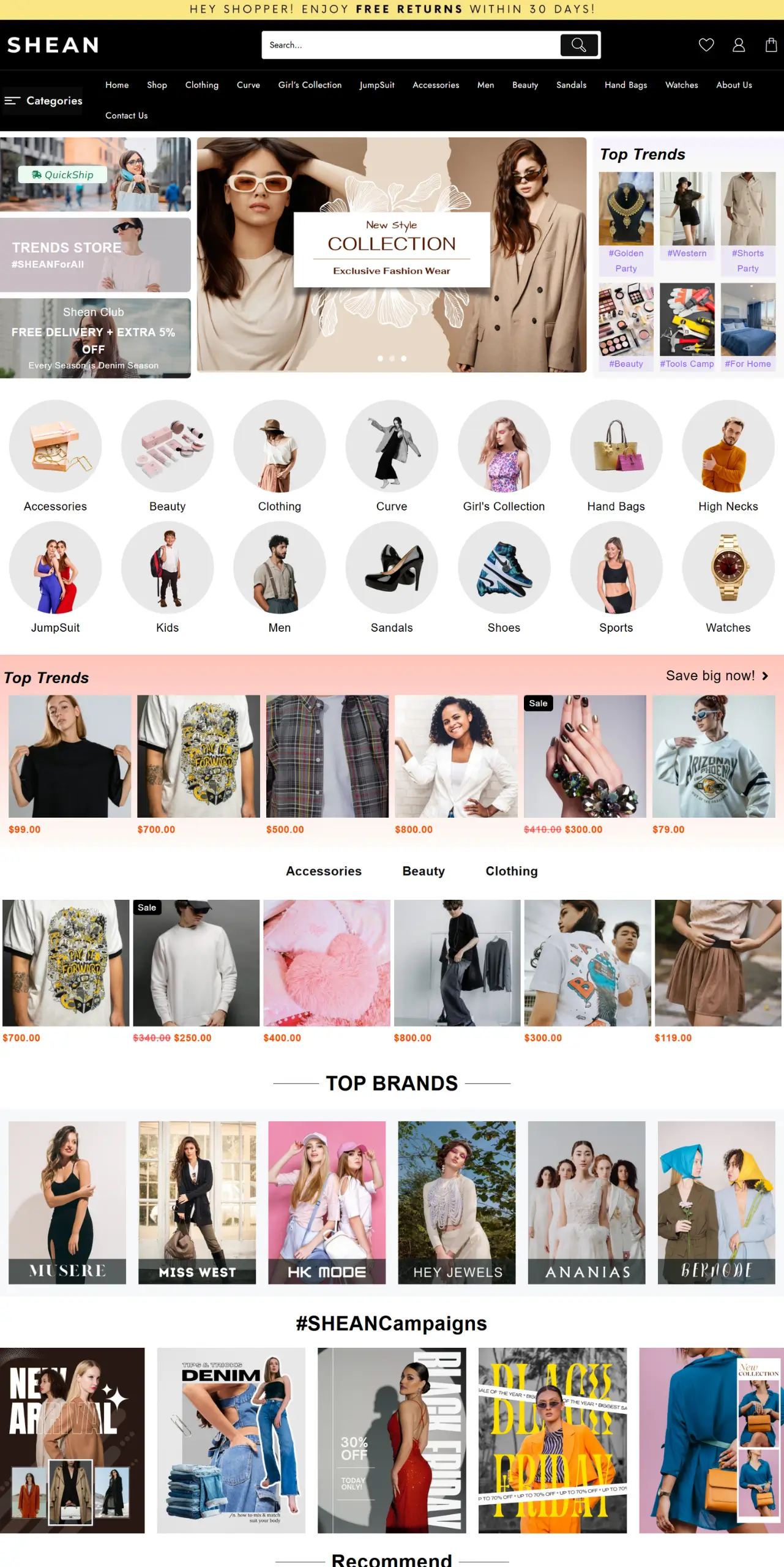
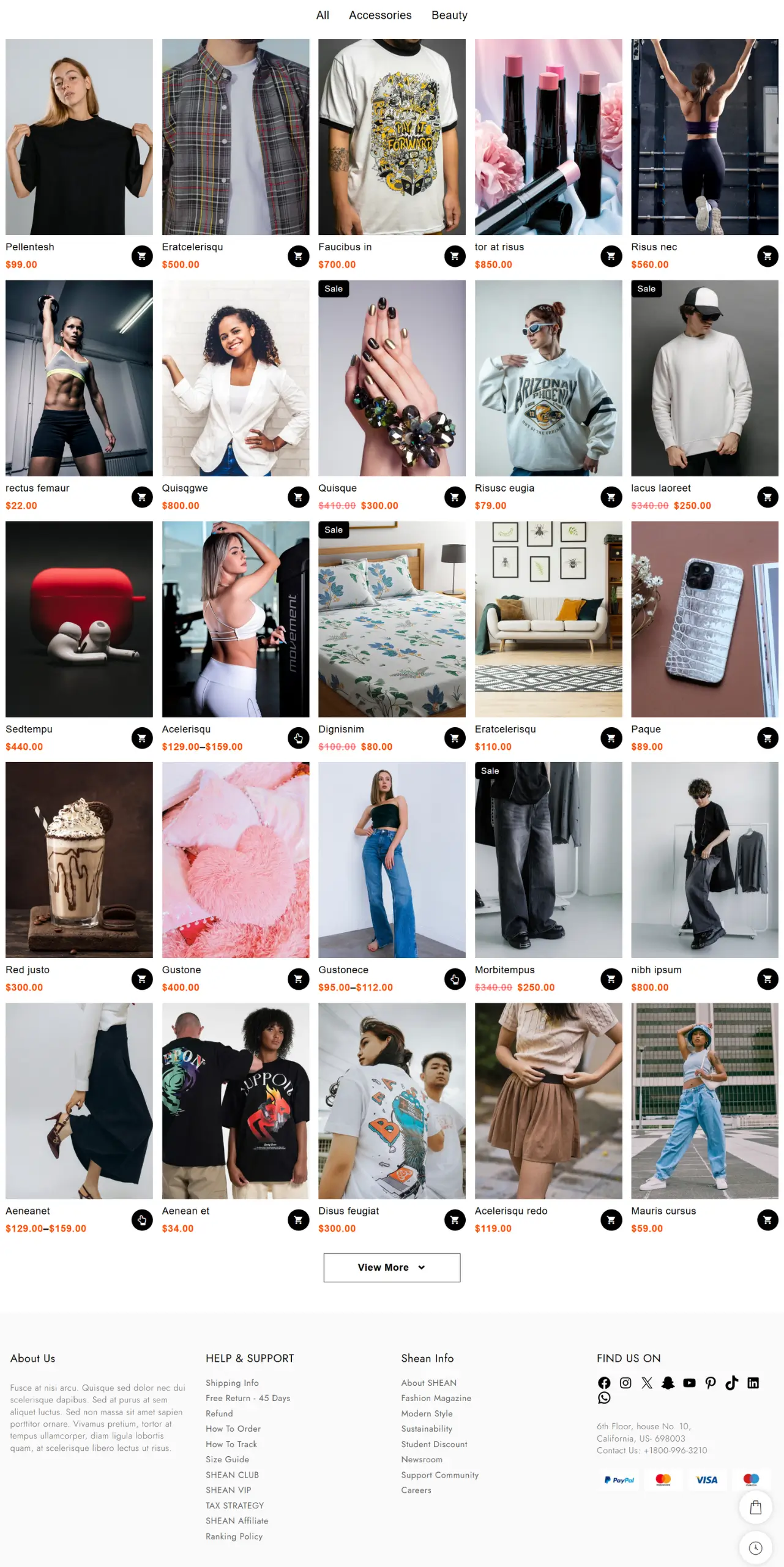
The homepage features a sleek promo banner, highlighted trending categories, and a stylish product grid showcasing both regular and discounted items. Creating an engaging shopping experience for a style-focused online store.
Product Showcase
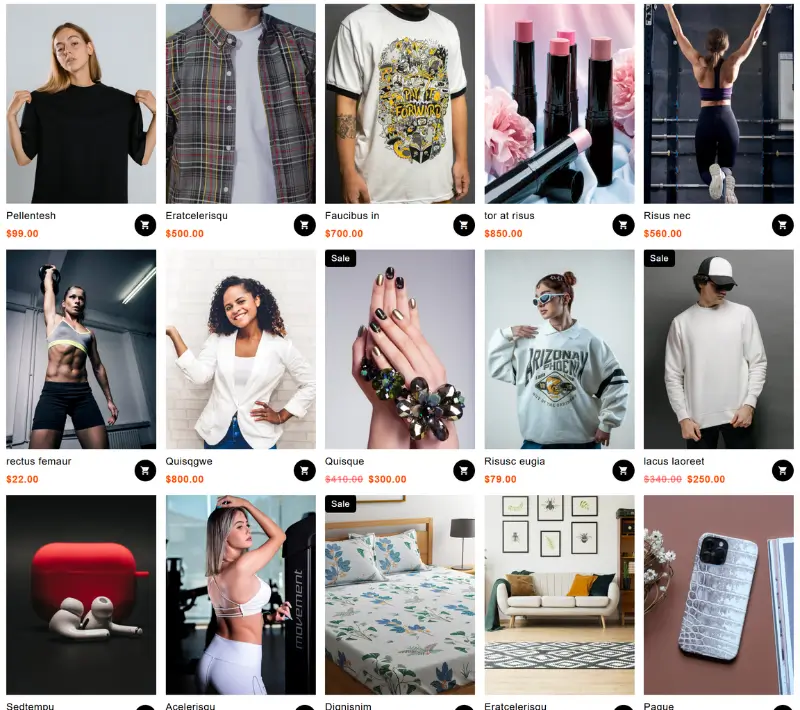
Showcases products in a clean, organized layout with high-quality visuals, intuitive hover effects, and easy navigation. Multiple display styles ensure an attractive, user-friendly, and engaging shopping experience.
About Us Page
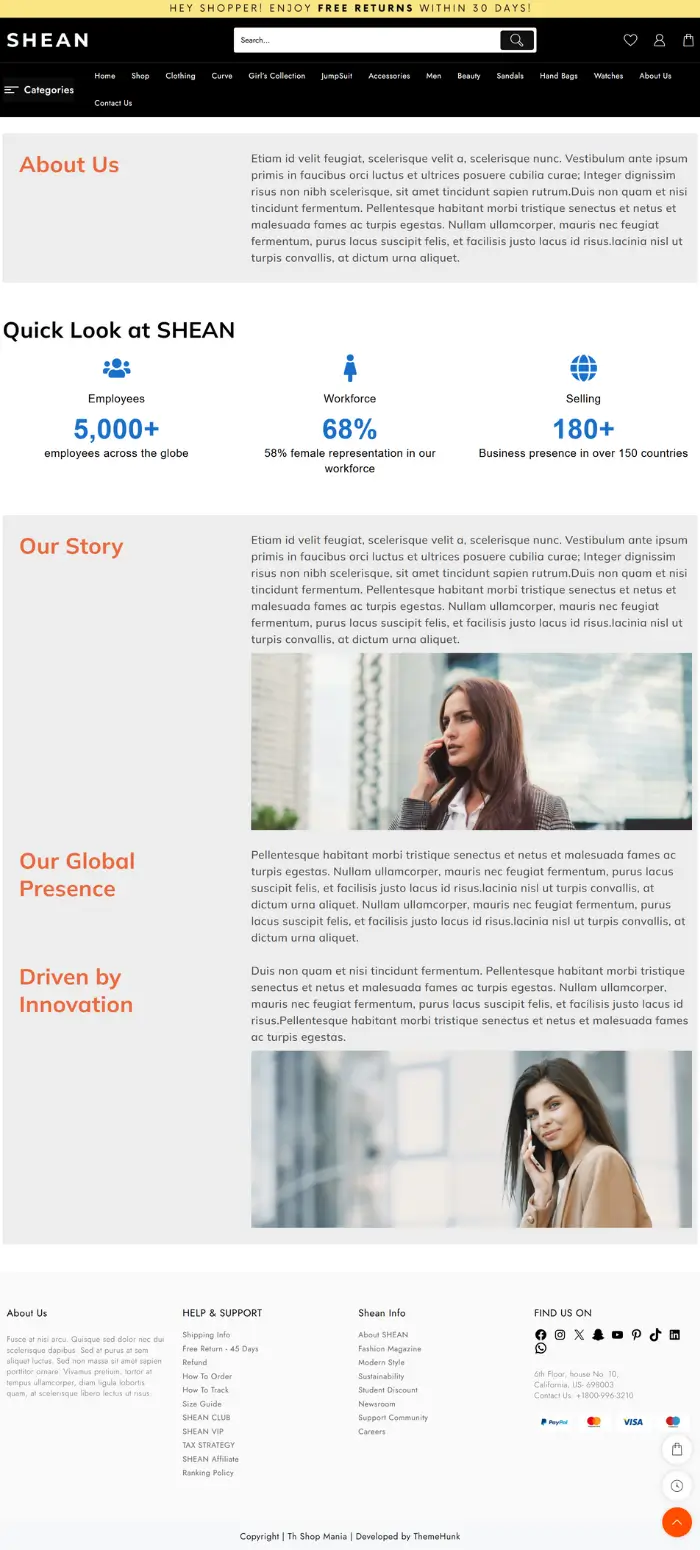
The template includes a pre-made page where you can share your brand story, mission, and values to connect with customers.
Highlight your company’s history, passion, team members, and showcase images of your workshop or products to build trust and engagement.
Contact Us

The Contact Us page provides a user-friendly contact form where visitors can enter their details and send messages.
It allows customers to make inquiries, address issues, and connect with your business seamlessly.
Shop Page
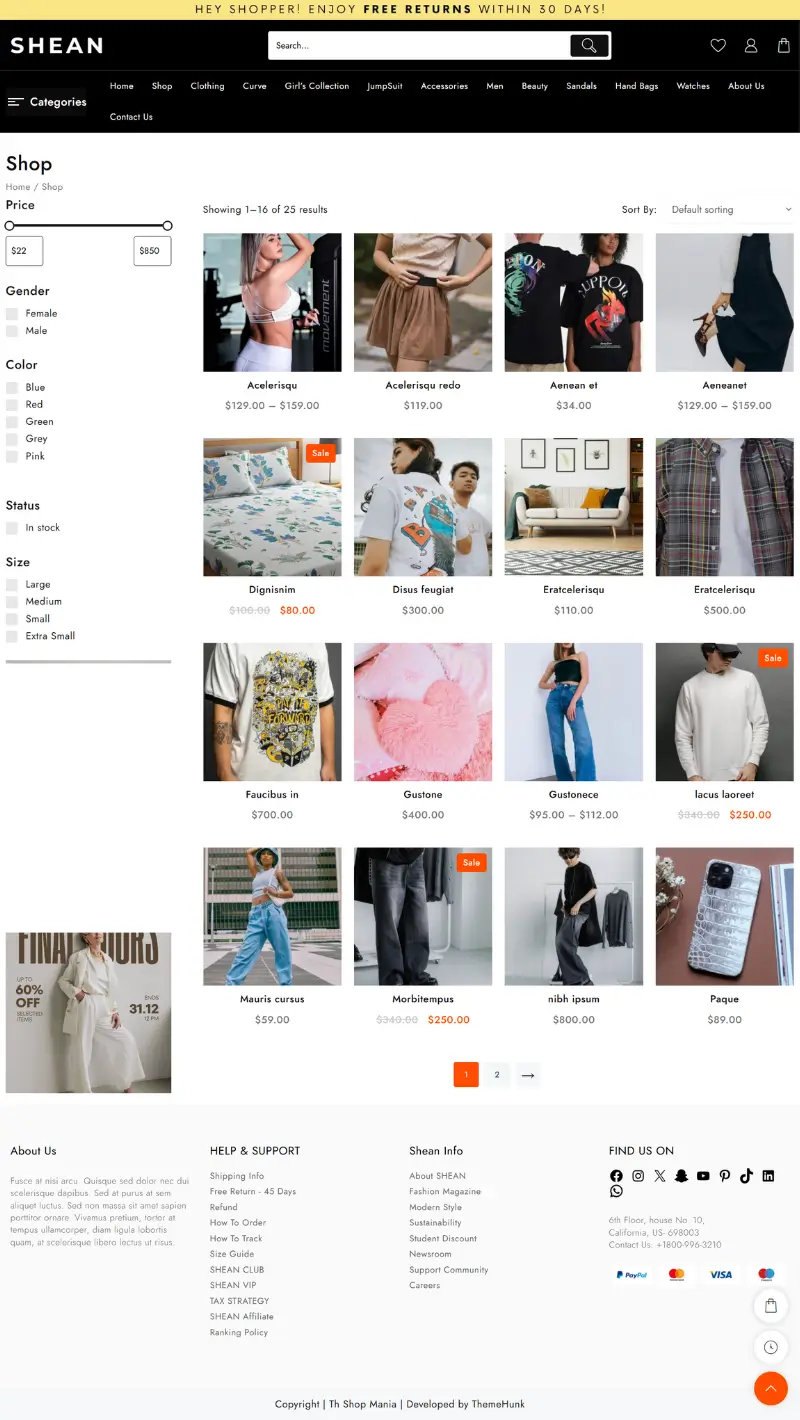
The Shop page offers a clean, user-friendly layout with a sidebar for category filters such as price, size, gender, color, and availability.
Each product includes a quick view option, wishlist, compare buttons, and clear pricing. This design enhances product discovery and streamlines the shopping experience.
Live Product Search
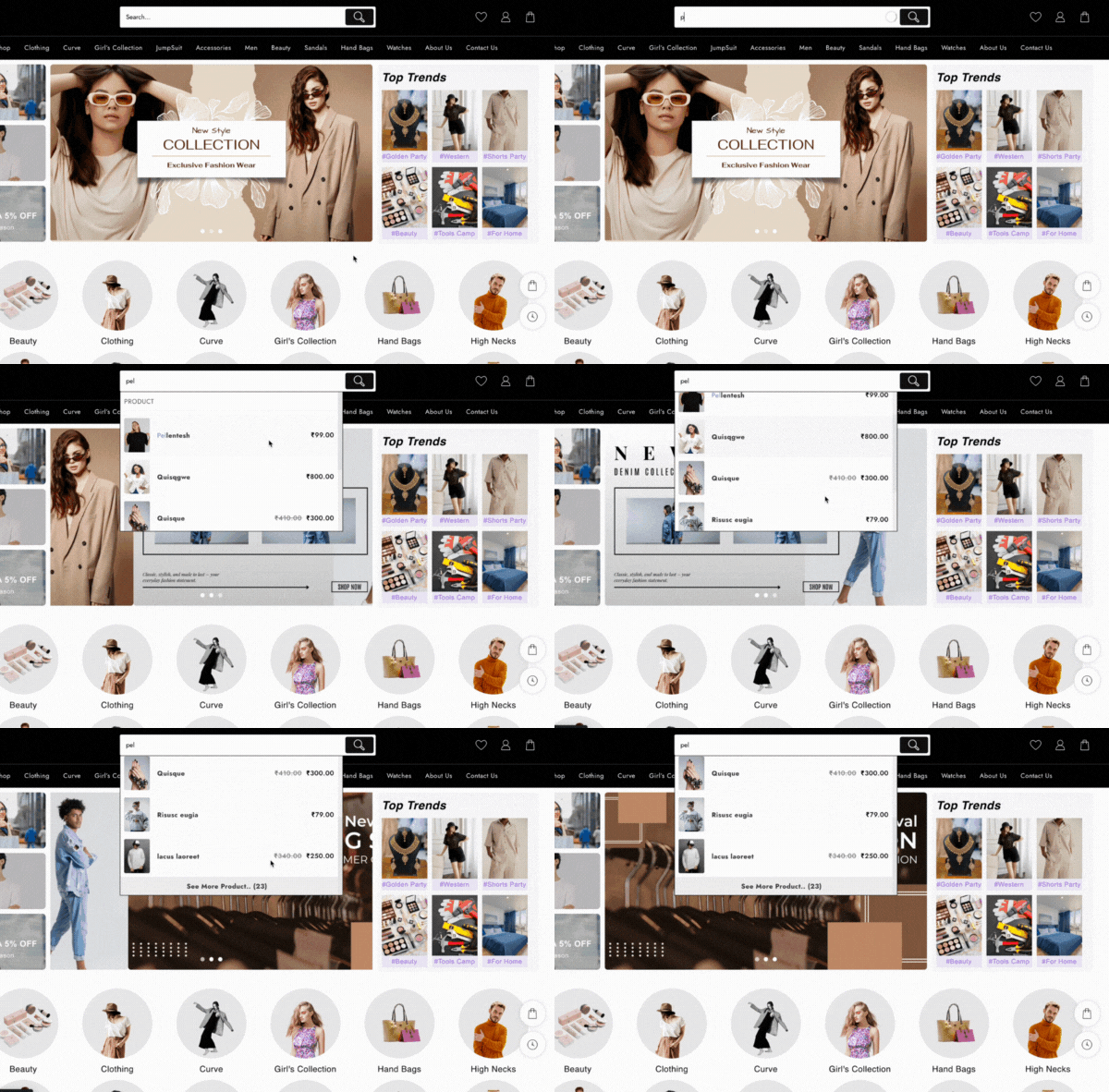
This fashion template features advanced live product search throughout the entire site, allowing users to quickly find items by categories, SKUs, or attributes.
Even partial keywords instantly display relevant results, enhancing user experience and boosting sales conversions.
Shopping Cart

This template provides versatile shopping cart options, including floating, sidebar, and dropdown layouts.
Designed for convenience, offering a quick view of selected items, real-time updates, and seamless checkout access, ensuring a smooth shopping journey and reducing cart abandonment rates.
How to Install the Fashion Store Template with One Click
Setting up a Fashion Store template for your WordPress website is easier than ever with a one-click demo import.
Following these steps, you can quickly install a professional and attractive design for your store without coding skills.
Download and Install the Theme
You need to install the Shop Mania theme before importing the demo template for the website.
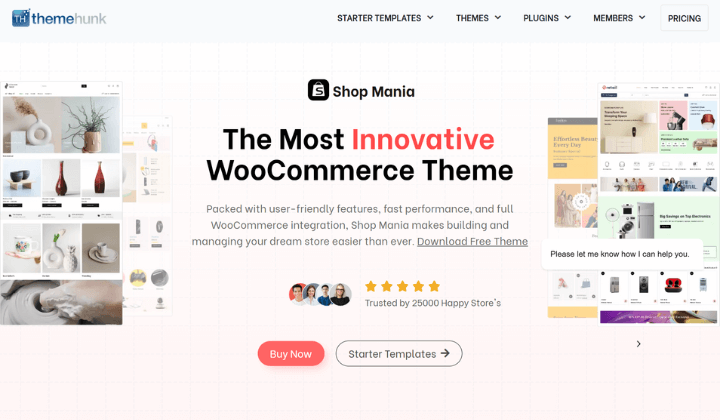
Purchase and Download the Shop Mania Theme from the below link
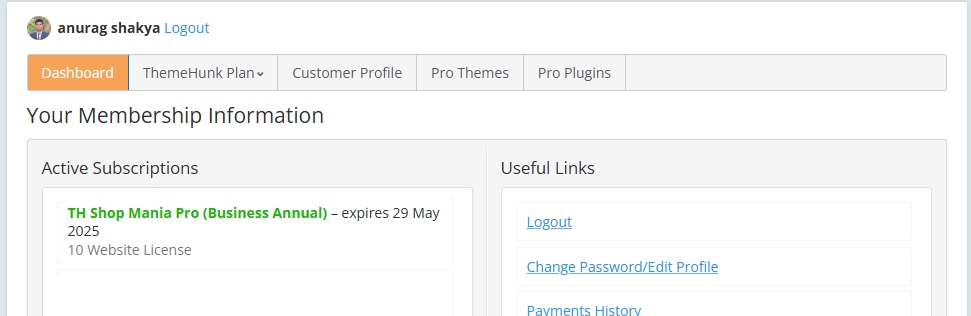
Download the Pro Version from the Members area
Once you purchase the theme, you’ll gain access to the member’s area dashboard, where you can easily download the Shop Mania Pro plugin.
You can log in to your >> Member’s area from here
Install Pro Plugin
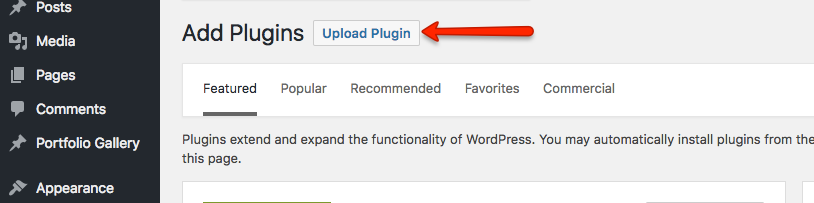
Now open your WordPress dashboard, navigate to Plugins, and click on Add New Plugin.

Next, click on Upload Plugin in the top left corner, as shown in the image below.
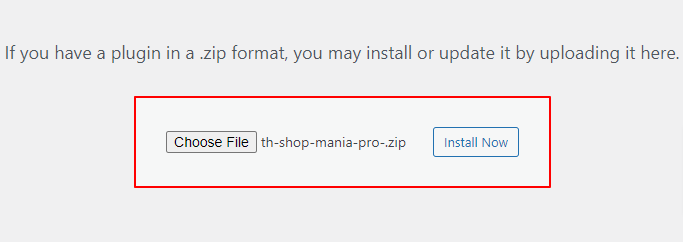
Upload the Shop Mania Pro plugin here, and click on Install Now.
Click on the Activate Plugin.

Generate & Activate Your License
Now, activate your license to unlock and access all the premium features of the theme.
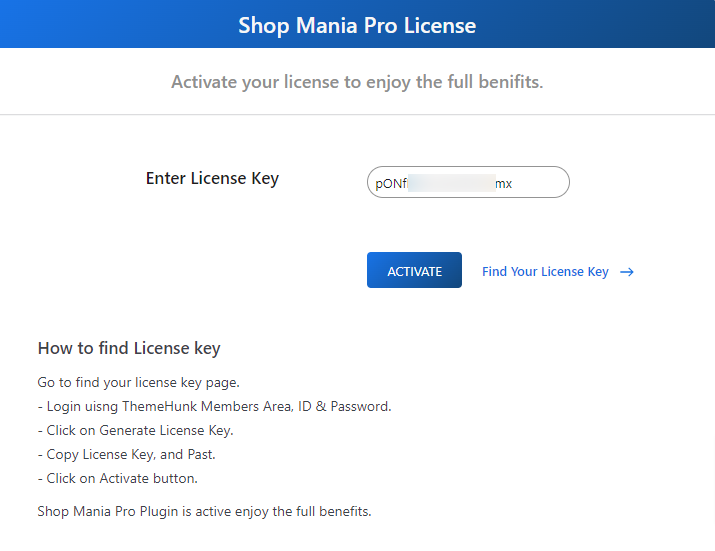
Navigate to Appearance and click on License
You can find the license from the >> license page here

Click on Find Your License Key to get your license key.

Log in with your Member’s Area ID and password to generate your license key.

Now you will see your license key. Simply click on Copy to save it for activation.

Paste the license key into the designated field, click Activate, and your license will be successfully activated.
Import Fashion Store Template
Navigate to Appearance and Click on Demo Import Sites.
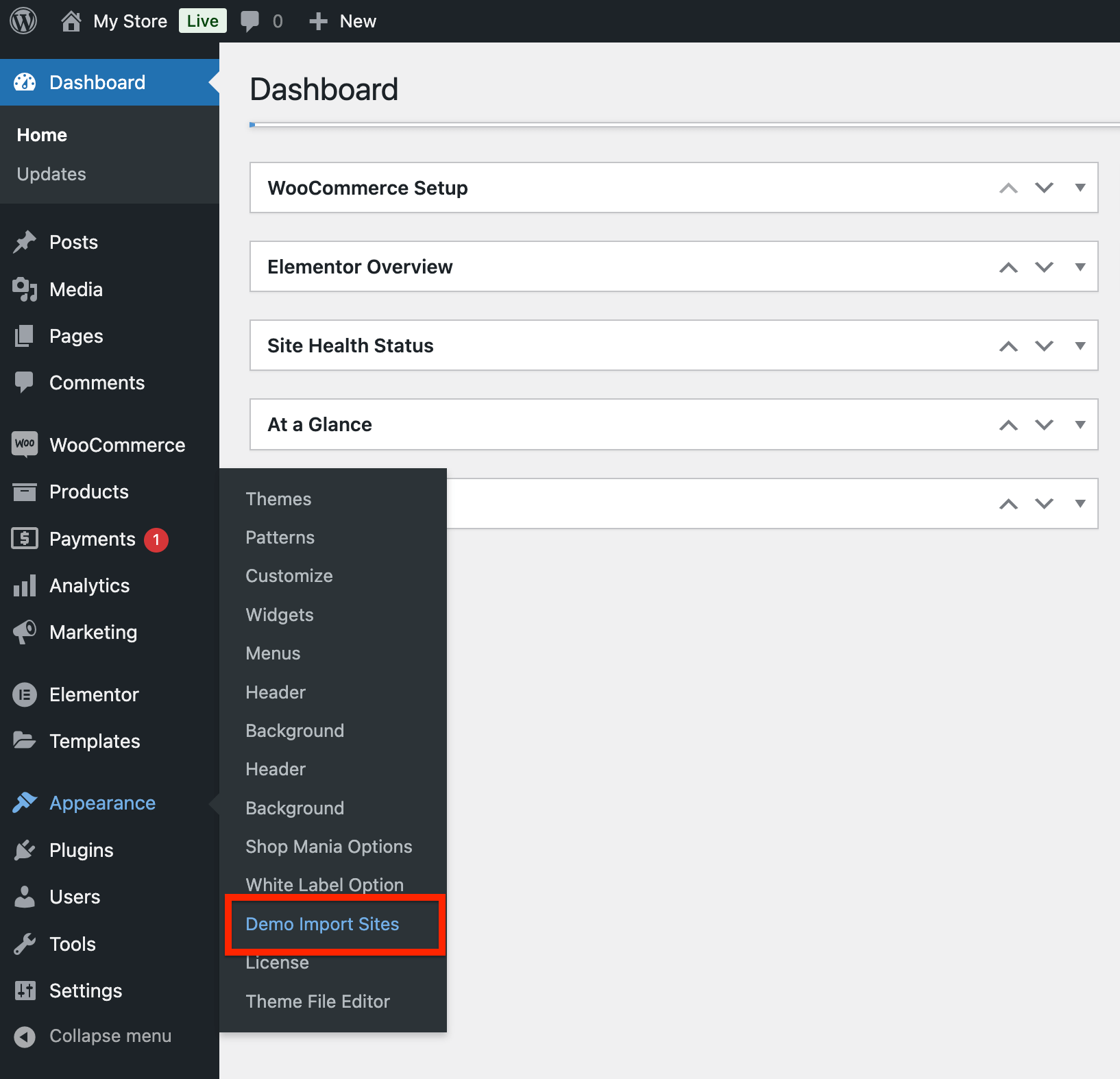
When you click on Demo Import Sites, you’ll be redirected to a new page.
On this page, you’ll see a dashboard with a View All Starter Sites button; click on it to proceed.

You’ll now see a collection of demo sites. From the list, find the Shean Fashion Store template, and we’ll proceed with installing it.
Click on the Shean template
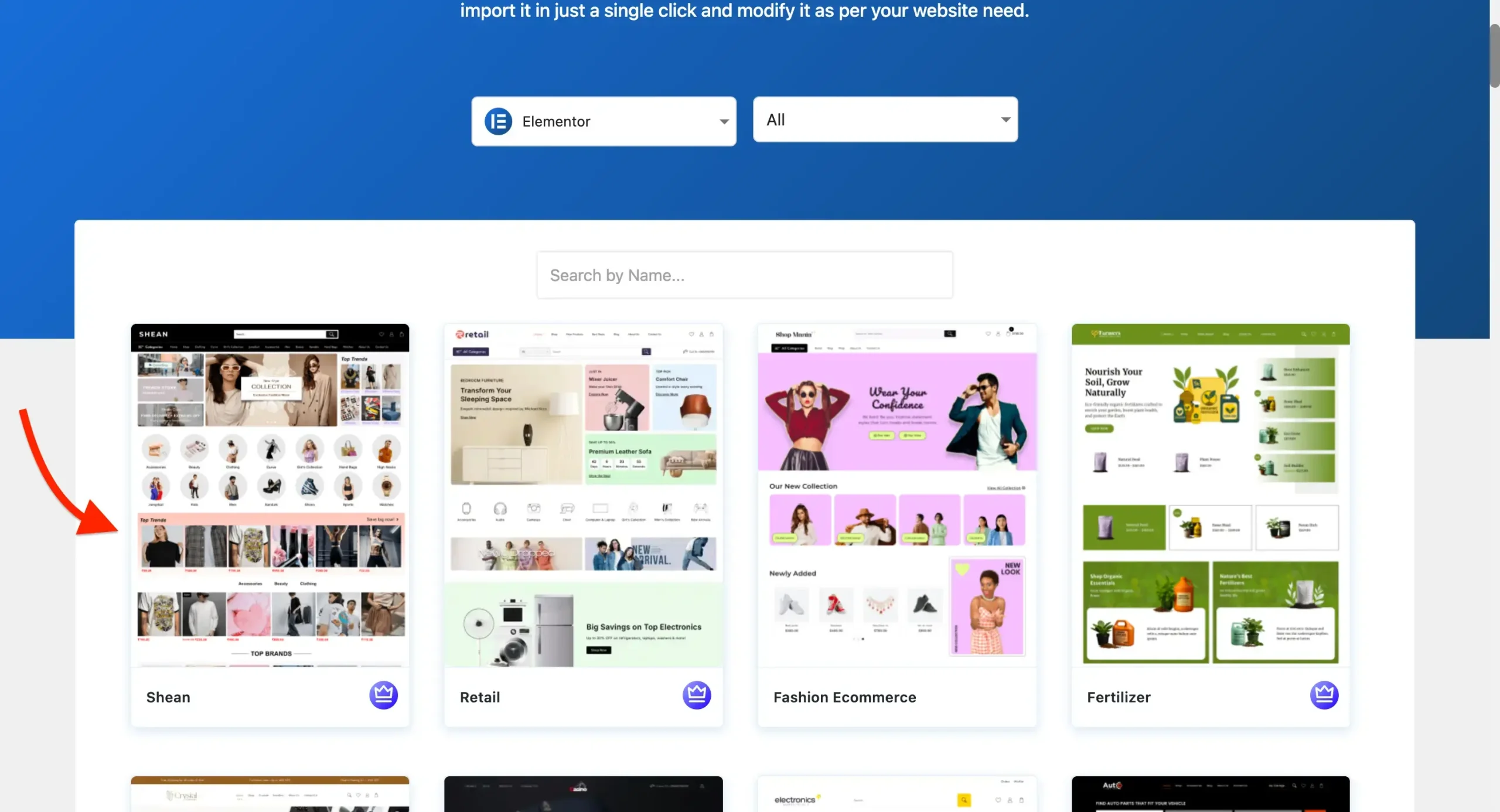
A full-page preview of the template will appear, helping you verify that the right design has been selected before installation.
Now, click on the Continue button to proceed further.

In the next step, click the Build My Website button, as shown in the screenshot below.
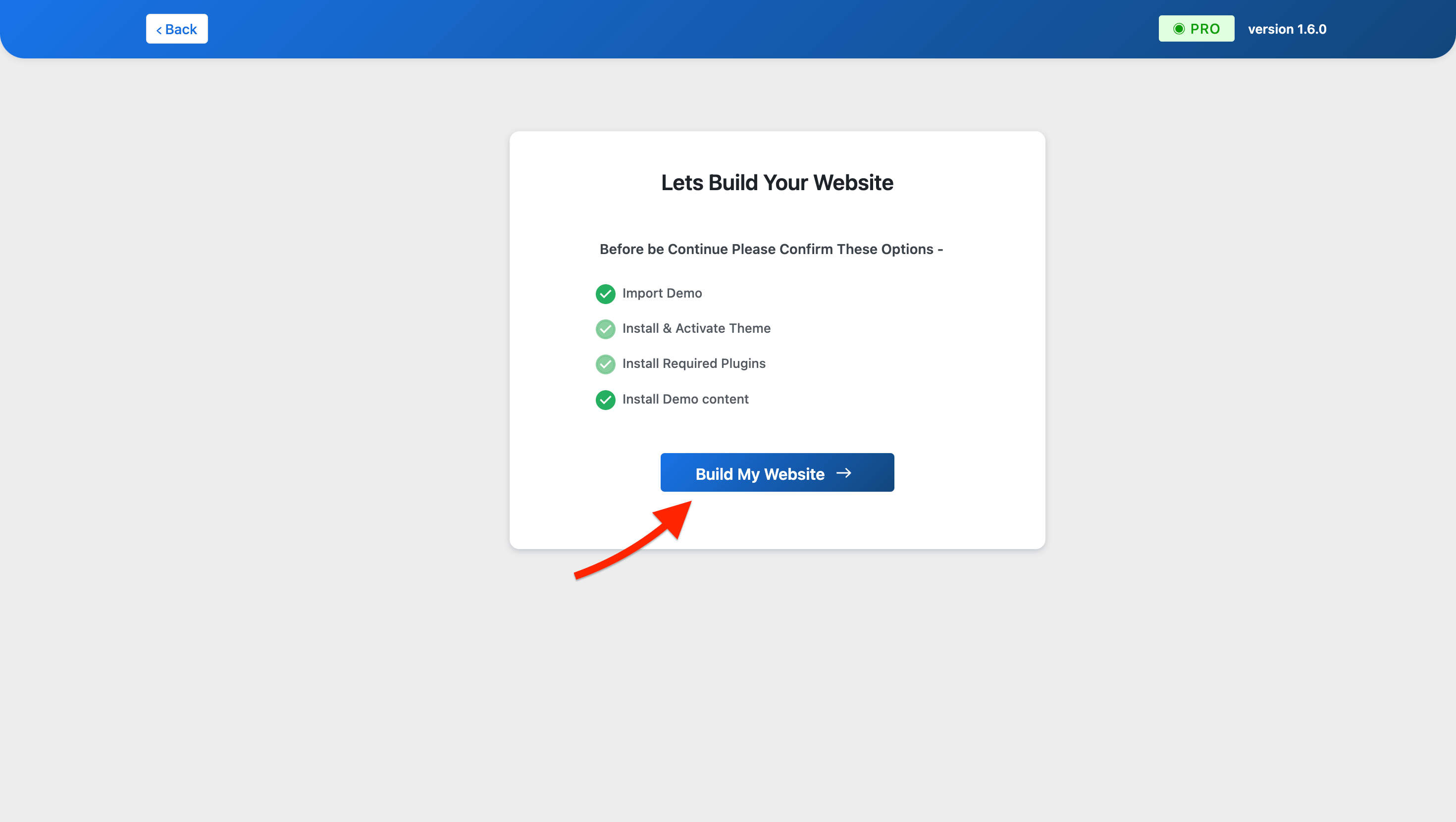
Now, wait a few seconds while your website is imported automatically.
Note: Don’t exit or close the page while the demo template is being imported. This may cause some problems.
After the demo is imported, you can now see or edit your website.
To view your website, click the View Website button. If you’d like to make changes, select the Customize button instead.
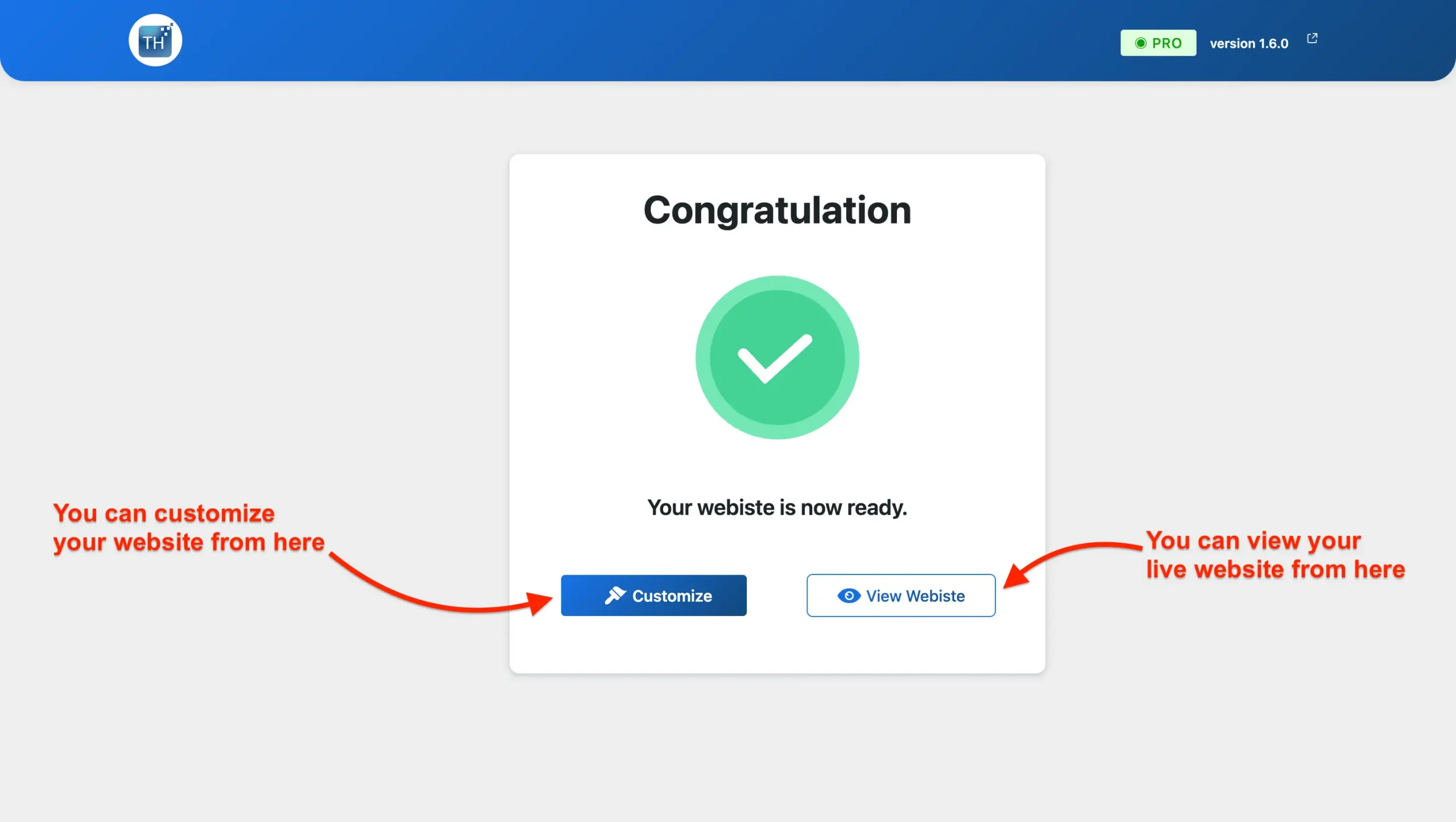
Your website is now ready and can be viewed live on any device. Importing the Fashion Store template was fast and seamless, ensuring an easy and efficient setup process.
Customizing or Modifying the Fashion Store Template
Personalizing the fashion store template in Elementor is simple and efficient, made easy by its user-friendly drag-and-drop interface.
Below is a step-by-step guide to help you get started:
Navigate to your website’s homepage, and you’ll find the “Edit with Elementor” option available, as highlighted in the screenshot below.
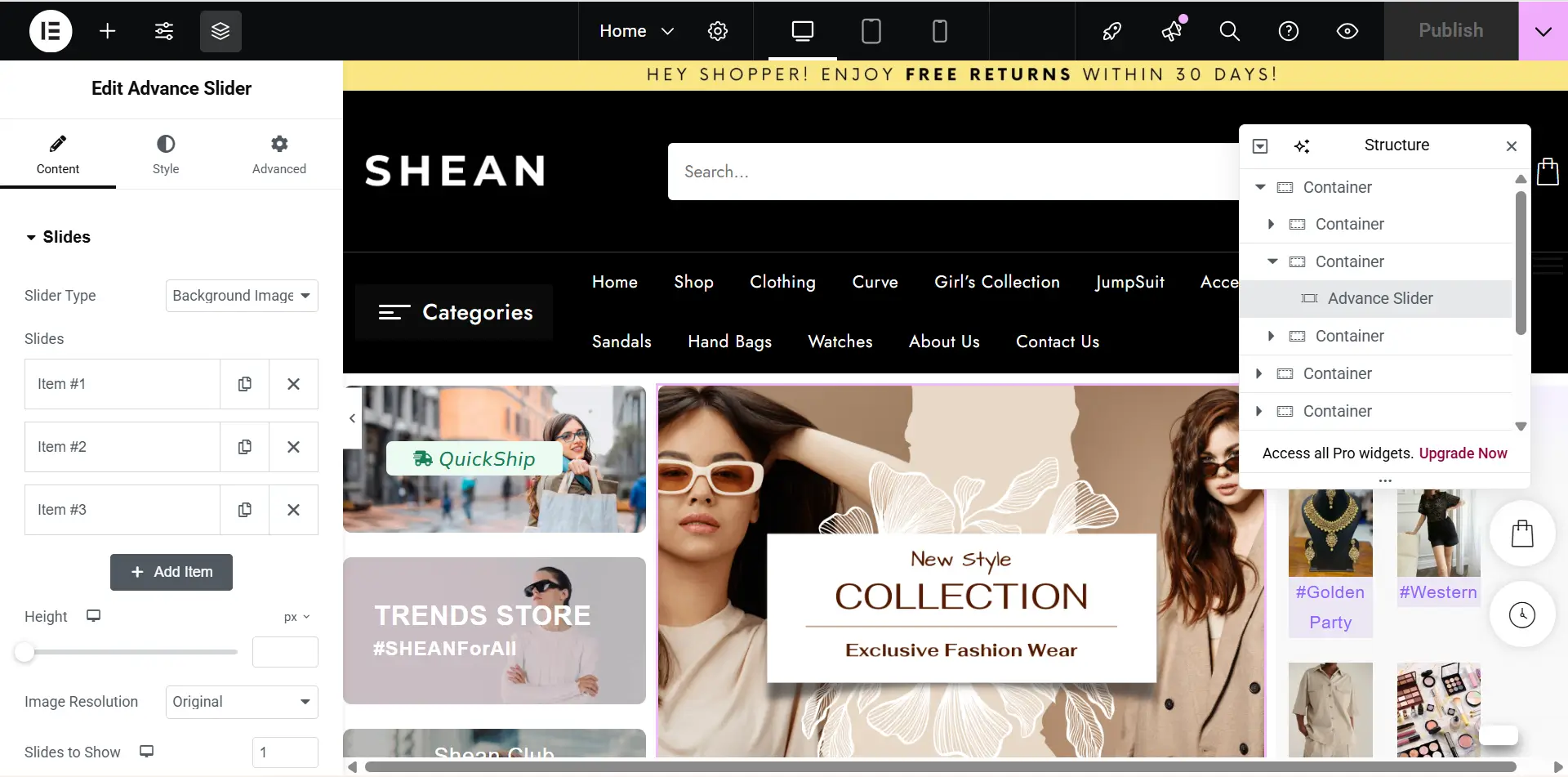
Editing any section in Elementor is quick and easy, and it allows you to modify content, structure, and design elements directly.
Whether you’re editing text, images, buttons, or layout settings, Elementor’s drag-and-drop interface makes it simple.
You can add or delete any section on your site very easily. You can also add your custom sections anywhere on your page.
By following these steps, you can effectively customize your homepage to reflect the unique style and offerings of your ceramic shop.
With Elementor’s user-friendly tools, you have the freedom to experiment with different layouts, designs, and content until it feels just right.
Add Product to Your Website
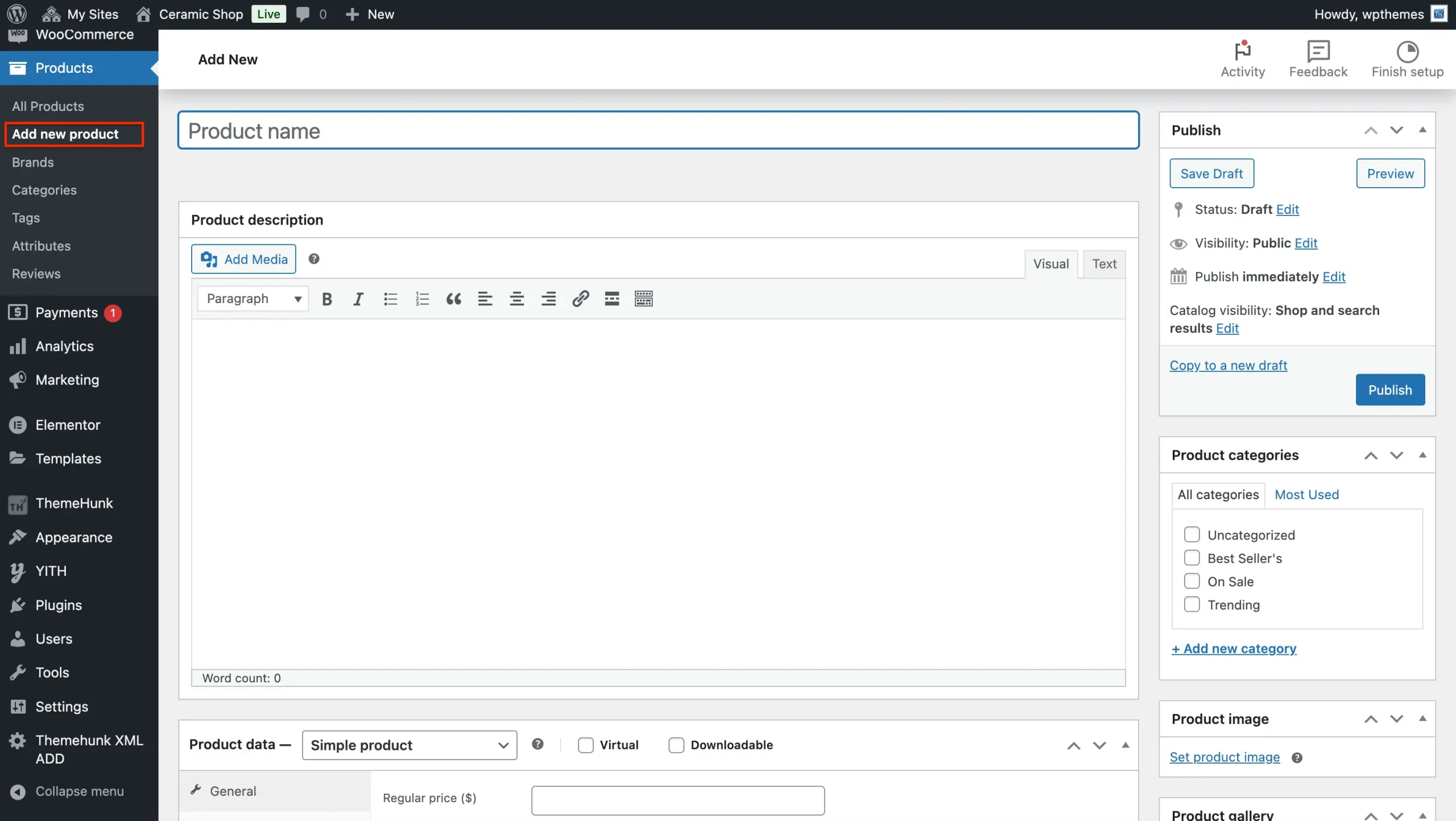
Adding a product to your WooCommerce store is a straightforward process. Here’s a step-by-step guide to help you through it:
Navigate to WooCommerce Products. On the left-hand sidebar, hover over “Products” and click on “Add New”.
Add Product Title. In the Product Name field at the top, enter the name of the product.
Below the title, you will see the Product Description box. Here you can add a detailed description of your product.
Set Product Type
Scroll down to the Product Data section. Here you can set different product types, such as:
- Simple Product: A basic product with no variations.
- Grouped Product: A collection of simple products.
- External/Affiliate Product: A product that links to an external website.
- Variable Product: A product with multiple variations (e.g., size, color).
Pricing and Inventory
- Regular Price: Enter the standard price of your product.
- Sale Price: If you have a discount, enter the sale price here.
Product Images
- On the right side, you’ll see a section called Product Image. Click Set product image to upload a main product image.
- Below this, you can also add Product Gallery Images. These are additional images that customers will see in the product gallery.
Set Categories and Tags
- Under the Product Categories section on the right, select or create a category for your product. Categories help organize your store.
- In the Product Tags field, add relevant tags (e.g., “blue jeans,” “casual shirts”) to help with product searchability.
Publish the Product
Once you’re satisfied with all the product details, click the Publish button on the right-hand side to make the product live on your store.
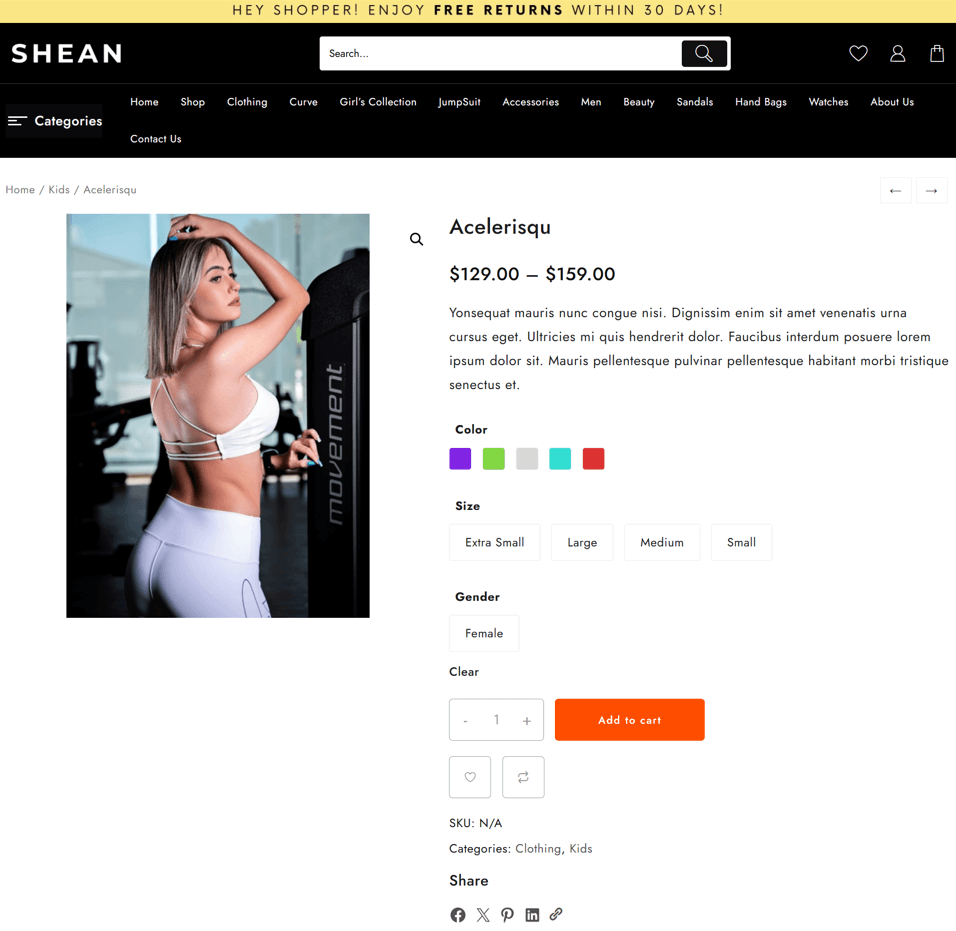
This is how your product will look on your Fashion Store website.
You can preview, and if you want any changes, you can edit them by clicking on the Edit Product option.
Tips for Optimizing Your Fashion Store Website for Better Conversions
After launching your fashion store website, it’s essential to focus on converting visitors into paying customers. Here are some optimization tips that can help:
- Product Page Optimization: Ensure each product includes high-quality images, clear and persuasive descriptions, and key details like dimensions, materials, and care instructions. Incorporating customer reviews and testimonials boosts credibility and encourages purchases.
- Use Call-to-Actions (CTAs): Incorporate clear and compelling CTAs, such as “Buy Now,” “Add to Cart,” or “Special Offer,” to guide visitors toward desired actions and increase conversions.
- Reduce Checkout Friction: Simplify the checkout process by minimizing steps, offering guest checkout options, providing multiple payment gateways, and ensuring forms are easy to complete, helping increase conversions and reduce cart abandonment.
- Offer Free Shipping or Discounts: Encourage sales by offering incentives such as free shipping, limited-time discounts, or special deals, motivating customers to complete their purchases and increase overall revenue.
- A/B Testing: Experiment with different versions of product pages, CTAs, layouts, and visuals to identify what drives higher engagement, conversions, and sales, optimizing your eCommerce performance.
Essential Tools and Plugins to Enhance Your Fashion Store’s Functionality
To provide the best experience for your customers, consider adding the following tools and plugins to your WooCommerce site:
- Live Product Search: Enhance real-time search results by displaying relevant products as users type, improving navigation, enhancing user experience, and helping customers quickly find items, ultimately increasing conversions.
- Woo Cart Pro: Enhance the shopping cart experience with advanced features such as sticky carts, real-time updates, quick add-to-cart, and custom cart designs, allowing customers to easily manage orders and enjoy a seamless shopping journey.
- Product Compare: Enable shoppers to view multiple products side by side, highlighting key features, specs, and prices, helping them choose the best option.
- Rank Math: This SEO plugin helps you optimize your content for search engines, improving your website’s visibility and search engine ranking.
- WooCommerce Product Add-Ons: Add customizable options like color, logo, text, or special finishes to product pages, enabling customers to personalize their purchases and enhance their shopping experience.
- WooCommerce PDF Invoices & Packing Slips: Automatically generate and send PDF invoices and packing slips for orders, simplifying order management, improving professionalism, and enhancing the customer experience.
- LiveChat: Provide real-time support on your website, allowing customers to ask questions, get instant help, and improve engagement, satisfaction, and conversion rates.
FAQ
Q: What is the Shop Mania fashion store template for eCommerce?
Ans: The Shop Mania fashion store template is a pre-built eCommerce layout for clothing, accessories, and lifestyle brands, offering one-click demo install, WooCommerce compatibility, and a fully customizable design to quickly launch your online store.
Q: Do I need coding knowledge to use this fashion store template?
Ans: No coding is required; you can customize colors, fonts, layouts, and product pages using the built-in WordPress and Elementor options.
Q: Can I customize the homepage and other layouts of the fashion store template?
Ans: Yes, you can fully customize the homepage and other layouts of the fashion store template. It offers multiple headers, footers, and section designs, allowing you to personalize the look to your brand.
Q: How fast is the Shop Mania fashion store template?
Ans: Shop Mania is a lightweight and performance-optimized theme, ensuring fast loading times for a smooth shopping experience and better SEO performance.
Q: Can I use Shop Mania for a small or budget-friendly fashion store?
Ans: Yes, Shop Mania is suitable for boutiques, low-budget fashion stores, and premium fashion brands alike.
Final Thought
One-click install templates are revolutionizing fashion eCommerce, combining attractive design, robust functionality, and user-friendly setup.
The Shop Mania template makes launching a fashion eCommerce store effortless. With its one-click demo import, stylish design, and WooCommerce integration, you can have a fully functional, mobile-friendly, and SEO-optimized store up and running in minutes.
From small boutiques and budget-friendly fashion shops to luxury clothing brands, the fashion store template provides all the features to present your products attractively and increase conversions.
Thanks for reading this blog. If you have any questions regarding this, do not hesitate to comment below. We will help you solve your problem. Thanks for reading this blog.
Please subscribe to our YouTube Channel, we also upload great content there Do Follow us on Instagram and Twitter.
Explore More Article –


