
Overview ➣ Discounts were found effective when it comes to increasing sales. With Woocommerce, coupon codes can be created and managed very easily. Learn to create the woocommerce coupon in this blog.
Wocoomerce is an unattachable part of WordPress ecommerce websites. It is the main plugin needed to create any ecommerce site.
You must have heard that ecommerce website offers discounts from time to time. Do you know, why did they so? There are so many reasons behind offering huge discounts.
With Woocommerce, creating and managing discounts is so easy. You can also create and manage discounts in woocommerce. This helps increase customers, boost sales, eliminate extra inventory, etc.
However, there are some other ways also to achieve the same objective like sales. But discounts are as effective as sales.
In this blog, we will see how to create and manage discounts in woocommerce. We will go through every step involved.
What Is The Significance of Discounts?
Discounts are very important in many aspects. Let’s see them
Boost Sale
There are several ways to increase revenue through sales but boosting sales through offering discounts and creating new customers is one of the most effective techniques.
When a discount is offered on a website, sales are increased as customers find it necessary to buy if something is coming at a cheap price, this is human tendency.
Increase Customers
If you can fetch customers offering attractive discounts and let them know about your product then, and if they like your product, there are higher chances they may buy again from you. Because fetching new customers is a headache.
This is how you can convert the users into permanent customers. The price-sensitive users are attracted the most.
Clear Extra Inventory
To get rid of extra inventory, this technique has been proved helpful. When attractive offers are shown on the site, average sales increase.
When there is excessive inventory due to any reason, it becomes important to clear it. Reducing the price and fixing a deadline, creates a sense of urgency, that makes customers buy items even if not needed.
It not only helps clear inventory but also increases the cash flow of your site. After clearing the inventory, you can invest in the latest or trending products.
How To Create And Manage Discounts In WooCommerce
Now we will be seeing the procedure of creating and managing discounts in woocommerce but make sure the woocommerce is installed into your dashboard.
Step 1) Open Your WordPress Dashboard
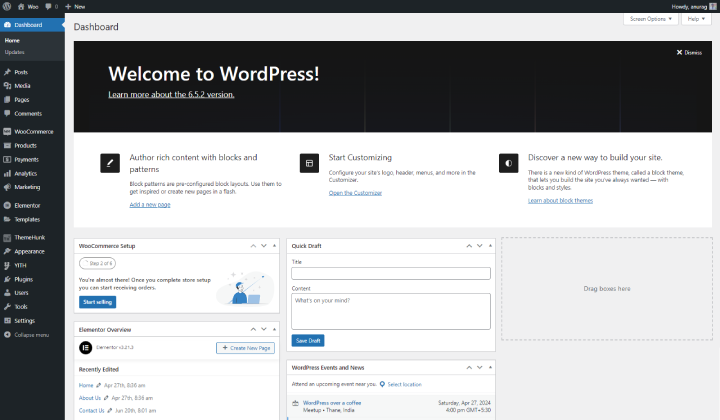
Log in to your WordPress website and open your dashboard.
Step 2) Go to Marketing and click on Coupon
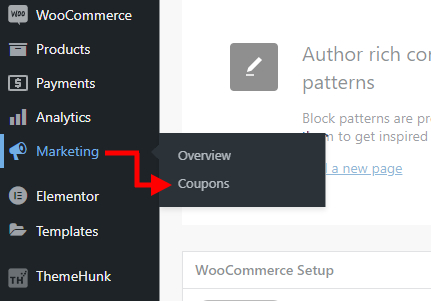
Hover your cursor on Marketing and click on Coupons.
Now, you will see a page where you can see coupons, if any.
Step 3) Click on Add New Coupon
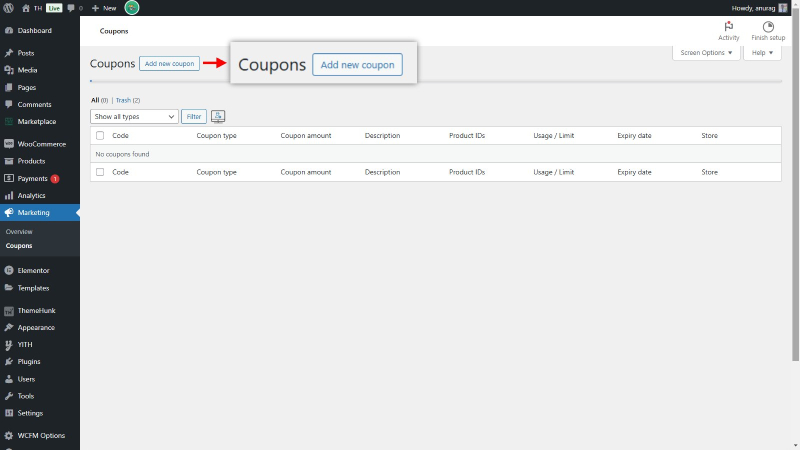
Here a button is given to create new coupons. If you already have some coupons, you can see a list of them.
Step 4) Write Coupon text manually or Click on Generate Coupon
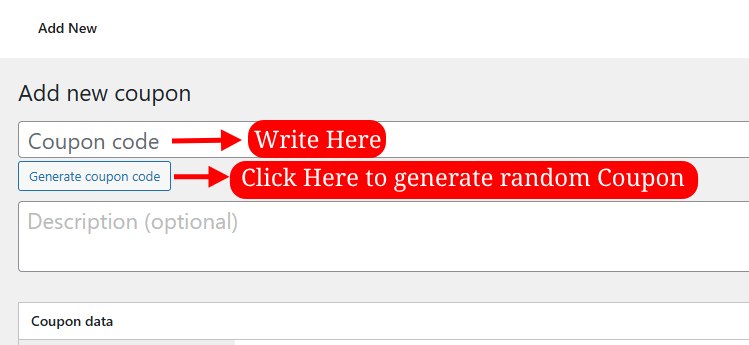
In the box, you can write the text for the Coupon, later the text will work as a Coupon Code. If you click on Generate coupon code then a random coupon will be generated.
In the description box, you can write a description of the coupon.
Customize Settings
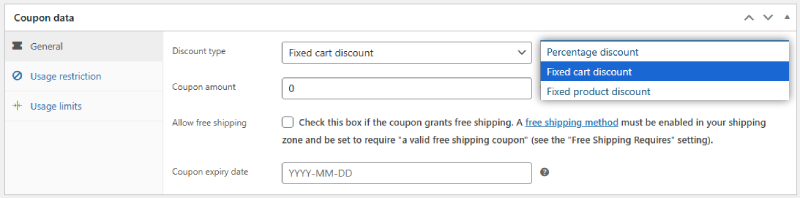
In the General settings, you can choose the Discount type from Percentage Discount, Fixed Cart Discount, and Fixed Product Discount.
If the Cart Discount is selected then you can enter the amount of the discount, and the discount will apply to the full amount of products in the Cart. But if a Percentage discount is selected, the Coupon amount would be in Percentage. Likewise, if you select the fixed product discount, then the discount I applicable to any product.
If you want to make the shipping free too then check the Allow Free Shipping box. A Coupon expiry date is given to set a date for the coupon to be functional.

In the Usage Restriction section, various restrictions can be given, from minimum to maximum spent to discount for a selected product, there are many options to restrict the discount.

In the Usage Limit, you can set a limitation on coupons if it should be for a selected number of times, and a user can use a coupon for a limited number of times.
Step 5 ) After all, click on Publish
Having created a coupon and setting every amount, click on publish.
Later you can see the Coupon here.
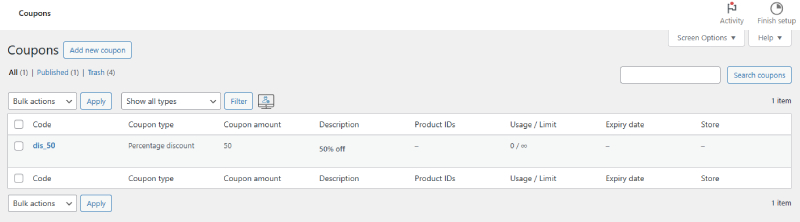
Here, every coupon with its type, amount, and other settings can be seen. Likewise, if you create more coupons, they will appear here.
Now let’s see using the Coupon.
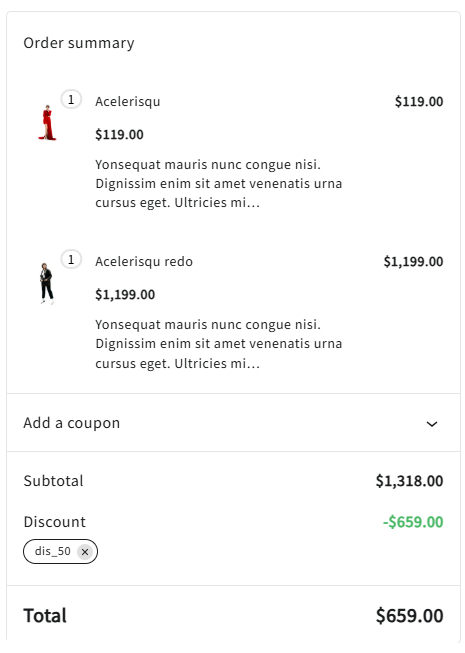
In the above image, the Coupon is applied, and the 50% amount is deducted. This is how it works.
How To Style Coupon?
Woocommerce has not given the facility to stylize the Coupon and show it on your site. I understand that, to attract users, it is also necessary to demonstrate and motivate them to use the coupons.
But if you want to customize it and show it stylishly, you will need help from another plugin.
For this, we can use Woo Coupons Addon of Elemento Addons.
This is how you can use Elemento Addons to showcase the Coupons.
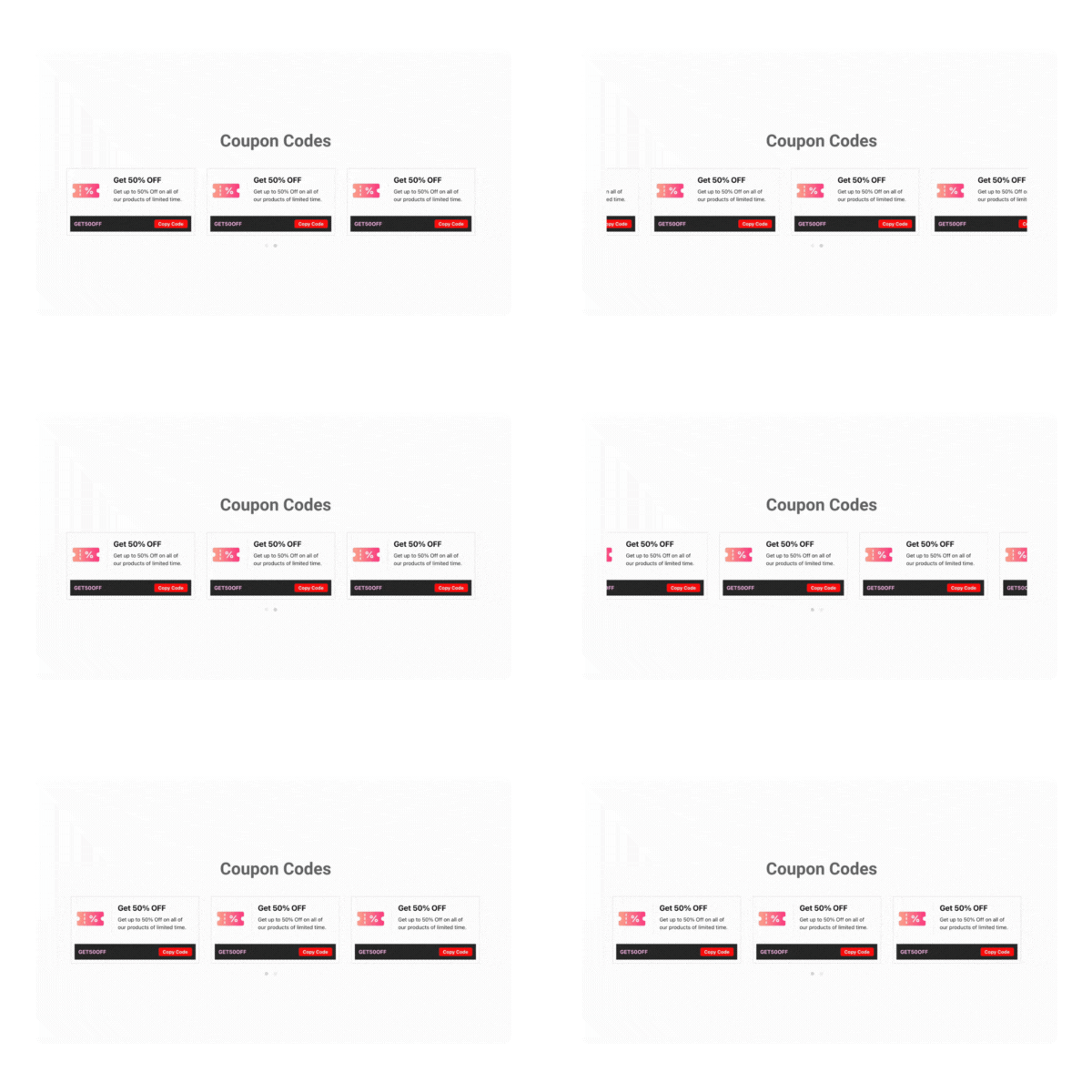
Not only this, you can design the Coupon as you want, as it offers full freedom to do so.
Moreover, when the user clicks on Copy Code, the Coupon is copied to the clipboard directly. And as it is integrated with Elementor, the design with this addon is super easy.
FAQ
Q. Can I set a Coupon for a particular product?
Ans. Yes, you can select a particular product for a Coupon from the Usage Restriction Settings of the Coupon. Not only this but you can even select a product category for discount also.
Q. Is there any cost of creating a coupon code?
Ans. No, there is no charge for creating a coupon code. You can create it free of cost from woocommerce settings.
Conclusion
So, we have discussed Woocommerce Coupons in detail. We covered a major topic, i,e, creating and managing discounts in woocommerce through coupon codes.
We also saw the customization settings of coupons as they are also important while creating the coupons. Discounts in Woocommerce are significant not only because they reduce the amount but there are many reasons as we discussed above.
I hope this blog will help you. Still, if you have any queries or suggestions then let me know in the comment section.
You can Subscribe to our YouTube Channel, we also upload great content there, also Do Follow us on Facebook and Twitter.
Discover More Articles


