
Overview ➣ Find the best Wishlist plugin for WooCommerce to increase sales and engagement. This article reviews top-rated free and premium options to help you choose the right plugin for your online store.
You optimize product pages, simplify the checkout process, and run targeted marketing campaigns, yet some shoppers still leave without making a purchase.
Shoppers often love items but aren’t ready to purchase them, and later forget about them.
A WooCommerce plugin for wishlist solves this by keeping favorite items just a click away, turning “maybe later” into sales.
Customers can create personalized lists, share them with others, and return when the timing, price, or offer is right.
For store owners, wishlists offer valuable insights into customer preferences, enabling smarter marketing, more informed inventory planning, and even inspiring new product ideas, while increasing engagement and reducing cart abandonment.
Why Add a Wishlist Feature to Your WooCommerce Store
- Increase Customer Engagement: Shoppers can save products they love, creating a personal list that encourages repeat visits and increases chances of completing future purchases.
- Boosts Sales Over Time: Even if customers aren’t ready to buy immediately, they can return later to purchase items saved in their personalized wishlist.
- Improves Personalization: Track wishlist activity to deliver personalized discounts or product recommendations, encouraging customers to complete purchases and boosting overall store sales.
- Encourages Social Sharing: Some plugins enable customers to share wishlists, increasing your store’s visibility and attracting new shoppers through social media and word-of-mouth referrals.
- Reduces Cart Abandonment: Wishlist buttons provide hesitant buyers with a way to save items for later, thereby reducing cart abandonment and maintaining purchase interest.
What to Look for in a WooCommerce Wishlist Plugin
- Ease of Use: Easy installation and configuration are key. A clean, user-friendly interface benefits both store managers and customers.
- Customization Options: Store owners should be able to adjust the wishlist button, table, and page design to align with their brand style for a consistent user experience.
- Sharing Capabilities: Social sharing is a powerful marketing tool. A good wishlist plugin should allow customers to easily share their wishlists on social media platforms, via email, or through a direct link.
- Privacy Settings: Customers should have control over the privacy of their wishlists, with the option to make them public, private, or shared only with specific people.
- Guest Wishlist: Allowing non-logged-in users to create wishlists can be a more effective way to capture potential customers.
- Analytics and Reporting: Insightful data on the most-added products to wishlists can help you identify popular items and tailor your marketing efforts accordingly.
- Performance: A lightweight and well-coded plugin is crucial to ensure your website’s speed and performance are not compromised.
- Support and Documentation: Reliable customer support and comprehensive documentation are crucial for troubleshooting any issues that may arise.
Now the real question: can you confirm all these features before installing a wishlist plugin on your production site?
The safest way is to create a WordPress sandbox with InstaWP. You can test the plugin’s functionality, performance, and compatibility in a risk-free environment, then move it to your live store with confidence.
Best Wishlist Plugins for WooCommerce
TH Wishlist
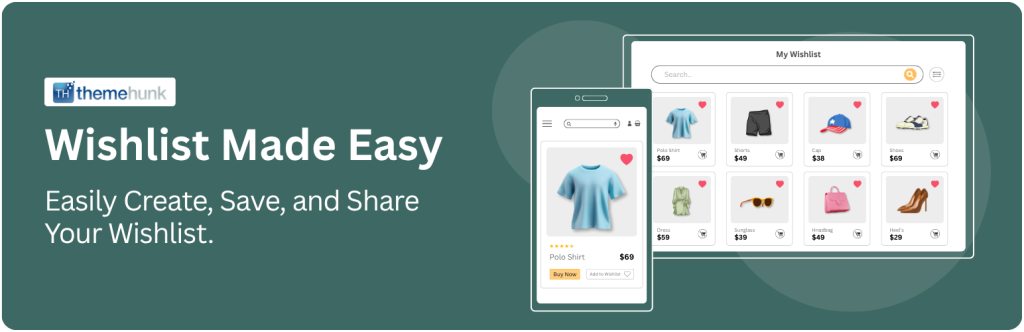
TH Wishlist plugin for WooCommerce is a clean, lightweight, and highly efficient option for eCommerce store owners.
It enables customers to save products for later with just one click, without adding unnecessary bulk to your website.
It works seamlessly with all WooCommerce themes and provides extensive customization options, allowing store owners to adjust button positions, styles, texts, and wishlist table columns through a drag-and-drop interface without coding.
Shoppers can create wishlists whether logged in or browsing as guests, and easily share them with friends or on social media, helping stores gain more visibility.
Key Features
- Customization: TH Wishlist offers full customization, allowing you to change the button’s style, color schemes, and text, with flexible placement options or shortcode support for product and shop pages.
- Guest and Logged-in User Support: The plugin supports both registered customers and guest users, allowing everyone to create and manage wishlists.
- Drag-and-Drop Wishlist Table Management: A standout feature is the ability to reorder the columns in the wishlist table using a simple drag-and-drop interface, giving you full control over the layout.
- Social Sharing: Built-in social sharing options for Facebook, Twitter, and email make it easy for customers to share their wishlists with their network.
- Customer Insights: Store administrators can view public wishlists created by customers, offering valuable data on the most popular and desired products to refine marketing campaigns and optimize inventory planning effectively.
- Lightweight and Performance-Optimized: Built to be lightweight and fast, the plugin runs smoothly without affecting your website’s speed or performance.
Pricing: Free version available; premium costs $39/year. – Get it now.
Overall, the ThemeHunk Wishlist plugin offers WooCommerce store owners a simple, effective, and free solution.
With a quick setup in just two minutes, it delivers a fully functional wishlist instantly. Here are the steps to get started:
Quick Setup
- Go to your WordPress Dashboard > Plugins > Add New > TH Wishlist and Activate.
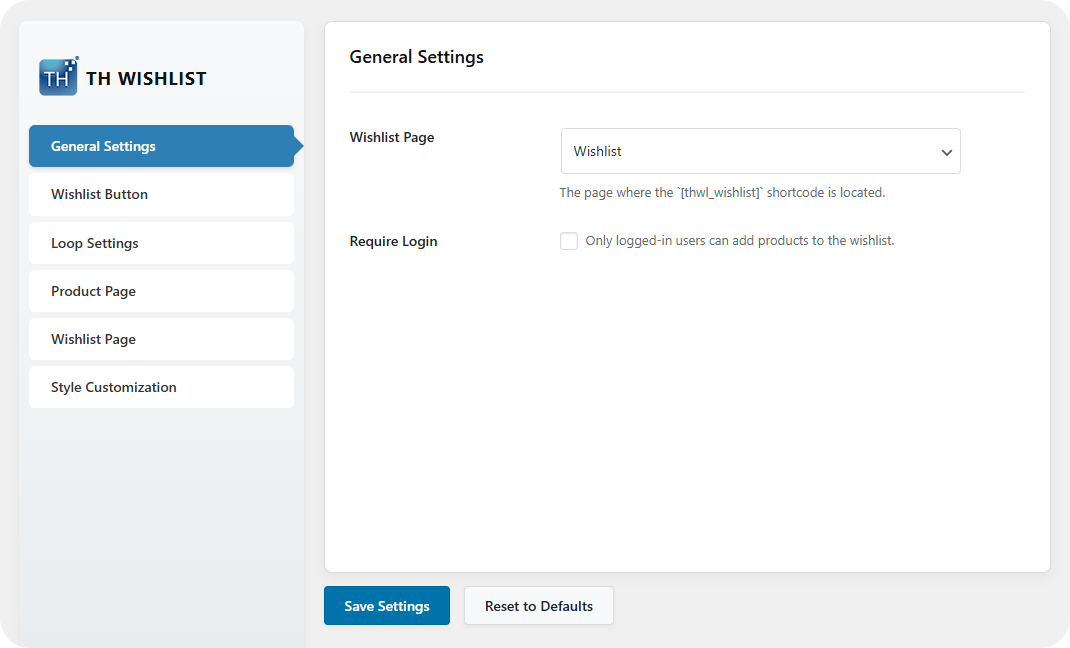
- Go to TH Wishist and pick your Wishlist Page under General settings.
- Select your wishlist button style and text under Wishlist Button.

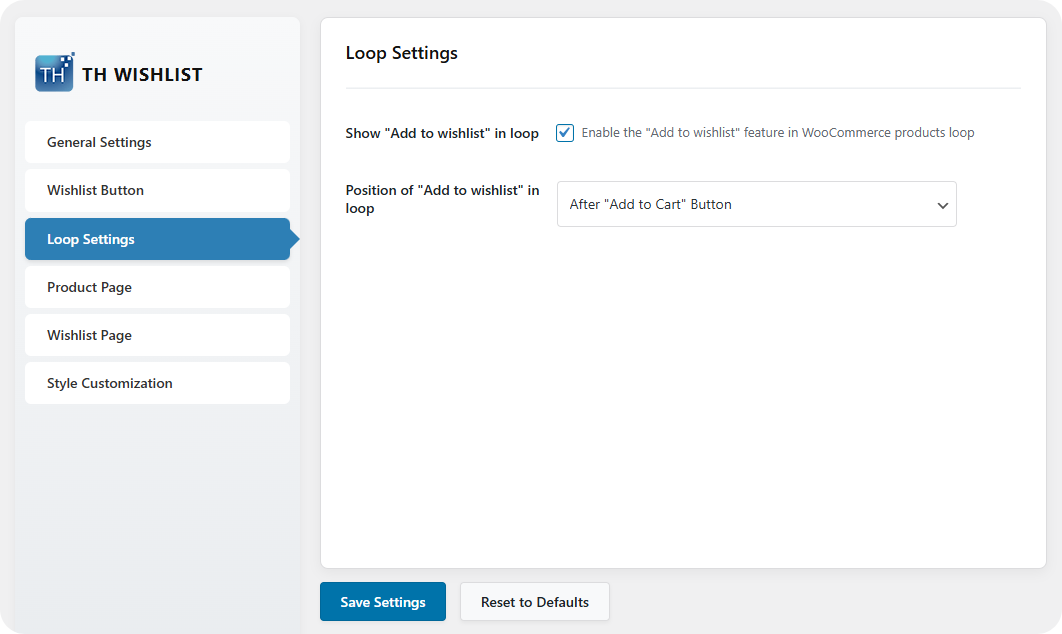
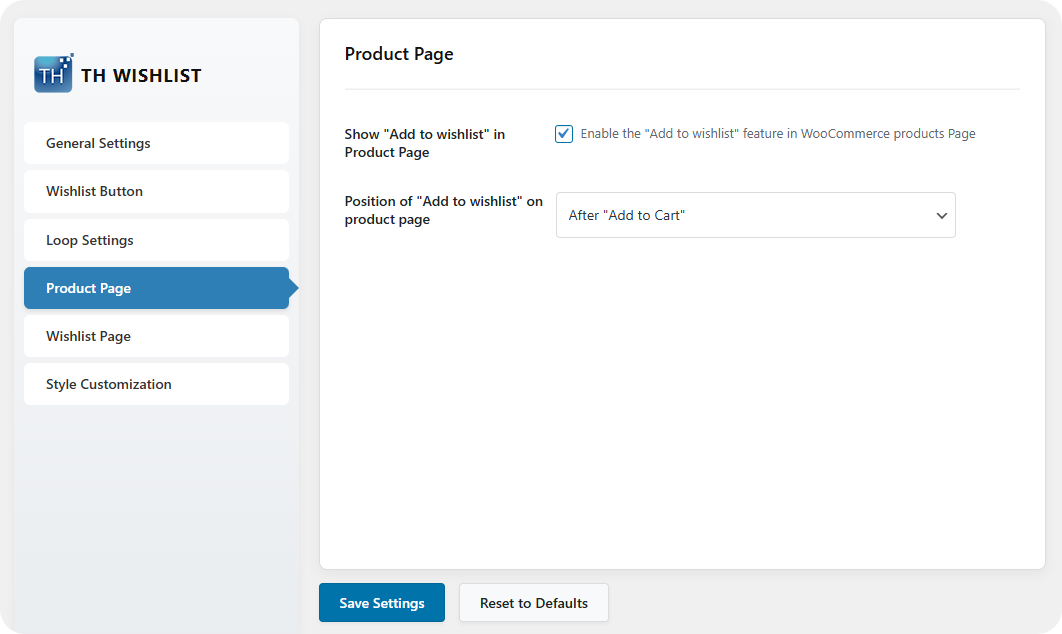
- Enable the button in Loop and Product Page settings- choose your preferred positions.
- Open Wishlist Page settings to enable social sharing, modify table columns, and (if desired) activate redirect to cart.

- Now open Style Customization to adjust styles such as color or hover effects.

YITH WooCommerce Wishlist

YITH WooCommerce Wishlist is an excellent plugin, offering a highly customizable Wishlist system with extensive styling options, smooth integrations, and is easy to set up.
It is fully compatible with WooCommerce WordPress themes, offering both free and premium versions, with advanced features in the Pro plan like multiple wishlists, promotional emails, and product availability alerts.
Key Features
- Multiple Wishlists: The premium version allows customers to create multiple, distinct wishlists for different occasions, such as birthdays, holidays, or home renovation projects.
- Advanced Privacy Settings: Customers can set their wishlists to public, private, or shared, giving them granular control over their privacy.
- Email Marketing Integration: The premium version enables you to send automated promotional emails to customers when a product on their wishlist goes on sale or is back in stock.
- Ask for an Estimate: A unique feature that allows customers to request an estimate for the products on their wishlist, which can be useful for custom orders.
- Wishlist Monitoring: The premium version provides store owners with access to customers’ wishlists, offering valuable insights into popular products.
Pricing: Free version available; premium costs $99.99/year.
TI WooCommerce Wishlist

TI WooCommerce Wishlist is a versatile plugin offering essential features plus marketing enhancements.
It provides a smooth user experience and integrates seamlessly with most WooCommerce themes.
This plugin works with major caching plugins, supports multilingual setups, and integrates easily with WooCommerce extensions.
Key Features
- Optimized for Performance: The plugin is coded to be efficient, adding minimal load to your server to keep your store running fast.
- Multi-Wishlist Functionality: The premium version allows users to create an unlimited number of wishlists and move products between them.
- Promotional Emails: A key premium feature is the ability to send automated emails for price drops, back-in-stock alerts, and even “wishlist reminder” campaigns.
- Advanced Analytics: Get detailed reports on popular products, user engagement, and the revenue generated from wishlist-driven purchases.
- “Follow” Wishlist: Users can follow public wishlists, which is a great feature for social engagement and gift registries.
Pricing: Free; premium version from $79/year.
WPC Smart Wishlist

WPC Smart Wishlist plugin for WooCommerce features an Ajax-based system for fast loading and an enhanced user experience.
It’s a great choice for store owners who want to add wishlist functionality without unnecessary complexity.
It is designed for seamless integration with WooCommerce, enhancing the shopping experience and customer engagement
Key Features
- AJAX-Powered: This WooCommerce wishlist plugin uses AJAX for all frontend events, ensuring a smooth and fast user experience without page reloads.
- Customizable Button and Popup: You can customize the “Add to Wishlist” button text, icon, and the wishlist popup to match your store’s design.
- Guest Wishlist Support: Allows guest users to create wishlists, which are stored in their browser’s cookies for a set period.
- Premium Features: The pro version unlocks advanced options, including creating multiple wishlists, receiving email alerts, and smoothly transferring items between wishlists and the cart.
Pricing: Free version available; premium starts at $29/year.
MoreConvert Wishlist for WooCommerce
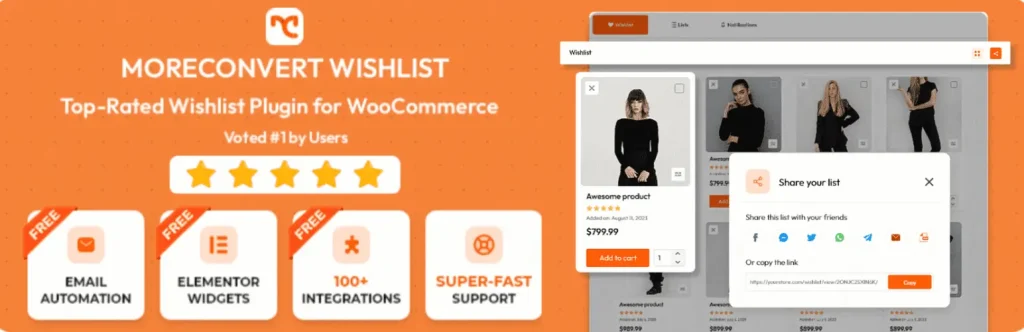
MoreConvert wishlist for WooCommerce is a modern and feature-rich plugin that aims to be more than just a wishlist.
This WooCommerce wishlist plugin positions itself as a marketing toolkit, with a strong focus on converting wishlist users into customers.
Key Features
- Advanced Marketing: The premium version includes features like abandoned cart recovery, back-in-stock notifications, price drop alerts, and email automation.
- Smart Coupons: You can create and send smart coupons to users based on their wishlist activity to incentivize purchases.
- Detailed Analytics: The plugin provides in-depth analytics on users, lists, and products, giving you valuable insights to inform your marketing strategies.
- Elementor Integration: Seamlessly integrates with the Elementor page builder, allowing you to customize your wishlist pages with ease.
Pricing: Free version available; premium starts at $89/year.
WishlistSuite

WishSuite is a free wishlist plugin for WooCommerce that allows you to place wishlist functionality anywhere via shortcodes or widgets.
It integrates deeply with WooCommerce, offering a lightweight solution that enhances engagement and increases conversions without slowing your store.
Key Features
- Easy Setup: WishSuite offers a hassle-free setup, letting you launch your wishlist system within minutes.
- Customizable Wishlist Table: You can easily show or hide different columns in the wishlist table on the dedicated wishlist page.
- Social Sharing: Comes with built-in social sharing buttons for popular platforms to encourage organic marketing.
- Flexible Button Placement: Display the “Add to Wishlist” button on the product page or the shop/category pages.
Pricing: Free to use.
Premmerce Wishlist for WooCommerce

Premmerce Wishlist plugin for WooCommerce is a user-friendly tool that allows customers to save and organize their favorite products.
For store owners, it delivers insights into customer preferences, helping create personalized promotions and special offers.
Key Features
- Shareable URLs: The core feature is the ability for customers to share their wishlist via a unique URL. Anyone with the link can then view the wishlist.
- Widget and Shortcode Support: Easily display wishlists in your site’s sidebar using a widget or anywhere else with a shortcode.
- Review Wishlists in Dashboard: Easily monitor and manage customer wishlists, track popular products, and use insights for targeted promotions.
Pricing: Free to use; no premium version.
QODE Wishlist for WooCommerce

QODE Wishlist plugin for WooCommerce is a versatile and customizable option available in both free and premium versions, created to improve user engagement and conversions.
It gives store owners a stylish and reliable way to add wishlist functionality, enabling customers to save, organize, and share their favorite products with ease.
Key Features
- One-Click Add to Wishlist: This WooCommerce wishlist plugin offers a simple, intuitive button for customers to save products.
- Modern Design: Clean, minimal interface that integrates well with QODE and other premium themes.
- Multi-Wishlist Support: Users can create multiple wishlists, with adjustable visibility settings: public, private, or link-only.
- Marketing Enhancements: Set up automatic email campaigns for sales, back in stock, and special offers, plus easily add “Ask for Estimate” forms.
Pricing: Free version available; premium starts at $89/year.
Wishlist for WooCommerce: Multi Wishlists Per Customer

Wishlist for WooCommerce plugin by WPFactory gives shoppers greater flexibility than a standard “save for later” list.
Rather than storing all favorites in one place, customers can create and organize multiple wishlists.
This feature is perfect for those shopping for different occasions, planning separate purchases, or sharing curated collections with family and friends.
Key Features
- Multiple Wishlists in Free Version: Users can create, rename, and delete multiple wishlists without needing a premium upgrade.
- Shareable Wishlist: Customers can share lists through email, links, or social platforms.
- Customizable Design: You can customize colors, icons, and button styles to match your theme.
- Privacy Control: Users can set their wishlists to be public, shared, or private.
Pricing: Free version available; premium costs $49.99/year.
FAQ
Q: What is Wishlist in WooCommerce?
Ans: A wishlist is a feature that allows customers to save products they like without adding them to the cart. It works as a personal shopping list, helping shoppers revisit items later, share them with others, or complete their purchase when the time is right.
Q: Are WooCommerce wishlist plugins free?
Ans: Yes, all plugins in this list are free to use. For example, the TH Wishlist is an excellent option, offering full customization and all essential features.
Q: Do WooCommerce wishlist plugins work for guests?
Ans: Yes, many wishlist plugins (including TH Wishlist and WPC Wishlist) let guest users create temporary wishlists for a limited time, making it an effective way to engage potential customers.
Q: Do WooCommerce wishlist plugins slow down my site?
Ans: No, most wishlist plugins are built with performance in mind. Lightweight options like TH Wishlist have minimal impact on site speed, while advanced plugins with more features may require proper caching and optimization.
Final Thought
A wishlist plugin for WooCommerce is a must-have for any store, enhancing customer experience while giving insights into shopper preferences. The right plugin helps boost engagement, lower cart abandonment, and increase sales.
From simple free plugins like TH Wishist to advanced premium options, each plugin offers unique strengths. Choose the one that best fits your needs and start turning customers’ wishes into sales.
Thanks for reading this blog. If you find this article helpful, do share it with your friends. If you have any questions, do not hesitate to comment below. We will help you solve your problem.
We hope this article will help you find the Best Wishlist Plugins for WooCommerce.
Please subscribe to our YouTube Channel. We also upload great content there. Do follow us on Instagram, Facebook, and Twitter.
More Helpful Read –


