
Overview ➣ Classic Themes are the foundation of WordPress’s past, while Block Themes define its future- offering complete design freedom, where every detail can be customized like a work of art.
Block Themes vs Classic Themes: The journey of WordPress started in 2003, and since then, it has become the world’s leading content management system (CMS), now powering over 43% of all websites globally.
Over the years, WordPress has continuously evolved, introducing innovative ways to create and manage websites.
The introduction of Block Themes within the Gutenberg project marks a significant transformation for the platform.
With Full Site Editing (FSE) introduced in WordPress 5.9 and later versions, website design has become more flexible and user-friendly.
This transition from Classic Themes to Block Themes represents a major shift, fueling discussions among developers and users about the future direction of WordPress theme development.
But which one should you choose? This guide will explore Block themes and Classic Themes, highlighting their differences, benefits, and drawbacks to help you make an informed decision.

Block Themes
Block Themes are modern WordPress themes built particularly for Full Site Editing (FSE). Every part of the website, from headers and footers to page templates, is constructed using blocks.
This enables visual, drag-and-drop customization with the Gutenberg block editor, eliminating the need for coding.
Key Features of Block Themes
- Full Site Editing (FSE): Allows users to visually edit all parts of a website using the Gutenberg block editor.
- No Need for Customizers or Widgets: Block Themes replace the traditional theme customizer with the Site Editor.
- Improved Design Flexibility: Users can create and modify templates without coding.
- Global Styles: Allows users to easily change the website’s typography, color combinations, and layouts.
- Modern Approach: Utilizes block patterns and templates for quick and easy page building.
Example of Block Themes
Vayu Blocks

Vayu Blocks is a modern block-based page builder designed for the Gutenberg editor. It enables users to create stunning and highly customizable websites without relying on traditional page builders.
It offers pre-built blocks for headers, footers, testimonials, pricing tables, and more, ensuring an intuitive drag-and-drop experience.
Vayu Blocks provides multiple pre-designed theme templates that you can import in one click. These templates are designed for full-site editing (FSE) and allow complete site customization, from layouts to colors to typography.
The templates are fully responsive and suitable for various websites, including blogs, businesses, and eCommerce stores.
Vayu Blocks simplifies website building with a block-based design and a flexible theme system, ideal for both beginners and developers.
Key Features
- Compatible with Gutenberg block editor
- Pre-build starter theme templates
- Global color and typography
- Drag-and-drop customization
- Lightweight and fast
- WooCommerce-ready
- SEO-friendly
- Mobile-responsive
- One-click demo import
- Dedicated support
More Block Theme Options: Blur, and default WordPress themes like Twenty Twenty-Four and Twenty Twenty-Five.
Classic Themes
Classic Themes follow the traditional WordPress theme structure, relying on PHP templates, the WordPress Customizer, and widgets for site design. These themes have served as the foundation of WordPress for years, providing stability and compatibility with a wide range of plugins and page builders.
Key Features of Classic Themes
- Theme Customizer: Provides options to change site settings, colors, and layouts.
- Supports Page Builders: Works well with Elementor, WPBakery, Divi, and other page builders.
- PHP-Based Templates: Uses template files such as header.php, footer.php, and functions.php.
- Dependence on Widgets and Menus: Uses widgets for sidebars and menus for navigation customization.
- Wide Plugin Compatibility: Supports most WordPress plugins due to its established framework.
Example of Block Themes
Shop Mania
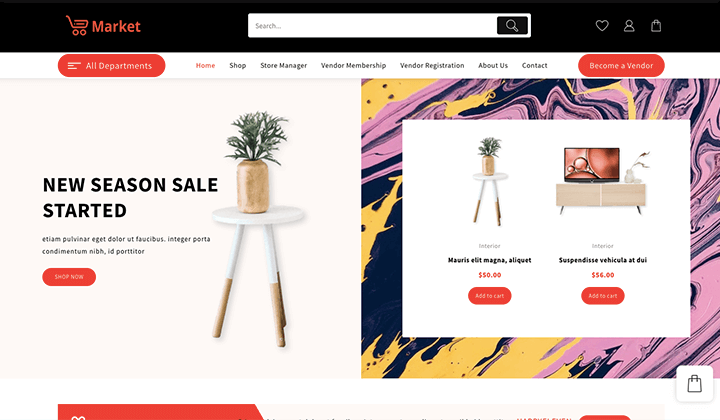
Shop Mania is a feature-rich and highly customizable WordPress theme designed for building professional online store websites.
With a focus on speed and performance, this theme ensures a smooth shopping experience with a user-friendly interface.
The theme seamlessly integrates with popular page builders like Elementor, Brizy, and Gutenberg, enabling effortless drag-and-drop customization.
Shop Mania offers multiple pre-build templates, advanced product filters, a quick view option, variation swatches, product cart styles, an off-canvas sidebar, a floating cart, various checkout page styles, and seamless integration with WooCommerce and All-in-One Woo-Cart plugins.
Whether you launch a fashion, electronics, grocery, or any eCommerce website, Shop Mania provides all the essential tools for creating a stunning and conversion-focused online store effortlessly.
Key Features
- Page Builder compatible
- Pre-designed templates
- WooCommerce optimized
- Easy customization
- Multivendor capability
- Fully responsive
- SEO optimized
- Fast and lightweight
- One-click demo import
- Dedicated support
More Classic Theme Options: Zita, Top Store, Open Shop, Oneline, Gogo, and Bevro.
Key Differences- Block Themes vs Classic Themes
| Feature | Block Themes | Classic Themes |
|---|---|---|
| Template Structure | HTML-based, flexible structure | PHP-based, rigid structure |
| Editing System | Full Site Editing (FSE) | Theme Customizer |
| Customization | Gutenberg Block Editor | Page Builders, Customizer, Widgets |
| Design Flexibility | High, allows template modification | Limited, requires custom coding or page builders |
| Theme Customization | Uses Global Styles and block patterns | Uses theme settings, Customizer, and additional CSS |
| Learning Curve | Difficult for those new to blocks/FSE | Easier for longtime WordPress users |
| Plugin Compatibility | Limited, may conflict with non-block plugins | Works with most plugins and page builders |
| Development Approach | Uses JSON-based global styles and templates | Requires PHP knowledge for developement. |
Pros and Cons of Block Themes
Pro’s ✅
- Modern Design
- Full Site Editing
- Complete design control
- Lightweight and fast
- No coding needed
- Future-proof
Con’s 🚫
- Limited themes options
- Plugin compatibility issue
- Users may take time to adapt
- Less community support
Pros and Cons of Classic Themes
Pro’s ✅
- Wide range of themes and plugins
- Familiar interface
- Strong Page Builder support
- Stable and reliable
- Wast community support
Con’s 🚫
- Limited flexibility
- Users may take time to adapt
- Page Builders and excessive use of plugins may impact performance
- Not future-proof
Which One Is Better: Block Themes or Classic Themes?
The choice between Block themes and Classic themes isn’t about which is ‘better’ but rather which ‘best suits your needs’. Here are some key points that can help you make the right decision.
Choose Block Themes if:
- You want complete control over the website design without coding.
- You prefer a lightweight and fast website.
- You are building a new website and want to make it adaptable for the future.
- You want to take advantage of modern design flexibility and global styles.
Choose Classic Themes if:
- You prefer the traditional WordPress theme development.
- You depend on existing plugins and page builders.
- You need a wide range of themes known for reliability.
- You have a Classic theme site and want to avoid a major redesign.
The Future of WordPress Themes
WordPress is shifting towards block-based design, with Full Site Editing (FSE) becoming the new standard.
While Classic Themes will continue to be supported, they may become less relevant as Block Themes evolve, providing more flexibility and modern design options.
This transition reflects WordPress’s commitment to a more intuitive and block-based experience. Therefore, it is clear that Block themes are the future of WordPress website building.
FAQ
Q: What is the difference between Block themes and Classic themes?
Ans: Block Themes use Full Site Editing (FSE) and the Gutenberg block editor for full visual customization, while Classic Themes depend on PHP templates, the WordPress Customizer, and widgets for site design.
Q: Do Block themes require coding knowledge?
Ans: No there is no need for coding knowledge. Block themes allow users to design and customize their site using the Gutenberg block editor without coding.
Q: Are Classic Themes gradually becoming out of use?
Ans: No, Classic Themes are still widely used and supported, but WordPress is shifting towards Block Themes as the future of website building.
Q: Can I shift from a Classic Theme to a Block Theme?
Ans: Yes, but some adjustments may be needed, especially in layout and design, as the Block theme follows a different structure with full site editing.
Q: Are Block Themes compatible with all plugins?
Ans: It depends. Plugins compatible with the block editor work well with Block Themes on the other hand the older plugins designed for Classic Themes may not work properly.
Q: Do Block Themes improve site speed?
Ans: Block Themes enhance site speed by using lightweight code and modern web standards, resulting in faster loading times and better user experience. However, performance also depends on hosting quality and the number of plugins used.
Q: Will WordPress stop supporting Classic Themes?
Ans: As of now there are no official announcements by WordPress to stop supporting Classic Themes in the near future, but WordPress’s future development will focus on Block Themes and Full Site Editing.
Final Words
Both Block Themes and Classic Themes have their importance. Block Themes represent the future, offering a modern, flexible, and visual customization approach through Full Site Editing.
However, Classic Themes remain a reliable choice for those who prefer the traditional workflow and extensive compatibility with plugins and page builders.
Consider your needs, technical skills, and long-term goals before deciding. As WordPress advances, adopting Block Themes offers a more future-ready and efficient way to build websites.
Thanks for reading this blog. If you find this article helpful, do share it with your friends. If you have any questions, do not hesitate to comment below. We will help you to solve your problem.
We hope this article will help you make a well-informed decision between Block Themes and Classic Themes.
Please subscribe to our YouTube Channel, We also upload great content there. Do Follow us on Instagram, Facebook, and Twitter.
More Helpful Read –


