
Overview ➣ Are you struggling to manage a messy stack of WooCommerce extensions? Packing your site with multiple single-purpose plugins slows down your loading speeds, causes frustrating code conflicts, and drains your budget with endless renewals. Discover how StoreOne replaces your cluttered dashboard with a single, high-performance, all-in-one ecommerce solution.
Managing a WooCommerce store often feels like juggling too many balls at once. You install one plugin for product sliders, another for a quick view feature, and yet another to customize your checkout page. Before you know it, your WordPress dashboard is cluttered, your website slows down, and plugin conflicts start breaking your store.
This not only makes it tough to organize the dashboard, but also increases website load. There is a better way. You can replace that messy stack of single-purpose tools with StoreOne, the ultimate all-in-One WooCommerce solution designed to streamline your site, boost your sales, and save you money.
Why Store One?

Store One is a powerful all-in-one WordPress plugin. It consists of multiple addons that are specifically designed to power your website by focusing on different features.
Instead of forcing you to piece together your ecommerce store’s functionality from dozens of different developers, Store One packs the most essential ecommerce features into a single, cohesive ecosystem.
The Hidden Cost of Using Multiple Woocommerce Plugins
Every time you install a single-purpose WooCommerce plugin, your site carries extra weight. While adding a slider, a quick-view popup, or a badge manager seems harmless, stacking dozens of plugins creates “plugin bloat.”
This clutter leads to code conflicts, heavy database queries, and slow page speeds that directly destroy your conversions and search engine rankings. Let’s see them in detail
- Slower website speed caused by forcing browsers to download multiple separate CSS stylesheets and heavy JavaScript files.
- Frequent plugin conflicts occur when third-party tools from different developers clash and break features.
- More updates to manage every single week, increasing the time you spend on maintenance instead of selling.
- Severe security risks are created by having more plugins open up more entry points and vulnerabilities for hackers.
- Higher yearly costs from accumulating separate subscription fees that quietly drain your ecommerce budget.
- Compatibility issues after WordPress/WooCommerce updates can suddenly crash your entire checkout funnel.
- Complicated site troubleshooting because tracking down a store bug requires deactivating dozens of tools one by one.
- Drains your business budget through a messy web of recurring annual license fees for individual add-ons.
Breakdown Multiple Plugins vs Store One
The analysis contrasts using multiple, disparate plugins with a consolidated solution, noting that the latter eliminates dashboard clutter, recurring costs, and code conflicts while enhancing performance.
Consolidating to a single ecosystem streamlines the backend and ensures, as summarized in the table, that a unified toolkit improves store speed and security while reducing maintenance workload.
| Metric | Multiple Plugin Stack | Store One |
|---|---|---|
| Updates | 10- 15 Update Monthly | Single Update |
| Compaibility | High Risk | Built Together |
| Cost | Multiple License | One Solution |
| Performance | More Scripts | Optimized |
| Dashboard Clutter | Messy Menus | Clean Panel |
| Security Risks | Multiple Vulnerability Points | Secure Ecosystem |
| Troubleshooting | Tedious Individual Testing | Instant Feature Toogles |
| Core Web Vitals | Slow Loading | Fast Site Speed |
Price Comparison: Separate Plugins vs Store One
Consolidating premium ecommerce extensions into a single platform like StoreOne eliminates high, scattered recurring fees, reducing annual software overhead by hundreds of dollars.
This transition offers a predictable, unified license that bundles essential features under a single price point.
| Required Features | Standalone Plugin Cost | Store One Cost |
|---|---|---|
| Frequently Bought Together | $49–$79 / year | Included |
| Bundle Product | $49–$69 / year | Included |
| Quick Social Share | $19–$29 / year | Included |
| Trust Badges | $29–$49 / year | Included |
| Product Video Gallery | $39–$69 / year | Included |
| Inactive Tab Message | $19–$39 / year | Included |
| Stock Scarcity | $29–$49 / year | Included |
| Smart Offers | $49–$99 / year | Included |
| Visitor Count | $29–$49 / year | Included |
| Other Features | $99–$199 / year | Included |
| Total Annual Investment | $473 – $893 / year | Start From $49 |
Performance Benefits of One Plugin vs Many
- Fewer database queries: StoreOne loads all configurations via a single call instead of forcing WordPress to query ten different plugin tables simultaneously.
- Reduced CSS/JS files: The entire system utilizes shared stylesheets and scripts rather than loading dozens of individual, competing frontend files.
- Lower server requests: It relieves immediate pressure on your hosting plan and keeps your site responsive during high-traffic sales spikes.
- Better Core Web Vitals scores: This specifically improves Largest Contentful Paint (LCP) and Interaction to Next Paint (INP), to boost your Google SEO rankings.
- Faster mobile performance: By eliminating heavy execution scripts that cause layouts to lag or freeze on mobile cellular networks.
- Eliminated script redundancy: It features sharing the exact same modern code instead of loading multiple versions of the same code.
- Clean database architecture: This prevents “fossilized data tables” from being left behind when trying out different third-party marketing tools.
- Streamlined browser rendering: Since your theme doesn’t have to parse and resolve code conflicts before displaying the page to a visitor.
Getting Started with Store One
Let’s see step by step how you can set up the Store One plugin.
Step 1: Install Store One
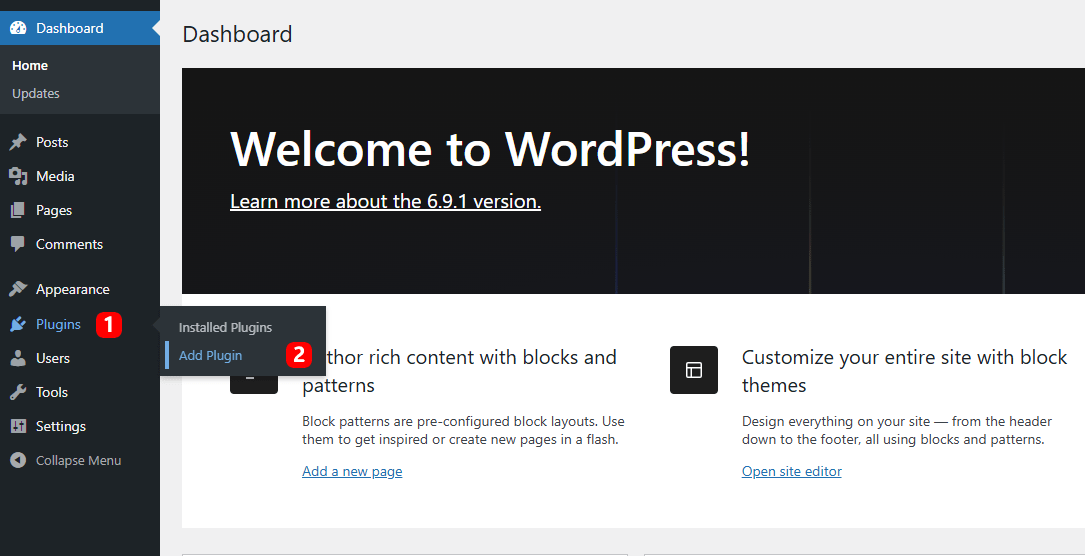
Open your WordPress dashboard, go to Plugins, and click on Add Plugin
Go to the Search Bar in the top right corner and search TH Store One

Install and Activate the Plugin
After the successful activation of the Store One plugin, you will see the Store One menu in your WordPress dashboard. Click on it.

Step 2: Enable required addons
This dashboard would open up. You need to click on the Configure button of the respective addon you want to enable.
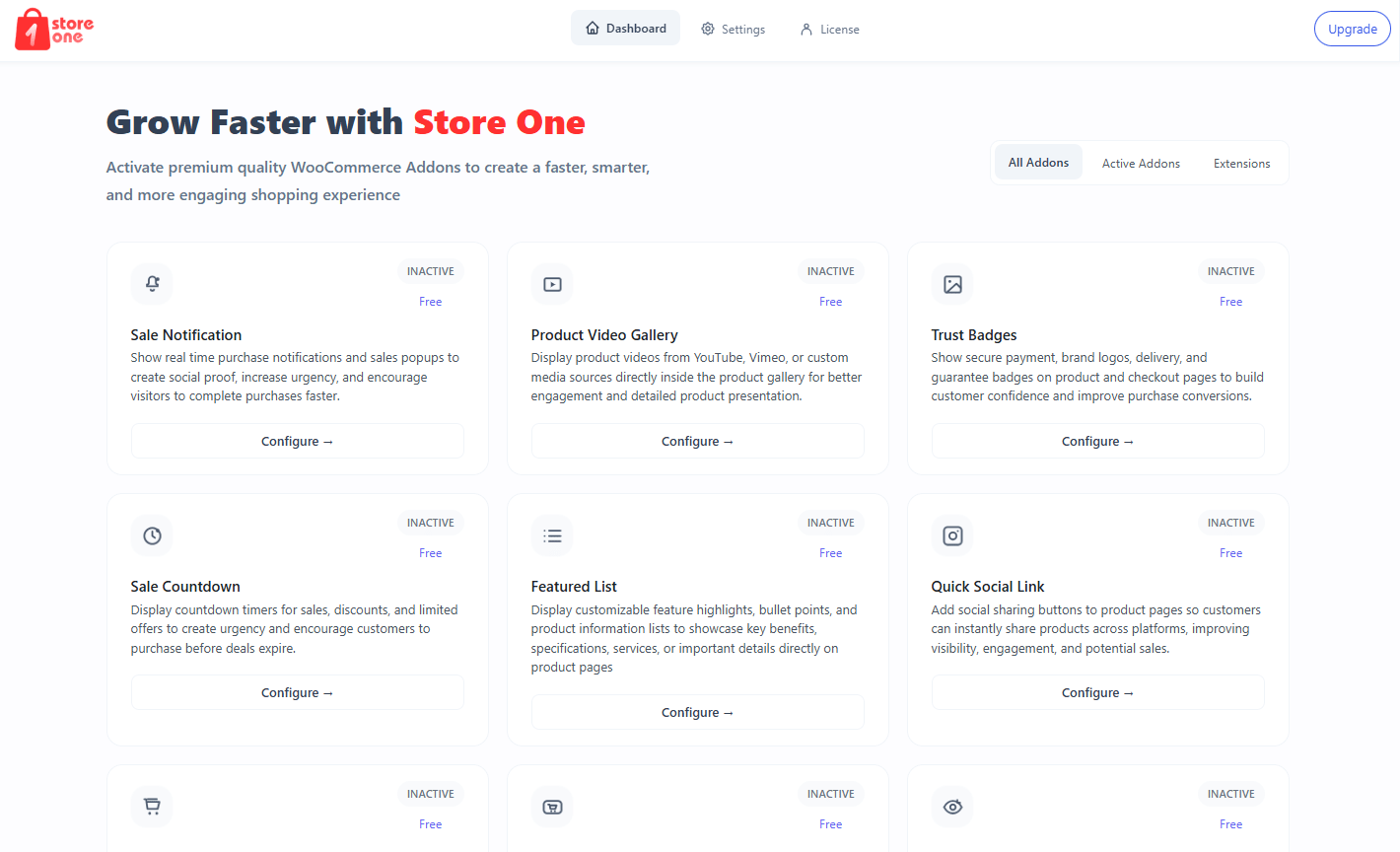
You will see the Enable toggle in every addon.

Step 3: Configure the addon using settings and other options

You can set up the addon using the settings provided. The live preview on the right side helps you monitor every development going on, so you can see what the addon looks like before saving. You don’t have to switch to the live page to preview changes.
Step 4: Test your store
After configuring, save the changes and open a website page.

Before and After Using Store One
Let’s see how the Store One plugin would benefit your store.
- Drastically Reduces Your Active Plugin Count – Instead of dealing with a messy dashboard filled with over 12 standalone tools, Store One replaces them all with one single software plugin. This cleans up your backend workspace and simplifies your entire administration routine.
- Delivers a Much Faster Storefront Checkout Experience – The built-in direct checkout button bypasses long multi-step cart pages to send mobile customers straight to the final payment form. Cutting out these extra steps keeps buyers focused and stops them from walking away before buying.
- Guarantees Total Website and Core Code Stability – Because all marketing and layout addons are built by the exact same development team, they are coded to work together perfectly. You will never have to worry about a sudden plugin update clashing or crashing your storefront.
- Slashes Your Monthly and Annual Software Bills – Switching to an all-in-one license eliminates a massive web of scattered individual recurring renewals and hidden upgrade costs. It puts hundreds of dollars back into your marketing budget by handling everything under one price point.
- Cleans Up and Unclutters Your Administrative Dashboard – Instead of jumping between twelve separate configuration tabs in your WordPress sidebar, you get one unified, tidy control panel. You can easily turn individual tools on or off with simple click-and-toggle switches.
- Optimizes Performance for Faster Page Loading Speeds – The lightweight framework removes the heavy, unoptimized code blocks that slow down standard mobile browsing networks. Your product pages snap into view instantly, keeping search engines like Google happy for better SEO results.
- Saves Maintenance Time with Fast Single Updates – You no longer have to spend time testing and running a dozen separate plugin updates every single week. A single click keeps your entire ecommerce store completely secure, updated, and running at peak performance.
- Keeps Your WordPress Database Lightweight and Healthy – It stops broken code snippets and junk data tables from being permanently left behind inside your server files by trial software. This clean structure prevents hidden backend errors and keeps your store operating fast for years to come
What Store One Addons Offers?
StoreOne packages a comprehensive suite of several built-in, conversion-focused tools directly into a single WordPress installation. By turning on these modular extensions, you can instantly upgrade your design layouts, trigger buying urgency, and streamline your customer checkout paths without adding a single line of code.
Here is a comprehensive look at the specific built-in addon StoreOne offers to elevate your online business
Buy Now Button

The Buy Now Button adds an instant purchase option directly to your product pages and shop page. It bypasses the traditional, multi-step cart process, routing shoppers straight to an optimized checkout form.
It is fully responsive, works seamlessly with mobile wallets, and allows you to customize button text to create a completely frictionless, high-conversion purchasing journey.
Why is it needed?
- Halves Checkout Time
- Reduce Cart Abandonment
- Work Seamless in all Devices
- Reduces Site Server Strain
Sale Notification

The Sale Notification generates live, automated sales pop-up windows across your website to showcase recent customer orders in real time. It dynamically pulls exact product titles, buyer details, and item images directly into a highly customizable visual layout.
You can also design custom, dynamic sales pop-up alerts that appear across your store to capture immediate attention. This also facilitates you to configure unique notification rules, display order sequences, slide transitions, and precise time durations to create a continuous stream of convincing social proof for all store visitors.
Why is it needed?
- Build Instant Buyer trust
- Trigger Powerful FOMO (Fear Of Missing Out)
- Increase Visitor Engagement
- Boost Product Discovery
Product Video Gallery

The Product Video Gallery addon upgrades your standard WooCommerce product gallery into an interactive, multi-media slider. It allows you to seamlessly mix traditional product photos with videos from YouTube, Vimeo, or your own WordPress media library directly on a single item listing.
Featuring native support for custom video thumbnails, responsive aspect ratios, and smart autoplay configurations, it gives buyers an immersive, 360-degree view of your inventory.
Why is it needed?
- Derive High Conversion Rate
- Improve SEO
- Improve Product Showcase
- Reduce Product Return Rate
Bundle Product

The Bundle Product addon empowers you to create custom product packages and special item combos directly within your core WooCommerce inventory manager. You can group together matching collections, create tiered volume discount milestones, and let shoppers configure custom attribute selections for individual items inside the package.
The entire workflow operates natively, allowing you to build attractive bulk-buy deals that load perfectly across all device viewports.
Why is it needed?
- Skyrockets Average Order Value
- Boosts Marketing Conversion Rates
- Moves Slow Stock
- Updates Inventory Automatically
View Bundle Product Live Demo
Product Feature List

The Product Feature List allows you to break down complicated product descriptions into beautifully organized, structured bulleted lists right next to your product images.
Instead of forcing customers to read through heavy walls of text, you can highlight technical specifications, material details, and unique selling points using clean icons and customizable typography that perfectly match your store’s branding layout.
Why is it needed?
- Improves Page Scanability
- Maintain Design Consistency
- Highlight Premium Features
- Accelerates Mobile Buying Choices
Quick Social Share

The Quick Social Share addon integrates lightweight, highly responsive social sharing icons directly onto your product pages. It enables shoppers to instantly broadcast their favorite finds to popular platforms like WhatsApp, Facebook, Pinterest, and X with a single tap.
The addon features complete visual customization, allowing you to adjust button placements, sizes, and styles without adding heavy third-party scripts.
Why is it needed?
- Generates Organic Traffic
- Triggers Rapid Discovery
- Complements Your Aesthetic layout
- CEnsure Smooth Mobile Interaction
Trust Badges

This Trust Badges addon allows you to display recognized security symbols, checkout guarantees, and payment method icons right next to your purchase buttons.
It eliminates the need for graphic design skills, letting you select from a pre-built icon library or upload custom security shields to reassure hesitant shoppers directly during decision-making moments.
Why is it needed?
- Reduces User Checkout Hesitation
- Saves Secondary badge Plugin Costs
- Offers Precise Frontend Placement Controls
- Improves Long-term Site Trust Metrics
Frequently Bought Together

The Frequently Bought Together addon automatically displays complementary product recommendations right on your single product pages, perfectly mimicking Amazon’s highly successful upselling framework.
It allows you to create targeted product bundles, giving customers a frictionless way to add multiple items to their cart with a single click.
Why is it needed?
- Skyrocket Your Average Order Value
- Trigger Rapid Consumer Impulse Purchases
- Eliminate Premium Standalone Cross-Selling Tools
- Enhance User Navigation Between Related Items
Sticky Cart Bar

Sticky Cart Bar ensures your purchase buttons stay permanently accessible by pinning a responsive add-to-cart bar to the top or bottom of the screen as users scroll down your pages.
It displays the product’s required components like name and price, keeping your mobile layouts highly actionable and entirely focused on conversion.
Why is it needed?
- Keep Buying Options Visible Continuously
- Optimize Your Mobile Shopping Funnel
- Reduce Friction In User Buying Journeys
- Lower Page Bounce And Exit Rates
Inactive Tab Message

The Inactive Tab Message addon detects when a visitor switches away from your store to another browser tab and automatically flashes a custom, attention-grabbing title message.
It acts as an instant psychological trigger to lure distracted shoppers back to their open shopping carts before they forget about your website entirely.
Why is it needed?
- Recover Distracted Shoppers Instantly
- Re-Engage Users For Free Without Ads
- Allow Complete Message Customization
- Work Silently Without Server Resource Strain
Stock Scarcity

Stock Scarcity addon embeds an automated, highly visible progress bar directly on your product pages to showcase real-time dwindling inventory levels.
Along with pulling your live product quantities, it gives you the flexibility to display smart dummy inventory levels to strategically build momentum, transforming standard data into a clear visual alert that prompts hesitant browsers to complete their checkout before items sell out.
Why is it needed?
- Ensure Absolute Theme Design Harmony
- Improve Low-Stock Text Customization Options
- Helps Clear Out Warehouse Stock Uniformly
- Trigger Rapid Consumer Impulse Purchases
Sale Countdown
Sale Countdown addon embeds real-time ticking promotional clocks directly onto your single product listings and archive pages to highlight limited-time discount windows. It communicates precise deadlines for active price drops, encouraging shoppers to capitalize on deals immediately.
The system integrates smoothly with global WooCommerce scheduling fields, allowing store owners to deploy fully automated, hands-off promotional campaigns.
Why is it needed?
- Drive Instant Conversions Before Deadlines Expire
- Automate Campaign Start And End Times
- Customize Visual Clock Layout Styles Effortlessly
- Replace Resource-Heavy Third-Party Script Plugin
Recently Viewed

Recently Viewed addon inserts a dynamic history carousel at the bottom of your store pages, automatically tracking every item an individual visitor inspects.
It gives you advanced catalog filtering controls to choose exactly how to display products, whether by last viewed order, a completely random mix, alphabetical title, or the date modified, building a highly personalized path for users.
Why is it needed?
- Simplify Internal Retail Website Navigation
- Remind Buyers Of Original Shopping Intentions
- Maximize Long-Tail Catalog Exposure Metrics
- Streamline Side-By-Side Product Evaluation Experiences
Smart Offers

The Smart Offers addon allows you to deploy strategic pop-ups at key interactive decision points throughout the consumer journey.
It empowers store owners to build highly dynamic promotions like “Buy X Get X” or tiered discounts, while giving you code-free control over custom banner text and notification messages.
Why is it needed?
- Maximize Average Transaction Value Benchmarks
- Configure Intelligent Cart Target Triggers Easily
- Deploy Tailored Post-Purchase Promotional Funnels
- Replace Bulky Standalone Marketing Popup Plugins
Visitor Count

Visitor Count addon tracks real-time traffic activity and displays live viewer counts directly on your WooCommerce product pages.
Along with capturing actual live traffic data, it gives you the flexibility to configure controlled fake visitor counts to maintain consistent social validation, minimizing customer buying hesitation by demonstrating high demand across your catalog.
Why is it needed?
- Establish Immediate Store Credibility And Authority
- Validate Product Desirability Through Social Proof
- Configure Custom Minimum and Maximum Traffic Thresholds
- Build Natural Urgency Without Using Fake Popups
Badge Management

The Badge Management addon replaces rigid default layouts with a powerful system to design, automate, and display custom labels like “Hot,” “Sale,” “New,” or specific discount percentages directly onto your product thumbnails.
It provides absolute control over badge text, positions, background colors, and CSS styling across your entire catalog, allowing you to highlight special stock lines without writing code.
Why is it needed?
- Establish Direct Visual Hierarchy Across Catalog Archives
- Highlight Seasonal Promotions Or Clearing Stock Instantly
- Ensure Smooth Graphic Rendering On Mobile Devices
- Configure Custom Rules Based On Inventory Categories
Pre Order

The Pre Order addon enables you to sell upcoming items, seasonal releases, or out-of-stock products before they physically arrive in your warehouse.
It seamlessly replaces the standard “Add to Cart” text with a custom “Pre-Order” button, lets you set exact automatic release dates, and allows you to offer special early-bird pricing to incentivize early commitments.
Why is it needed?
- Secure Early Revenue Before Inventory Arrives Physically
- Gauge Market Demand For New Product Launches Accurately
- Automate Availability Switches Based On Specific Calendar Dates
- Replace Costly Standalone Pre-Order eCommerce Plugin
FAQ
Q. Can I use Store One alongside other WooCommerce plugins
Ans. Yes, the Store One plugin is successfully tested along with other Woocommerce plugins and causes no issues. The website runs smoothly.
Q. What happens if I turn on all features at once?
Ans. Without any issue, you can use all the addons at once. As the plugin is lightweight, you will not face any issues.
Q. Is it easy to use for someone who doesn’t know how to code?
Ans. Yes, not even a single line of code is required to use this plugin. Any non-technical user can easily use this plugin and its add-ons.
Q. Does one license cover all of these features?
Ans. Yes, all these addons come under one plugin, and only one license is needed to keep the pro addon working. Although you can use the free addons without a license.
Q. Can I turn off addons I don’t need?
Ans. Yes, you can turn off or disable the addons that are not needed. You are not bound to keep every addon on.
Q. Will Store One conflict with my existing theme?
Can I use Store One alongside other WooCommerce plugins. The Store One plugin is compatible with almost every major WordPress theme. So you will not face any issue regarding compatibility.
Results & Benefits of Using Store One Plugin
Making the switch to an all-in-one solution completely transforms how your store operates behind the scenes and how your customers shop. By running your business on a single, coordinated system, you will see immediate improvements in site speed, dashboard management, and sales figures.
Here are the real-world results and benefits you will experience after activating StoreOne
- Instant Speed and Performance Boost
- Faster Loading Times: Your pages snap into view instantly because your server loads one clean piece of software instead of loading files from 12 different plugins.
- Better Search Rankings: Lightweight code directly improves your site’s Google Core Web Vitals, pushing your shop higher up in organic search results.
- Smooth Mobile Browsing: Mobile shoppers will enjoy zero screen lag and fast image gallery loads, even when browsing on slower cellular connections.
- Maximum Financial Savings
- Zero Hidden Fees: You pay for one budget-friendly license instead of keeping track of dozens of separate monthly or annual premium bills.
- No Developer Hassles: Because the tools never clash with each other, you won’t need to hire expensive web developers to fix sudden site bugs or broken code.
- More Marketing Budget: Putting hundreds of dollars back into your pocket gives you extra cash to spend on social media ads and getting traffic to your store.
- Stress-Free Store Management
- One Clean Control Panel: Your WordPress sidebar stays completely clean, letting you manage your countdown timers, badges, and bundles from one single menu.
- One-Click Updates: You can update your entire conversion toolkit safely with a single click, completely removing the fear of crashing your live checkout funnel.
- Instant Toggle Switches: If you don’t want to use a specific feature, you can turn it off instantly without leaving behind ghost tables or junk data inside your database.
- Higher Customer Conversion Rates
- Fewer Abandoned Carts: Fast direct-checkout tools let impatient buyers skip the cart page entirely and check out in under ten seconds.
- Higher Average Order Value: Built-in Amazon-style bundles and product pairing grids naturally convince shoppers to add multiple related items to their orders.
- Instant Trust and Credibility: Clean security badges and live visitor notifications work together seamlessly to ease buyer anxiety right before they hit the purchase button
Conclusion
Managing a WordPress woocommerce store doesn’t mean fighting with a dozen different plugins for separate functionalities. Stacking multiple plugins fills your WordPress dashboard with clutter, slows down your page loading speeds, and drains your business budget with endless annual software renewals.
Store One has taken the major required features under one plugin. By replacing that messy stack of single-purpose tools with StoreOne, you get a clean, lightweight, and unified alternative.
It is time to clean up your backend, speed up your site, and protect your profit margins with an all-in-one plugin, viz Store One.
If you find it helpful, you can subscribe to our YouTube Channel, where we also upload great content, and follow us on Facebook and Twitter.
Explore More


