
Have you ever seen event ticketing websites? The main motive behind these sites is to show detailed information about the event and sell event tickets.
But do you know, how to build an event ticket website? Let me tell you, for such type of ticketing or event websites WordPress plugin is used.
From a small event to a concert, people use websites to sell event tickets. This is because it is now very easy to create a website and make the registration and ticket distribution simple.
Ticketing websites play a crucial role in the modern entertainment landscape by providing a convenient platform for consumers to purchase tickets for events such as concerts, sports games, and theatre productions.
They enhance accessibility by offering real-time availability, a variety of payment options, and user-friendly interfaces, making the ticket-buying process seamless.
Additionally, these platforms often provide valuable information such as event details, seating charts, and reviews, which help consumers make informed decisions.
In this blog, we have an event ticketing website, and with the help of necessary plugins, we will see the use of woocommerce to sell event tickets.
Use Of WordPress To Sell Event Tickets
WordPress is used not only to create e-commerce and other websites but it is used to create any type of website including Ticketing sites.
WordPress is a popular choice for ticketing websites due to its flexibility, user-friendly interface, and a wide range of plugins specifically designed for event management and ticket sales.
These tools allow website owners to easily create and manage events, sell tickets, handle payments, and provide a seamless user experience, making it suitable for businesses ranging from small local events to large festivals and concerts.
In the event ticket websites, woocommerce assists in the same way, the only difference is that there are tickets instead of products.
How To Use WordPress To Sell Event Tickets?
So in this blog, we need two plugins that are Tickera and Woocommerce, so, Install and activate both plugins.
Step 1) Open your Dashboard

Log in to your WordPress site and open your dashboard.
Step 2) Navigate to Plugins and click on Add New Plugin
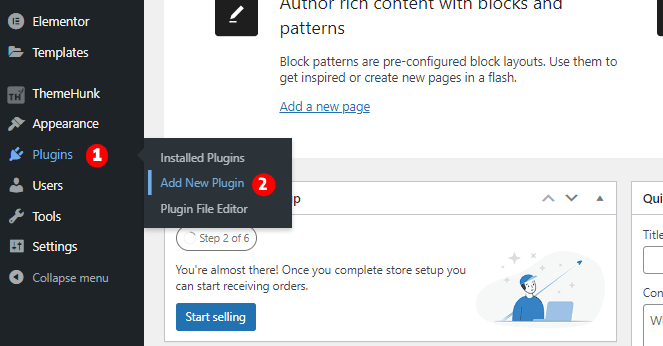
Hover your cursor on Plugins and click on Add New Plugin.
Step 3) Go to the Search Bar and search for Tickera

Search for the Tickera plugin and click on Install Now. After installation, click on Activate.
After activating the Tickera, you can see it in Menu. Click on it.

When the Tickera plugin is activated, set it up and finish all necessary steps.
Step 2) Click on Create new event

Now we have to create an event.
Step ) Fill in all the required details and click on Publish

Here you need to fill in all the asked details about the event. You can fill in the dates and upload the logos of the event and sponsors.
Step ) Click on Create Ticket Types

Go to Tickera options and click on Ticket Types.
Step ) Click on Create New Ticket Type

On the top left side, you find the button to create a new ticket type, click on it to proceed.
Step ) Fill In all the details regarding the Ticket Type

In these boxes, give the details asked about and the Ticket Type.

Here select the Event Type in the Event box and then click on Publish.
This is how it looks after all.

You can also see the Cart button following the Price Type.
When you click on the Add To Cart button, the ticket type is added to the Cart.

Users need to fill in the information of the Buyer and Attendee here. Moreover, if the user has a Coupon Code, then it can also be applied.
This is the Checkout Page

But wait, if you need a premade website without doing anything, then you just need to install Shop Mania Pro to your dashboard and import the Event Ticketing Website template.

WordPress Event Ticketing template comes with all the necessary pages and various layouts that you can opt to customize the site. It is compatible with elementor, which allows customization with its drag-and-drop builder.
FAQ
Q. Where are ticket websites used?
Ans. Ticket Websites are used to make registration portals and distribute tickets online. It is mostly built for concerts, events, etc.
Q. What is needed for a ticketing website?
Ans. For the ticketing websites, a ticket plugin and a theme that supports the plugin are needed.
FAQ
So we learned how we can use WordPress to sell tickets. We saw every step involved in creating the website and also saw a short method where one only needs to import a template and the site will be ready.
But to sell something online, woocommerce is needed too. We installed the Woocommerce plugin.
There are so many WordPress plugins to create a website and we used Tickera as it provides all the features that we need. Tickera is free and easy to use.
I hope this blog will help you. Still, if you have any queries or suggestions then let me know in the comment section.
You can Subscribe to our YouTube Channel, we also upload great content there, also Do Follow us on Facebook and Twitter.
Discover More Articles


