
Overview ➣ In B2B WooCommerce, buyers need clarity on bulk pricing, specifications, and value before making decisions. A product comparison feature makes this easier by showing products side by side, saving time and reducing confusion. For sellers, it builds trust, boosts conversions, and creates a strong competitive edge.
The way B2B eCommerce works has changed a lot in recent years. In the past, companies used catalogs, phone calls, or long email chains to place bulk orders. But now, buyers want the same smooth, quick, and easy online shopping experience they get on B2C websites.
For building such an online store, WooCommerce is one of the best choices. It gives businesses everything they need: secure bulk order management, special pricing options, and features designed for B2B WooCommerce stores.
However, B2B customers shop differently from regular shoppers. They usually order in large quantities, spend bigger budgets, and take more risks. That’s why making the right decision matters a lot.
Here, the product comparison feature becomes a must-have. It helps buyers quickly compare multiple products, check key details, and confidently choose the best option.
For any B2B WooCommerce store, product comparison is not just useful; it’s essential.
Why Product Comparison Is a Must-Have Feature
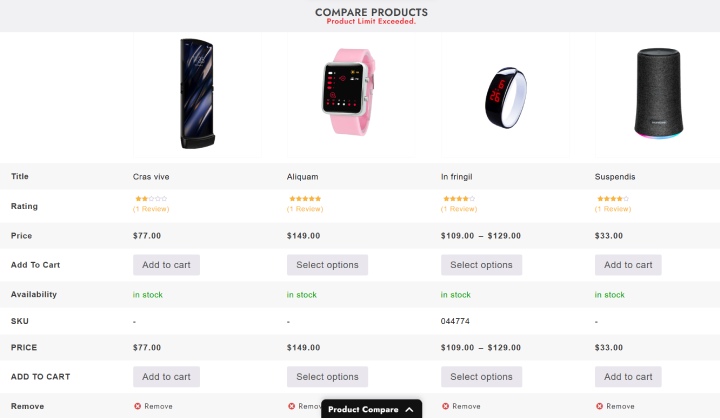
Product comparison tools allow customers to make a side-by-side evaluation of products.
Perhaps more important in a B2B site, where decisions are made even on larger orders, it is helpful when you allow the customer to evaluate products side by side.
Here is why:
1. Simplifies Complex Decisions
B2B products are often complex, with technical details, bulk discounts, and specifications that may confuse buyers. A product comparison feature brings all relevant information together in one table, so buyers can easily spot differences and make quick decisions.
Example: A company purchasing industrial printers can compare speed, ink capacity, maintenance cost, and price in one view without opening multiple product pages.
2. Builds Trust and Transparency
Transparency is the cornerstone of B2B relationships. By enabling buyers to compare products directly on your website, you show that you have nothing to hide.
Instead of making customers dig for details or request quotes, you empower them with information. This builds trust, improves your reputation, and increases the chances of repeat business.
3. Saves Time for Buyers
In B2B, time is money. Buyers don’t have hours to research every product. Product comparison cuts down research time significantly by putting all the data in one place.
Example: A retailer comparing wholesale mobile accessories can check prices, warranty, and shipping policies in minutes, instead of hours.
4. Reduces Decision Fatigue
When faced with too many options, buyers often feel overwhelmed. A comparison tool eliminates confusion by presenting clear differences, reducing decision fatigue, and increasing the chances of conversion.
5. Gives You a Competitive Advantage
Not all B2B WooCommerce stores offer product comparison. If you do, you’re already ahead of many competitors. Buyers prefer stores that make their purchasing journey smoother.
This means fewer abandoned carts, higher order values, and stronger brand loyalty.
6. Increases Conversions and Sales
When buyers can clearly see the value of your products, they are more likely to complete purchases. Comparison tables highlight not just price, but also the unique selling points (USPs) of your products, helping you win more sales.
7. Helps Upsell and Cross-Sell
Product comparison isn’t just for buyers: it’s a powerful tool for sellers. By displaying alternatives side by side, you can encourage buyers to consider higher-value products with better features.
Example: A buyer may initially compare budget laptops but end up choosing a slightly more expensive model that offers longer battery life and warranty, thanks to the comparison chart.
Real-World Examples of Product Comparison in B2B
Let’s see some real-world examples of product comparison in use:
Construction:
Contractors are comparing cement brands based on compressive strength, delivery time, and volume discount deals.
Healthcare:
Hospitals are comparing physiological monitors by battery length, supported sensors, warranty, and technical support.
Automotive:
Dealerships are comparing components such as brake pads or car batteries based on durability, warranty, and wholesale price.
Office Supplies:
Companies are comparing bulk orders of printers, copiers, paper, and furniture based on price, functionality, and delivery terms.
Food:
Restaurants are comparing oil or rice suppliers based on quality certifications, pricing, and delivery times.
In all these examples, product comparison serves to shorten the buying cycle and build user confidence in the buying decision.
B2B Buyer: Benefits of Product Comparison
Product comparison is a game-changer for B2B WooCommerce stores. It not only helps buyers save time and make better decisions but also supports sellers by boosting sales, building trust, and standing out from competitors.
- Saves valuable research time.
- Provides clarity and eliminates confusion.
- Ensures better decision-making with side-by-side data.
- Builds trust in suppliers.
- Reduces the risk of wrong purchases.
B2B Sellers: Benefits of Product Comparison
For B2B sellers, product comparison is more than just a feature: it’s a sales booster. It reduces buyer hesitation, increases conversions, and fosters trust, giving your store a strong edge over competitors.
- Reduces buyer hesitation, resulting in a faster checkout process.
- Increases sales and conversion rates.
- Enhances customer trust and satisfaction.
- Encourages upselling of premium products.
- Differentiates you from competitors.
Best Plugins for Product Comparison in WooCommerce
Here are some recommended plugins:
- TH Product Compare (by ThemeHunk) – Lightweight, simple, and designed for WooCommerce.
- YITH WooCommerce Compare – Popular with customizable comparison tables.
- WooCommerce Products Compare – Built specifically for WooCommerce users.
If you want a fast, user-friendly solution, TH Product Compare is highly recommended.
How to Add Product Compare in WooCommerce
We’ll use the free TH Product Compare plugin with the Shop Mania theme.
Step 1: Go to WordPress Dashboard

Open your WordPress Dashboard.
Step 2: Navigate to plugins and click on Add New Plugin

Go to Plugins in the menu and click Add New to access the WordPress plugins page, where you can install free plugins.
Step 3: Go to the Search box and search TH Product Compare

Go to the Search box and search TH Product Search. Click on Install to install the plugin. You can also download the plugin from here-
Step 4: Activate The Plugin
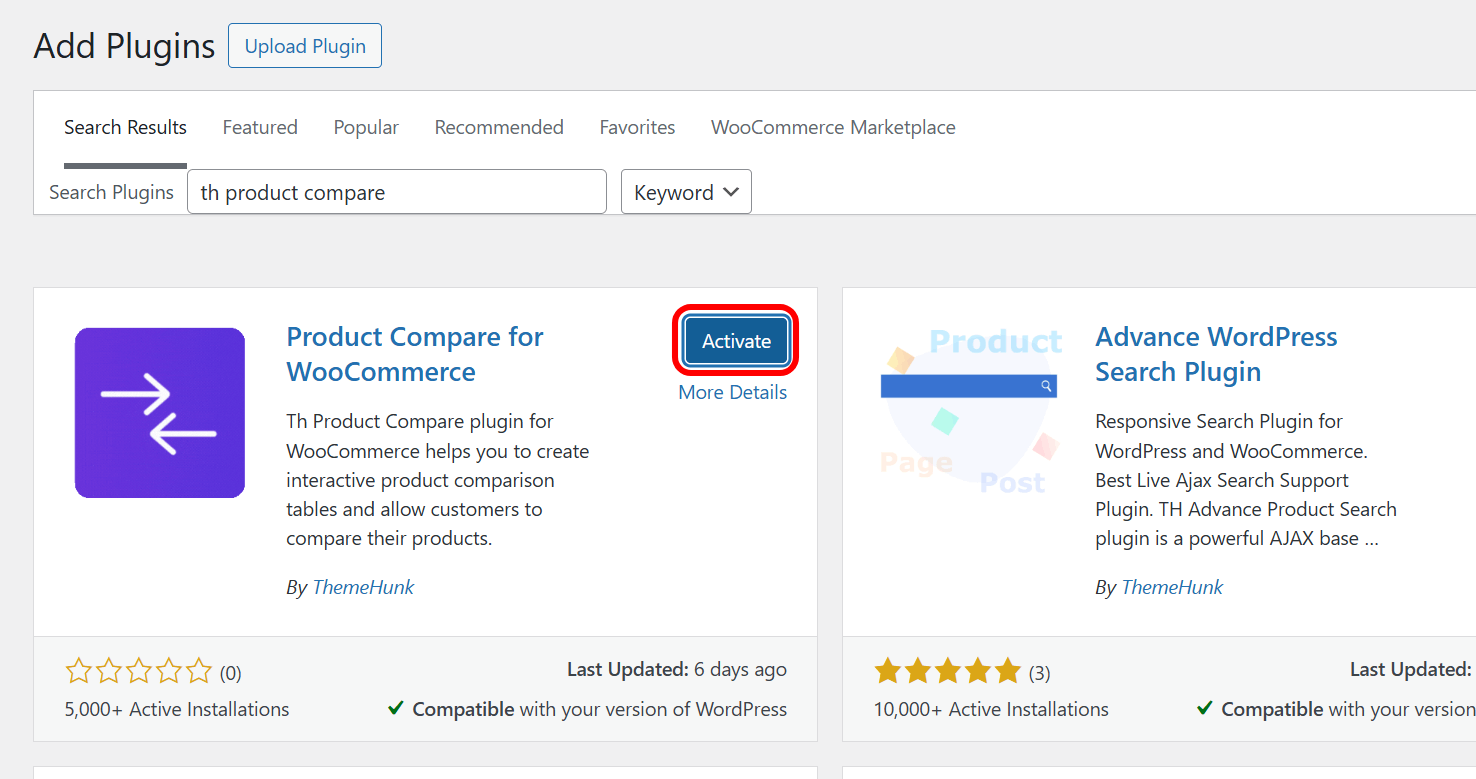
After installation, click Activate.
ThemeHunk will appear in the menu with the Product Compare option.
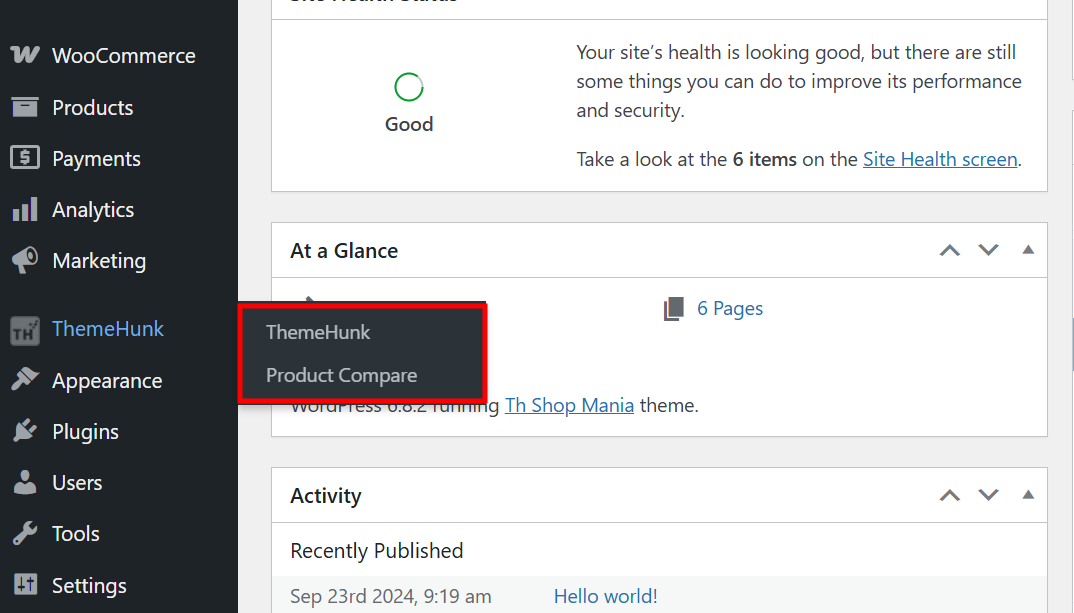
After activation, the ThemeHunk shall come to the Menu. In the ThemeHunk, there you will find Product Compare. Click on Product Compare to see the settings.
The Compare Button has automatically come to the Site.

Best Practices for Using Product Comparison in B2B WooCommerce
Update regularly:
Keep specifications and prices up to date.
Keep it simple:
Show only the most important features (e.g., price, warranty, delivery).
Highlight key differences:
Use bold or color to make variations stand out.
Allow unlimited comparisons:
B2B buyers often compare more than 2-3 products.
Optimize for mobile:
Many decision-makers research on mobile devices.
FAQ
Q: Why is product comparison important for B2B buyers?
Ans: Because B2B buyers purchase in bulk, they need clarity on pricing tiers, product specifications, and delivery timelines before making big decisions. Product comparison tables make this process faster and more accurate.
Q: Can product comparison integrate with other WooCommerce extensions?
Ans: Yes. High-quality plugins are designed to work with wishlists, quick view, product filters, and variable product selectors to create a seamless B2B shopping experience.
Q: Is the product comparison mobile-friendly?
Ans: Yes, most plugins provide responsive and scrollable comparison tables, so buyers can easily compare products even on mobile devices.
Q: How does product comparison increase sales for B2B sellers?
Ans: It removes buyer hesitation, builds trust, speeds up purchase decisions, and encourages upselling of higher-value products, leading to higher conversions and repeat customers.
Q: Can I customize the look of the comparison table?
Ans: Yes. Most plugins allow you to adjust colors, fonts, borders, and table design to match your store branding.
Conclusion
Product comparison in B2B WooCommerce is no longer an optional feature: it’s a requirement. Product comparison is a vital tool that reduces the complexity of the decision-making process, builds trust, saves time, and gives your store a distinctive edge in the B2B marketplace.
When you add product comparison to your WooCommerce site, you’re not only helping your customers – you’re also improving your own sales, conversions, and ultimately, your position in the marketplace.
If you’re ready to take your B2B WooCommerce store to the next level, you’ll want to install a Product Comparison plugin like ThemeHunk TH Product Compare. It’s easy, fast, and allows buyers to interact with your products much better.
With competition in B2B today, there has never been a better time to embrace business tools that can help make your store smarter, quicker, and customer-friendly.
I hope this blog will help you. Still, if you have any queries or suggestions, then let me know in the comment section.
You can subscribe to our YouTube Channel, we also upload great content there, and also Do Follow us on Facebook and Twitter.
See more:-


