
Overview ➣ Google Analytics is a free web analytics tool offered by Google that helps you know how visitors are using your website. From tracking the sources of traffic to studying behaviors and retention, it provides deep insights to perfect the performance of your site. Whether it’s a blog, e-commerce store, or business page, this tool helps all by guiding them toward worthiness through data.
Google Analytics is a free product of Google that lets you know how individuals visit your website.
It indicates who visits your website, where they are from, which pages they view, and what actions they take.
Using all this information, you can enhance your website’s content, structure, and overall performance to achieve better outcomes.
What Is Google Analytics (GA)?
Google Analytics is a comprehensive analytics platform designed to track and analyze user activities on websites, landing pages, and mobile apps.
It provides thorough information about user behavior, including geographical source, demographic properties, specific pages users visit, and the activities they take while on their sessions.
The platform is firmly established as an industry standard, and its free offering, better known as Google Analytics, is an appropriate fit for the majority of websites.
Google Analytics also allows companies to break down the entire customer path. It monitors which channels users are coming from (e.g., search engines, social media, or direct entry), devices and places used, and how users are getting around the site.
It also allows goal tracking, exit point identification, and recognition of repeat visitors, providing useful information for measuring user engagement and brand loyalty.
It shows you:
- How many people visited your site
- Where they came from (like Google, Facebook, or other websites)
- What pages they visit and how long they stay
This helps you know what’s working on your website and what needs improvement.
Why Google Analytics Is Important
Google Analytics is an important tool that enables your understanding of how your website is used.
- Know which content people like most
- See which marketing efforts are working
- Understand visitor behaviour
- Fix pages that are not performing well
This type of information helps you make informed decisions about setting up your website to attract more visitors or customers.
How to Set Up Google Analytics
Follow the instructions given below to create your Google Analytics account.
Create a Google Account
First, visit Google Analytics and sign up.
You have to log in with your Google account. You can go and create a Google account for yourself.
If you already have a Google or Gmail account, then you can use that to sign in.
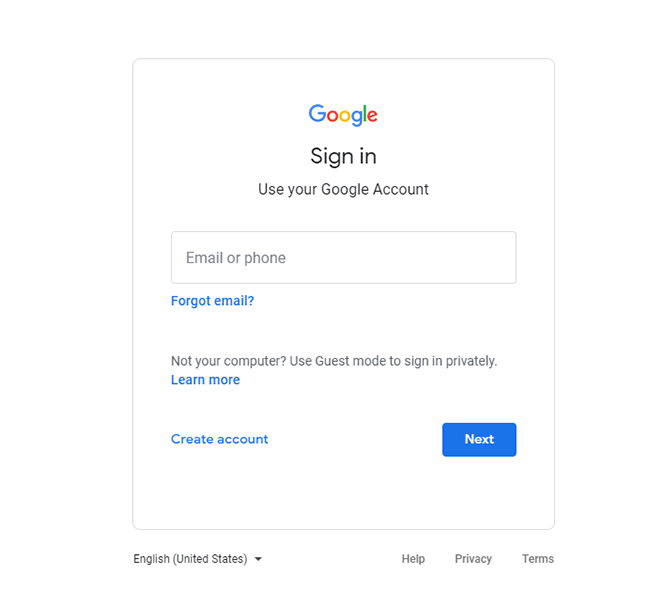
After you sign in to your Google account, you can start setting up your Google Analytics using your Gmail.
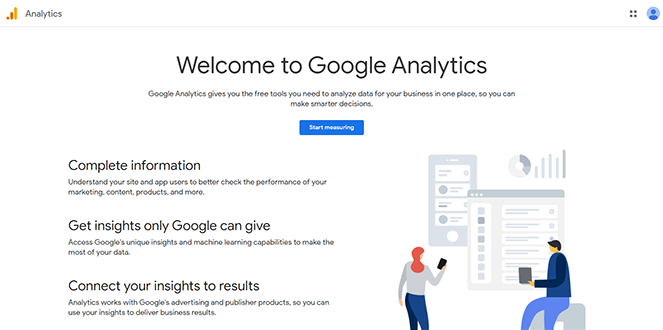
Go to Google Analytics
Next, you will need to enter an account name. This can be your business name or any name you choose, like shown in the image below.
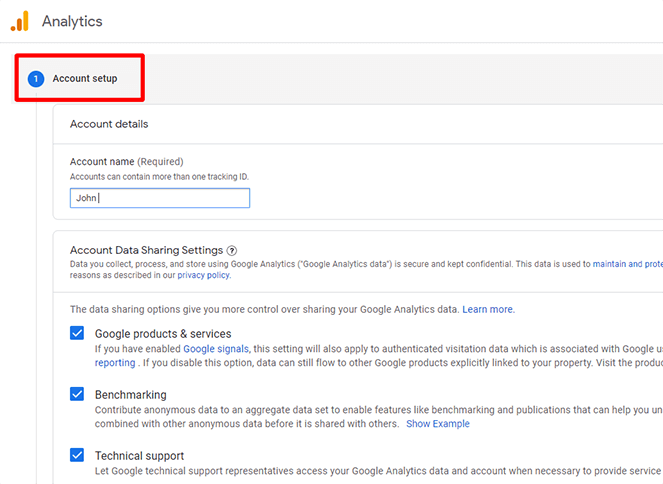
Next, enter the website name, URL, country, and time zone.
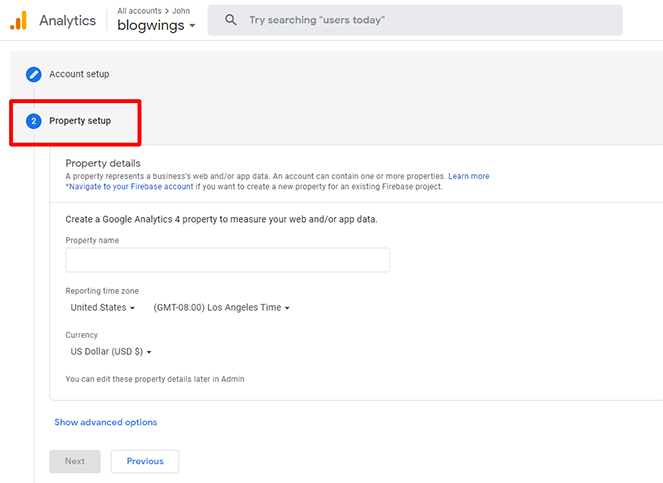
You will now receive a tracking code for Google Analytics. You must add this code to your WordPress website, so copy it.
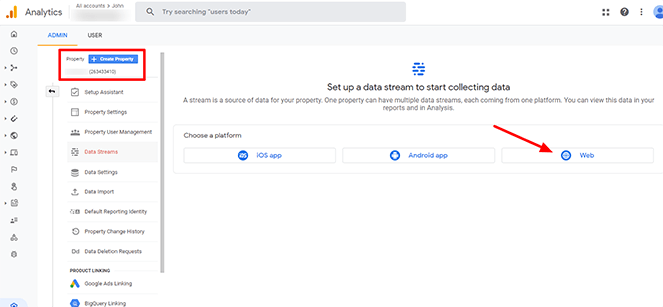
Additionally, you will be prompted to select whether you wish to track data via an app, website, or both. For your website, be sure to choose “Web.”
How to Use It for Website Optimization
When you log in to Google Analytics, you will land on the “Home” dashboard. This gives a quick overview of how your website is doing.

On the left sidebar, you will find built-in reports under these sections:
- Acquisition
- Engagement
- Retention
These reports show important details like who is visiting your site, how they found it, and what they are doing on it.
By clicking on those reports, you’ll get lots more options for exploring your data. Let’s take a quick look at each report:
1. Acquisition Overview and Traffic Acquisition
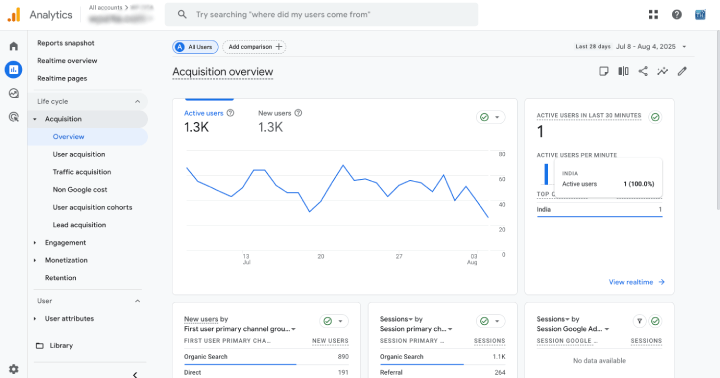
This section gives a quick summary of how people are reaching your website. It helps you see which sources, like search engines, social media, or other websites, are bringing in visitors.

This part provides detailed insights into each traffic source. You can see how many users came from each channel, how engaged they were, and which ones perform best for your goals.
2. Engagement Overview

This section shows what users do on your site, such as which pages they visit, how long they stay, and what actions they take (like clicking buttons or watching videos).
3. Retention Overview

This report tells you how often visitors return to your site after their first visit. It helps you measure how well you’re keeping users engaged over time.
What Is a Goal in Google Analytics?
A goal in Google Analytics is a specific action you want website visitors to take. It could be:
- Completing a contact form
- Purchasing an item
- Receiving a newsletter
- Downloading a file
You can evaluate how well your website is accomplishing your business objectives by setting goals. They keep an eye on critical user interactions that are essential to your website’s success.
By setting goals, you can identify the pages or marketing campaigns that are producing conversions.
You will also learn which traffic sources, including email, social media, and Google, are performing the best.
FAQ:
Q: What is Google Analytics and how does it work?
Ans: Google Analytics is a web analytics platform that tracks and reports website traffic using JavaScript tags. It collects data such as session duration, bounce rate, traffic sources, user behavior, and conversion metrics through a unique tracking ID implemented on your website.
Q: How can I track user acquisition sources in Google Analytics?
Ans: In Google Analytics, user acquisition data is available under the Acquisition > Traffic acquisition report. It shows the source/medium, campaign, and user medium that led users to your site, helping evaluate marketing channel effectiveness.
Q: How often should I analyze Google Analytics data?
Ans: Regular analysis is ideal weekly for marketing teams, and monthly or quarterly for strategic decisions. Continuous tracking helps spot trends, detect anomalies, and guide optimization efforts.
Conclusion
Google Analytics is a powerful analytics tool that helps you understand the performance of your website and the behaviour of users. This tool tracks anything from the source of traffic to their engagement and retention on your website, ensuring that all the data for an accurate decision is gathered.
These built-in report sections of Acquisition, Engagement, and Retention, amongst others, allow you to recognize trends, enhance content, and polish user experience.
Creating goals grounds you to track conversions and attribute their success to your business. When you analyze often, back-end adjustments are always made; also, the effectiveness of your site grows.
Start leveraging Google Analytics from today while extracting benefits and utilizing these insights for the sound growth of your website.
If you have any questions regarding anything, do not hesitate to just comment below, we will help you solve your problem. Thanks for reading this blog.
Please subscribe to our YouTube Channel, we also upload great content there, and also Do Follow us on Facebook and Twitter
Read more:-


