
Overview ➣ This article explores practical strategies to optimize WooCommerce store speed, covering hosting upgrades, themes, plugins, image optimization, caching, CDN integration, and HTTP/2/3 protocols. Learn how a faster load time boosts SEO ranking, enhances user experience, and increases conversions for sustainable eCommerce growth.
How to optimize a WooCommerce store’s speed is a crucial question for every online store owner who wants to enhance user experience and maximize sales.
A slow-loading site frustrates visitors, increases the bounce rate, and leads to lost sales. In contrast, an optimized store increases customer experience and improves business growth.
Studies indicate that if a website takes more than three seconds to load, 52% of visitors will leave. Even a delay of just one second can reduce the conversions by 7%.
For WooCommerce store owners, optimizing speed isn’t just a task, it’s essential for business success.
This guide will provide the steps to optimize the WooCommerce store’s performance, ensuring fast load time, better customer experience, and improved sales.

Why Speed Matters for a WooCommerce Store
Before exploring the ways to optimize the WooCommerce store speed, it’s crucial to understand why speed matters:
- User Experience: Slow sites frustrate users, leading to higher bounce rates and lost sales. A fast WooCommerce store lowers the bounce rate, keeps visitors engaged, and increases sales.
- SEO-Rankings: Google prioritizes fast-loading websites in search results. Core web vitals like LCP, INP, and CLS are crucial in SEO performance.
- Conversion Rates: Fast-loading websites experience higher add-to-cart rates, more successful checkouts, and increased returning customers that directly impact revenue growth.
- Mobile Performance: Over half of eCommerce traffic comes from mobile devices, where users expect fast performance. So, a fast-loading site is crucial for better user experience, higher conversions, and staying competitive.
- Reduce Server Costs: Optimizing speed reduces the load on your server, improving efficiency and lowering hosting costs while maintaining smooth website performance.
Key Factors Affecting WooCommerce Performance
Several factors affect your WooCommerce store’s speed. Some of them are:
Now, let’s explore each of these factors in detail.
Step-by-Step Guide to Optimize Your WooCommerce Store Speed
Choose the Right Hosting Provider

Hosting is the foundation of your store’s performance, making it the first crucial decision in optimizing speed.
Choosing the right hosting plan is essential for your WooCommerce success. To optimize the WooCommerce store speed, avoid shared hosting, as it often lacks the speed and resources needed for a smooth shopping experience.
Instead, opt for a performance-focused hosting solution to ensure fast load time and a better user experience.
Hosting Option for WooCommerce
- Managed WooCommerce Hosting: This is a great option, offering servers optimized for WooCommerce. Leading providers like Pressable, Kinsta, Hostinger, and SiteGround ensure top-tier performance and reliability. These offer WooCommerce hosting with built-in caching, CDNs, and other speed-enhancing features.
- VPS or Dedicated Hosting: For high-traffic stores, a Virtual Private Server (VPS) or dedicated hosting offers superior performance and reliability compared to shared hosting. Dedicated resources help maintain consistent speed and stability.
- Cloud Hosting: Platforms like Cloudways and Pressable offer scalable cloud hosting with enhanced performance, flexibility, and reliability.
Hosting Best Practices
- Server Location: Choose a data center close to your target audience.
- PHP Version: Use PHP 8.0+ for faster execution and improved performance. (WooCommerce 9.7+ supports PHP 7.4 or higher).
- SSD Storage: SSDs are 3x faster than traditional HDDs.
Related: Best WooCommerce Hosting Providers.
Optimize Your WooCommerce Theme

The role of the theme is essential to optimize WooCommerce store speed, as a heavy, poorly optimized theme can significantly slow your website’s performance. Here’s how to fix it:
Choose a Lightweight Theme
Avoid bulky themes with unnecessary features. Choose a fast, responsive WordPress theme that enhances load times, user experience, and compatibility with caching and optimization plugins. Such as
- Default Theme: WooCommerce’s Storefront theme is lightweight, fast, and optimized for performance.
- Third-Party Themes: Shop Mania, GeneratePress, Zita, and Neve are known for their speed, flexibility, and high customizability.
Customize for Performance
Customize your WooCommerce theme using a lightweight design, removing unnecessary features, reducing animations, and optimizing code. Enable only essential elements to improve speed, user experience, and overall efficiency, ensuring a smooth shopping experience.
Related: Best WooCommerce WordPress Themes.
Audit and Optimize Plugins
Plugins are essential, but too many plugins can slow down your site. Manage them wisely to optimize your WooCommerce store’s speed and ensure optimal performance. Follow these steps to optimize plugins:
- Audit Installed Plugins: Review your installed plugins, then deactivate and remove plugins you don’t use. Keeping only essential plugins reduces resource usage and improves speed.
- Replace Heavy Plugins: Replace bulky plugins with lightweight alternatives for faster performance.
- Check Plugin Performance: Use tools like Query Monitor to identify slow plugins affecting your website’s performance. It provides insight into slow queries, high memory consumption, and resource usage, enabling developers to identify performance issues efficiently.

- Update Plugins: Regularly update your plugins to ensure compatibility, security, and performance.
Related: Must-Have WooCommerce Plugins.
Optimizes Product Images and Media Files


Since images contribute to nearly half of the web page’s size, optimizing them is crucial for faster loading times. Here are the steps you can use:
- Compress Images: Use plugins like Shortpixel or Tiny PNG to compress images and reduce file size without compromising quality.
- Lazy Loading: Enable lazy loading to load images when they come into view to improve speed and reduce initial load times.
- Image Formats: Use the WebP image format or convert JPEG and PNG images to WebP format, which is approximately 30% smaller.
Related: Explore our step-by-step guide on how to compress images.
Implement Caching Strategies
Caching reduces server load by storing static copies of pages, improving speed, performance, and user experience by delivering pre-cached content efficiently.
Types of Caching for WooCommerce
- Page Caching: This saves entire HTML pages, allowing them to load instantly without regenerating content from the server.
- Object Caching: Stores database query results in memory using Redis or Memcached, reducing repeated queries.
- Browser Caching: Stores static website elements like CSS, images, and JavaScript in the user’s browser, reducing repeated downloads.
Use Cache plugins like W3 Total Cache, LiteSpeed Cache, or WP Rocket for optimal WooCommerce performance.
WooCommerce-Specific Caching Tips
- Exclude Dynamic Pages: Prevent caching for pages like cart, checkout, and account to ensure real-time updates and avoid checkout issues.
- Use Fragment Caching: Cache specific elements, like mini-carts, while keeping dynamic functionality to ensure a smooth user experience.
Related: Best WordPress Cache Plugins to Boost Website Speed.
Optimized the Database
Over time database collects unnecessary data such as post revisions, spam comments, and expired transients, which can slow down performance. Follow these steps to keep your database optimized:
- Clean Up Tables: Access phpMyAdmin or use plugins like WP-Optimize or Advanced Database Cleaner to delete unnecessary data and improve database performance.
- Schedule Regular Cleanups: Automate database optimization (daily, weekly, or monthly) to maintain performance and prevent unnecessary data buildup.
- Index Database Tables: Speed up database queries by adding indexes to WooCommerce tables, enhancing performance and reducing load times.
With the use of the WP-Optimize plugin, you can efficiently optimize the database.
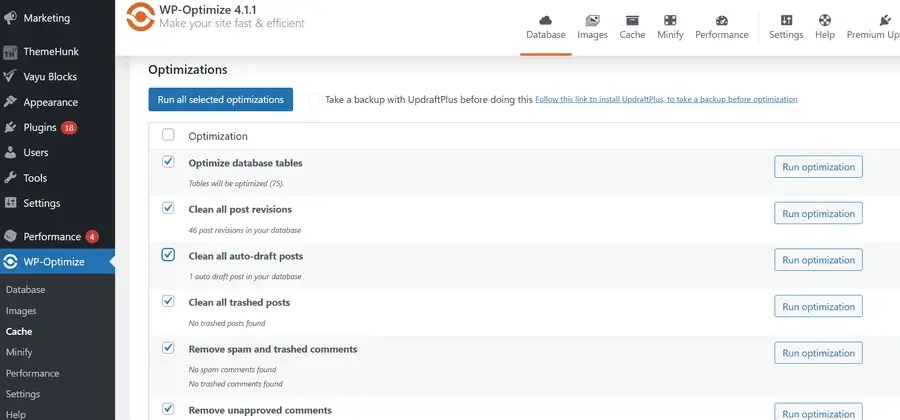
Install and activate the plugin, then navigate to WP-Optimize in the admin sidebar. Choose the item to delete or optimize and click ‘Run all selected optimizations’ to apply the changes.
Minify and Optimize Code
Excessive CSS and JS files slow down your site by increasing HTTP requests and blocking page rendering.
Tips to Optimize Code
- Minify Code: Minify CSS and JavaScript by removing unnecessary spaces and comments to reduce file size and improve load speed. Plugins like Autoptimize the minification process.
- Combine Files: Merge multiple CSS and JavaScript files into fewer files to reduce HTTP requests and improve page load time.
- Differ JavaScript: Delay loading essential scripts to avoid slow rendering and improve page speed. Plugins like WP Rocket and Async JavaScript help manage script deferral efficiently.
- Inline Critical CSS: Add essential styles directly to the HTML to speed up the loading of the visible part of the page, ensuring a faster and smoother loading experience.
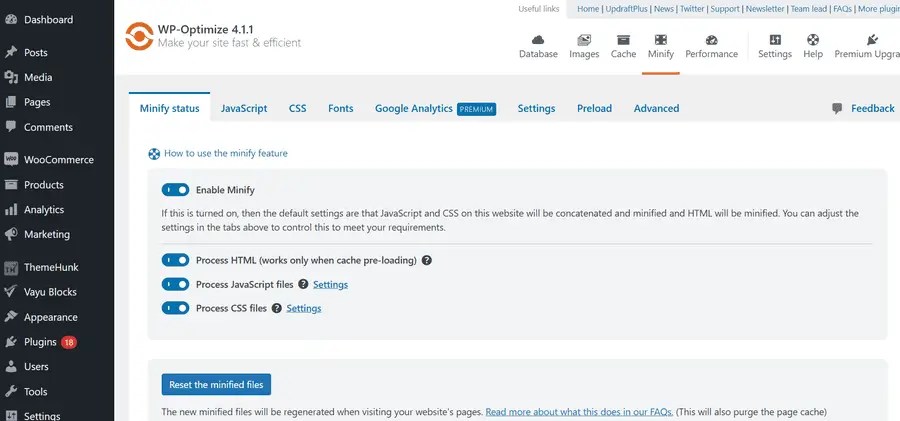
Using the WP-Optimize plugin, you can minify and optimize code.
Use a Content Delivery Network

Content Delivery Network (CDN helps optimize WooCommerce store speed by storing static files (images, CSS, JavaScript) on servers worldwide.
When a user visits your site, the CDN serves files from the nearest server, reducing latency and load times.
Set up CDN for WooCommerce
- Choose a CDN Provider: Top CDN providers include Cloudflare, Google Cloud CDN, BunnyCDN, Stackpath, and more.
- Integrate with Your Hosting: Many managed hosting services, such as Pressable and Kinsta, offer built-in CDN integration, which can be enabled through your host’s dashboard for improved performance.
- Using Plugin: Install a plugin like CDN Enabler or WP Rocket to easily integrate your site with a CDN.
- Configure CDN Settings: Configure CDN settings by catching static assets(images, CSS, JS), enabling Brotli or GZIP compression, and setting cache expiration headers (e.g., 1 year for images, 6 months for CSS/JS, and 1 hour for HTML).
CDN Best Practice
- Exclude Dynamic Pages: Avoid caching for cart, checkout, and user account pages to ensure real-time updates.
- Enable WebP Support: Use a CDN that automatically converts images to WebP for better compression.
- Monitor Performance: Track CDN uptime and cache hit ratios for optimal efficiency.
Use Advanced Performance Technique
Enhance your website performance to optimize your WooCommerce store’s speed with these expert tips:
Enable OPcache and Redis
Enable OPcache and Redis in your server settings or hosting dashboard to improve PHP performance.
- OPcache: Improves PHP performance by caching precompiled scripts, reducing processing time, lowering server load, and speeding up execution for faster and more efficient website performance.
- Redis: A high-performance in-memory data store that speeds up database queries, reduces load times, and enhances website performance by caching frequently accessed data.
Upgrade to HTTP/2 or HTTP/3
Modern HTTP protocols like HTTP/2 and HTTP/3 significantly improve website performance by optimizing how browsers and servers communicate. Upgrading from the outdated HTTP/1.1 can reduce latency, speed up asset delivery, and enhance user experience.
- HTTP/2: Use multiplexing to load multiple files at once over a single connection and enable header compression to speed up page loading.
- HTTP/3: Uses QUIC protocol (UDC) to enhance speed and reliability by reducing latency, especially on unstable or mobile networks.
Most hosting providers support HTTP/2, while HTTP/3 is available through Cloudflare and hosting like Kinsta.
Use Brotli or GZIP Compression
Activate Brotli or GZIP compression to shrink HTML, CSS, and JS files by 70-90%, enhancing load speed. Enable it via .htaccess or plugins like W3 Total Cache or WP Rocket.
Related: How to Fix HTTP 400 Bad Request Error in a WordPress Website.
Optimize for Mobile Devices
Mobile optimization is crucial as mobile users now dominate internet usage, driving most website visits and online sales. According to Statista, as of January 2025, mobile devices accounted for over 60% of global web pages.
In regions like Africa and Asia, mobile traffic is even higher, exceeding 75% and 71% respectively. Neglecting mobile optimization means missing out on a large share of potential customers and hurting Google ranking due to its mobile-first indexing.

To optimize your WooCommerce store’s speed and ensure a smooth experience on mobile devices, follow these essential steps:
- Responsive Testing Tool: Use Google’s mobile-friendly test to check the responsiveness of your WooCommerce store.
- Use a Responsive Theme: A mobile-optimized WooCommerce theme adapts seamlessly to any screen size, ensuring a smooth shopping experience. Avoid rigid layouts; flexibility and responsiveness are the key to success. Themes like Shop Mania, Zita, and Open Shop offer mobile-friendly designs for optimal performance.
- Optimize Images for Mobile: Serve optimized images for mobile users by using plugins like ShortPixel Adaptive Images or a CDN with device-aware resizing to reduce load time.
- Enable Mobile-Specific Caching: Use plugins like WP-Optimize to generate separate cache rules for mobile devices.
- Implement Quick Search Result: Enhance the mobile-shopping experience by using the Advanced Product Search plugin, which offers fast, accurate search results with live filtering, improving product discovery and user experience.
Related: Mobile-Optimized WooCommerce Themes.
Monitor and Test Performance
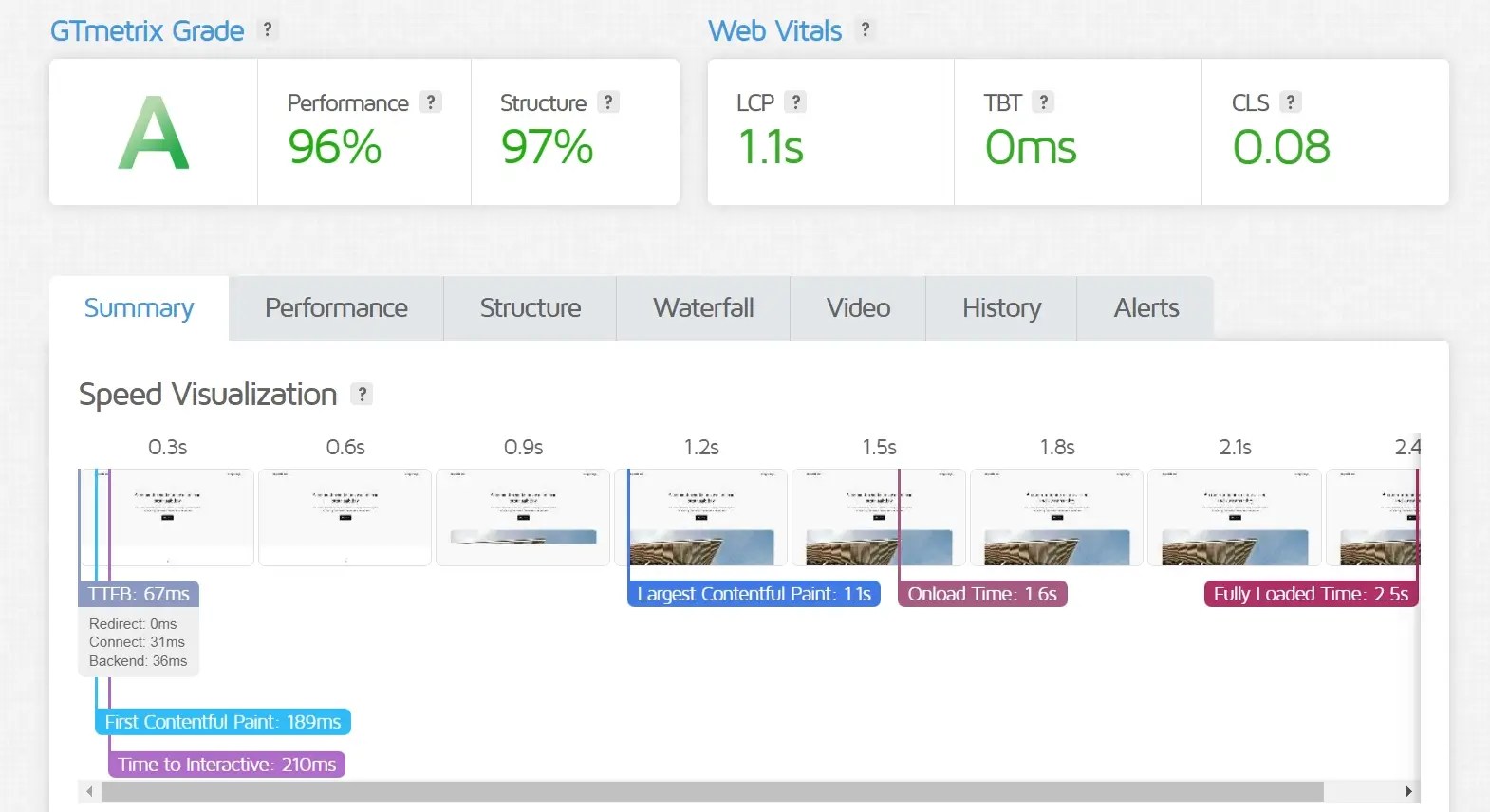
Optimization is a continuous process. Use these tools to monitor performance and make improvements:
Performance Monitoring Tools
- Google PageSpeed Insights: Analyze your site’s performance, track core web vitals scores, and provide recommendations to improve loading speed and user experience.
- GTmetrix: It helps analyze website load time, detects performance issues, and provides actionable suggestions to enhance speed and overall efficiency.
- Pingdom: Allows you to test website speed from multiple global locations, helping you analyze performance and optimize for faster load times.
Set Up Uptime Monitoring
Monitor your website performance with JetPack Monitor and UptimeRobot. These tools send real-time alerts when your site goes down, helping you quickly address issues and ensure your WooCommerce store remains accessible to customers.
FAQ
Q: What are the best hosting providers to optimize a WooCommerce store’s speed?
Ans: Managed WooCommerce hosting providers such as Pressable, Kinsta, SiteGround, and Hostinger offer optimized solutions to optimize WooCommerce store speed.
Q: What are the best lightweight WooCommerce themes?
Ans: Shop Mania, Zita, GeneratePress, and StoreFront are the best lightweight WooCommerce themes designed to optimize WooCommerce store speed and enhance performance.
Q: Can too many plugins slow down my WooCommerce store?
Ans: Yes use only essential and well-coded plugins while avoiding boated or outdated ones. Regularly audit and remove unnecessary plugins to maintain optimal performance.
Q: What is the best image format to optimize a WooCommerce store’s speed?
Ans: WebP is the best image format, offering better compression than JPEG and PNG while maintaining high quality, resulting in faster load time.
Q: How does a CDN improve WooCommerce’s speed?
Ans: A CDN stores copies of your site on global servers, allowing users to access content from the nearest location, reducing latency and improving load time.
Q: Should I use a caching plugin for my WooCommerce store?
Ans: Yes, caching plugins like W3 Total Cache, LiteSpeed Cache, WP Super Cache, and WP Rocket help optimize WooCommerce store speed by reducing server load and enhancing page delivery.
Q: What is the difference between HTTP/2 and HTTPP/3?
Ans: HTTP/2 allows multiplexing while HTTPP/3 (QUIC) uses UDP (User Datagram Protocol) for a faster and more stable connection.
Q: Is Brotli better than GZIP?
Ans: Yes, Brotli compresses better than GZIP, offering a higher compression rate and faster loading speed. However, GZIP remains widely supported and useful in some server setups.
Q: How do I test my WooCommerce store speed?
Ans: Use GTmetrix, Google PageSpeed Insights, or Pingdom to analyze your store’s speed and identify areas for improvement.
Final Words
Optimizing a WooCommerce store speed is an ongoing process, not a one-time task. Implement these strategies to enhance performance, boost sales, and improve user experience.
Even minor improvements can make a noticeable impact on customer satisfaction and revenue. Start with basics like better hosting, lightweight themes, image optimization, and caching, then gradually implement advanced techniques.
A well-optimized store benefits both your customers and your business. Stay proactive, adapt to change, and consistently refine your WooCommerce store for optimal performance.
Thanks for reading this blog. If you find this article helpful, do share it with your friends. If you have any questions, do not hesitate to comment below. We will help you to solve your problem.
We hope this article helped you understand how to optimize your WooCommerce store’s speed for better performance.
Please subscribe to our YouTube Channel, We also upload great content there. Do follow us on Instagram, Facebook, and Twitter.
More Helpful Read –


