
Overview➣ Taking a business online is no less than a milestone. Years ago, it was a headache, lots of coding, and errors. But now the time has changed, and a website can be built within minutes. Let’s see how you can create an Interior Design website easily.
If you own an interior design business, and you want to grow your business and earn more. This may be your chance. You just need a website.
You can create your website and offer your services worldwide, with no geographical limitations. Not only this, you will have full control over the site customization and redesign it however you want.
We will create our website on WordPress CMS, since it is a well-known CMS powering more than 40% website on the internet.
Let’s see what we will need for this website. Most of the plugins listed below will automatically download.
What We Need To Create A Interior Design Website
Shop Mania Theme – Shop Mania is among the fastest WordPress themes on WordPress. It is capable of creating any type of website. Its features make it suitable for business websites.
Shop Mania Pro Plugin – Shop Mania Pro is a plugin that adds some premium features and functionalities to websites. It also unlocks access to premium website templates. These features help you provide the best experience to users.
Elementor – Elementor is widely used to design websites. Its drag-and-drop builder makes it popular among designers. It is easy to use and doesn’t require coding knowledge to work on.
Lead Form Builder – Lead Form Builder lets you add a contact form on your website. You can generate leads and use them for marketing.
WP Popup Builder – This plugin helps you create pop-ups that you can create to catch users’ attention. You can design the pop-up however you want and control the display options.
How To Create An Interior Design Website
Here, we will see every step in building the website.
Step 1) Open your dashboard

First, log in to your WordPress website and open your dashboard.
Step 2) Go to Appearance > Add Theme

Click on Appearance. Here you will see your downloaded themes. Go to the top left corner and click on Add New Theme.
Step 3) Go to the Search Bar and search for the Shop Mania theme
Go to the left side and find the Search bar. Search for a Shop Mania theme.
Step 4) Install and Activate the theme
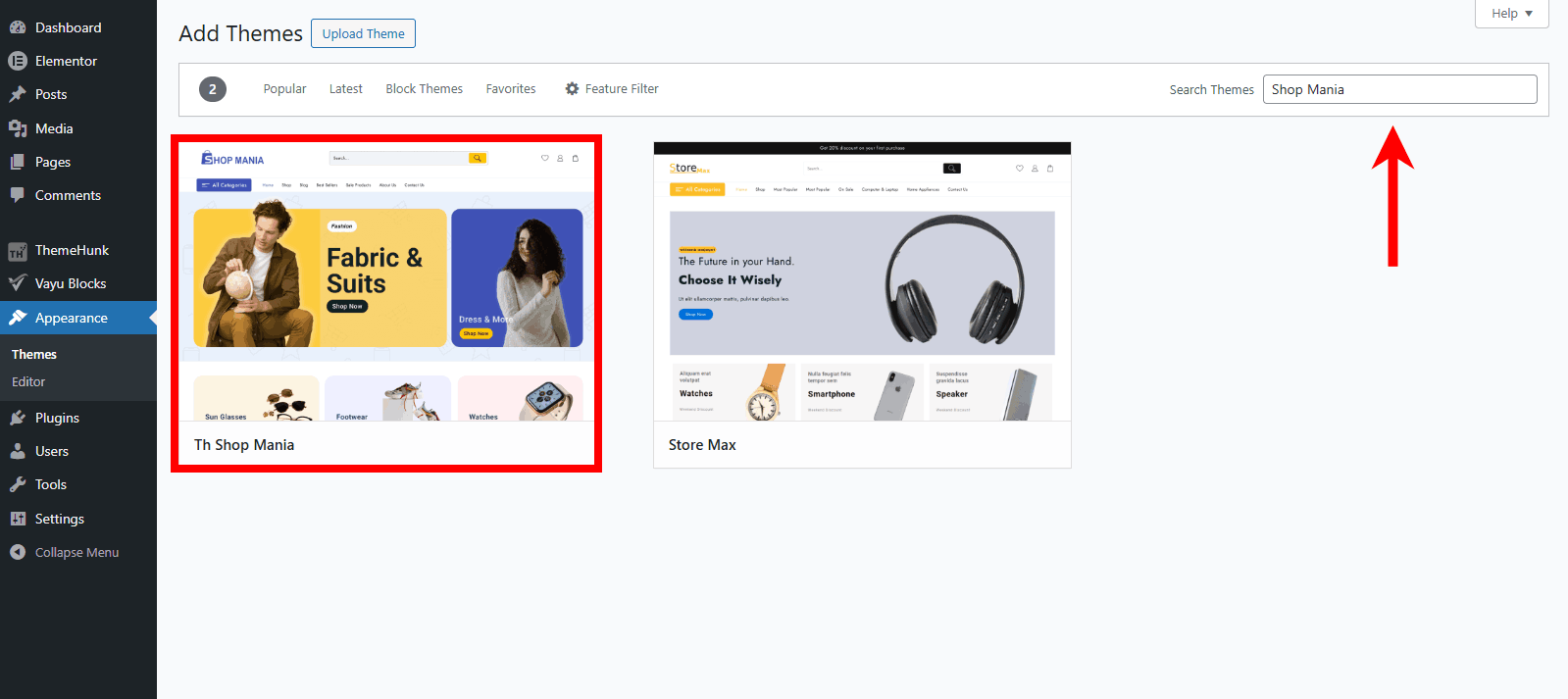
After searching Shop Mania, you can find the theme in the list, click on Install, and then activate it once installed.
Step 5) Purchase Shop Mania Pro Plugin
As the Interior Design is a premium demo, we need to upgrade the theme.
Go to themehunk.com > Shop Mania > pricing > pick a plan > Click on Buy Now.
Now, complete the formalities and get your Shop Mania Pro zip file.
Step 6) Upload Shop Mania Pro to your WordPress dashboard
Go to Appearance > Add Plugin > Upload Plugin
Now upload the Shop Mania Pro and then install and activate it.
Step 7) Go to Appearance > License
You will see a Box where the License Key is to be entered. To find the License Key, click on Find Your License Key.
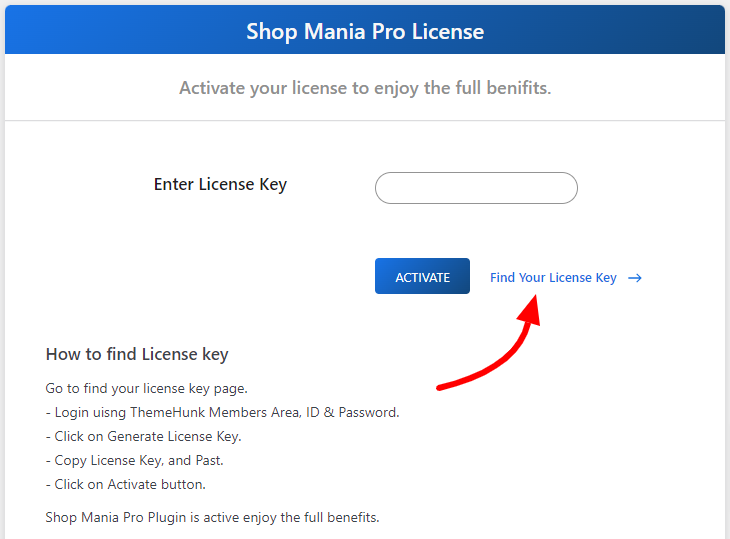
You will see another page, where the login ID and Password are to be filled.

Log in using the same credentials that you entered while purchasing the theme.
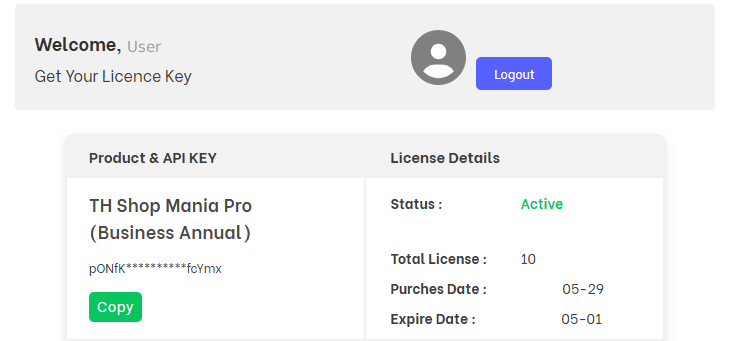
On the above page, click on Get License, and once the license key appears, click on Copy.
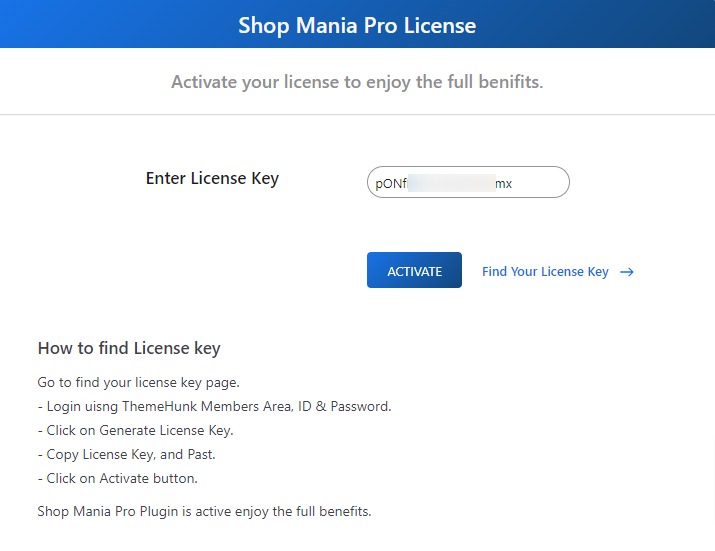
Paste the License Key into the box and click on Activate.
This will activate the Shop Mania Pro and will unlock your access to premium templates.
Step 8) Go to Appearance > Demo Site Import
Hover your cursor on Appearance and click on Demo Site Import. Once the page opens, click on View All Starter Sites.
Here you will see all the templates of the Shop Mania theme.
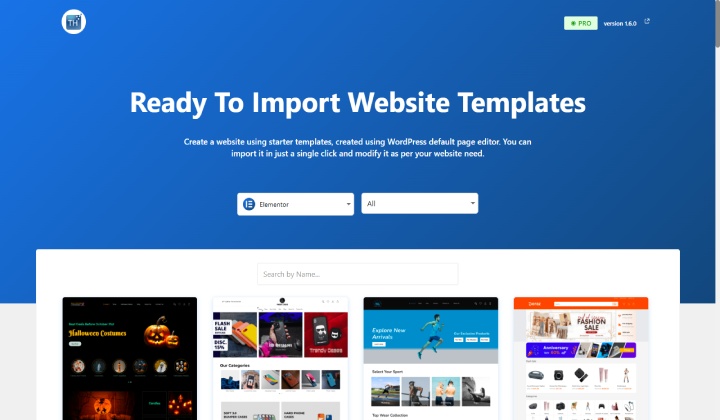
On this page, you can scroll down to explore all templates. You can also filter the templates by page builder and category.
Step 9) Search for the Interior Design
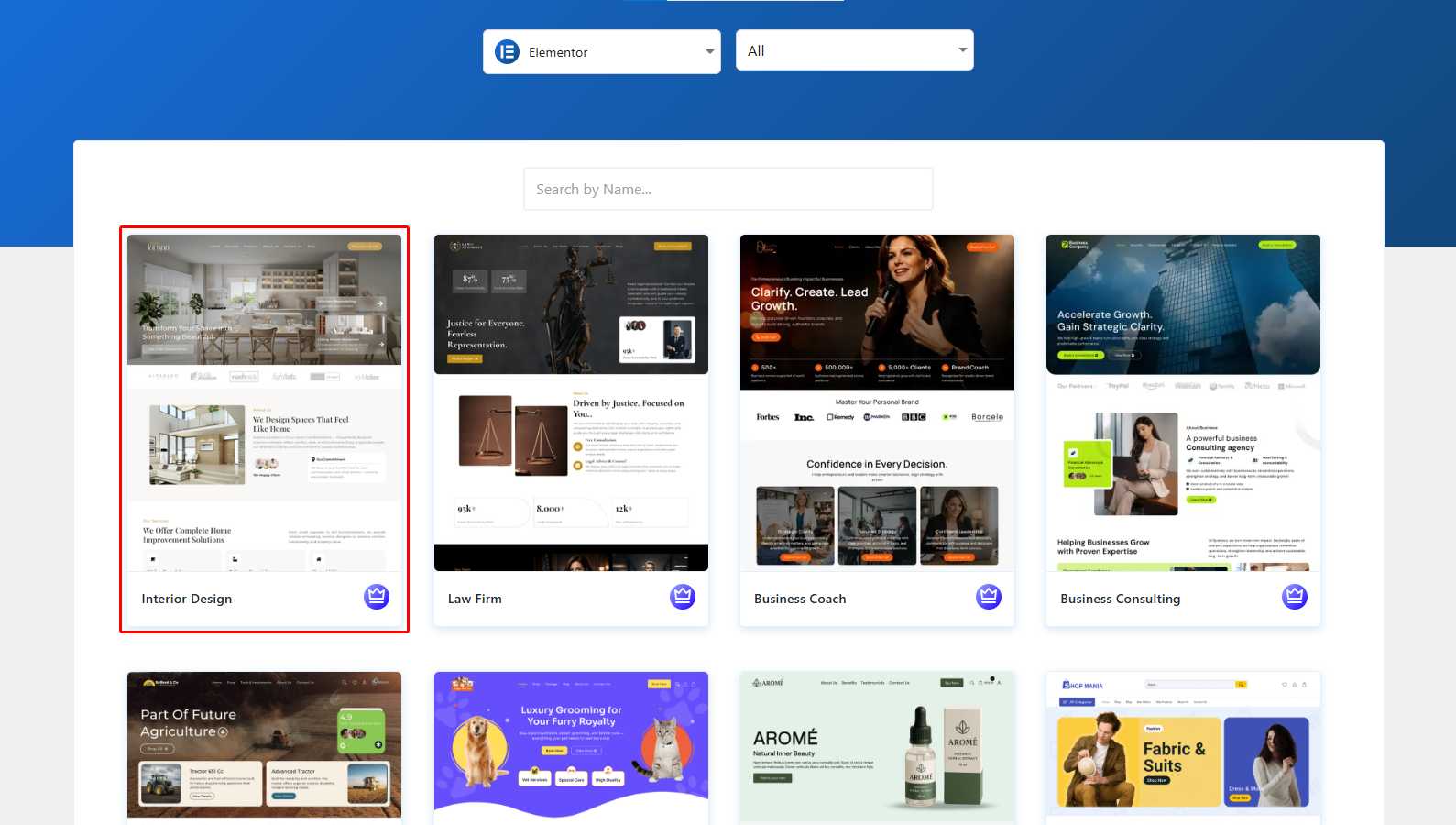
You can search from the search bar for the Interior Design template. Once found, click on it.
Step 10) Click on Continue
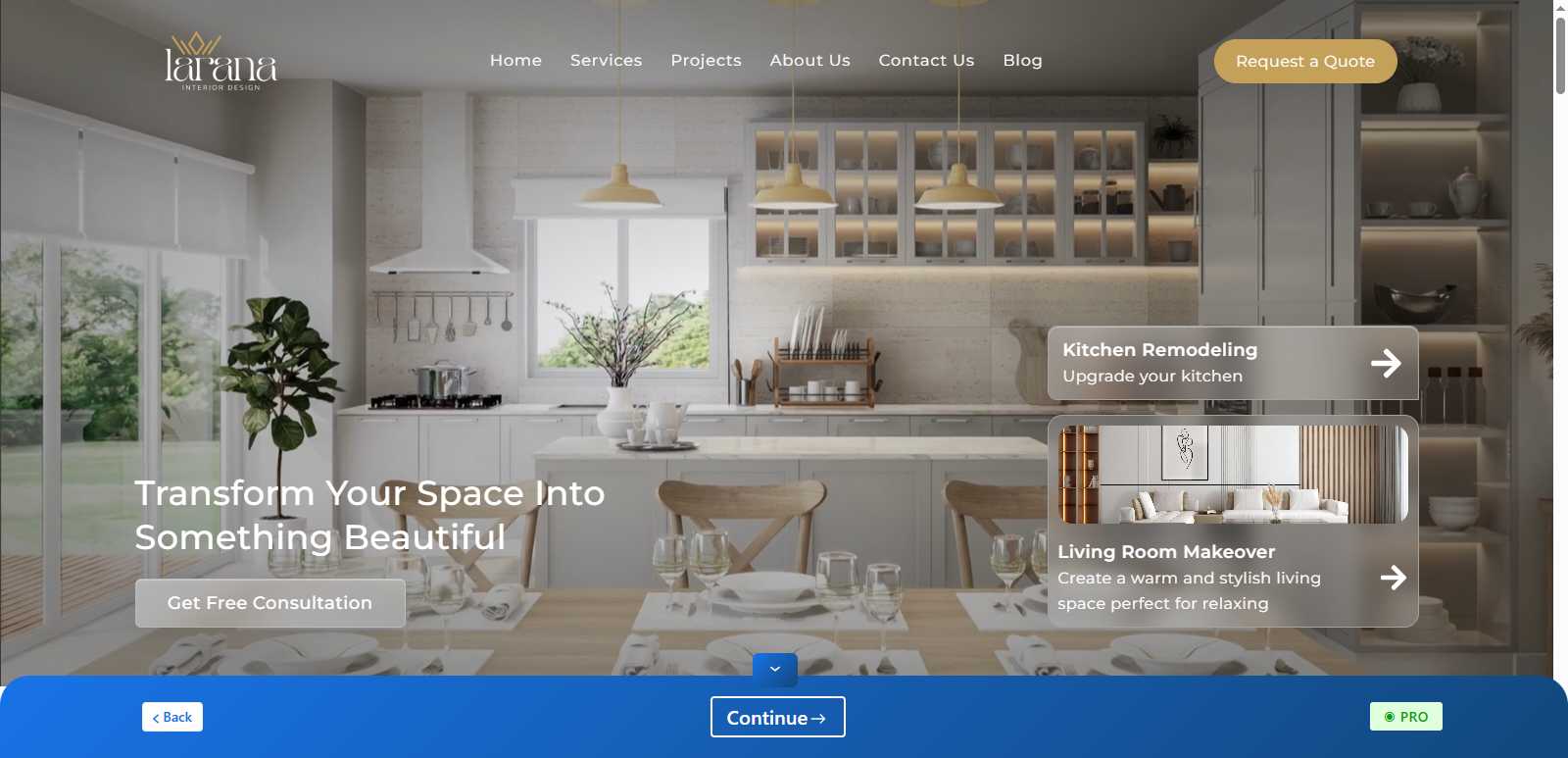
On this page, you can view the full site, including pages. After exploring the site, click on Continue at the bottom.
Step 11) Click on Build My Website

Click on Build My Website to proceed further.
Once the website is built, this page will appear.
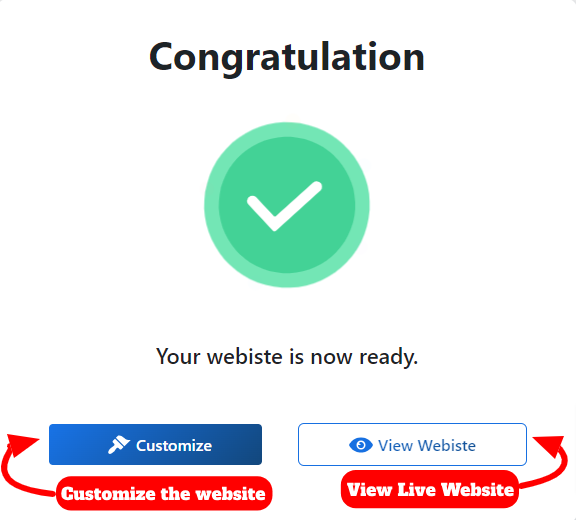
If you want to customize the site with Page Builder, click on Customize. Otherwise, click on View Website.
When you click on Customize, the site will open with Elementor for customization. Here, you can make any changes you want and then publish all changes.
After customization, go to the previous page and click on View Website.

The website is ready.
You can download the template from the button below.
FAQ
Q. Do I need coding knowledge to create this website?
Ans. No, coding is not required to build an Interior Design website. Simply follow the steps shown above. A beginner can easily create their own website with Shop Mania.
Q. What features should I look for in an interior design website?
Ans. For such websites, features like woocommerce compatibility, page builder integration, contact form, etc., are required for smooth performance.
Q. Is this template mobile-friendly?
Ans. Yes, the Interior Design website template is fully responsive on all devices, including mobiles.
Q. Can I customize my website after importing the demo?
Ans. Yes, you can customize your site with the help of the customizer and Elementor.
Q. Can I add additional pages that aren’t included in the template?
Ans. Yes, go to Pages> Add Page, create a page, and publish it.
Conclusion
So you just created a website. It doesn’t require lengthy code and extra efforts, with the help of a premade template.
If you find any problem, you can contact the support team and get an instant solution. You can also go through the documentation to understand the basic functions of the theme and plugins.
Moreover, it is compatible with almost all WordPress plugins, so you can extend your site’s functionality, such as SEO and analytics.
I hope this blog will help you. Still, if you have any queries or suggestions, then let me know in the comment section.
You can subscribe to our YouTube Channel, we also upload great content there, and follow us on Facebook and Twitter.
Discover More Articles


