
Overview ➣ There are so many sayings for clothing and clothing indeed expresses you without words. In this digital world if you sell clothes from your shop then there are some measures you can adopt to bless your business. The most important among them is taking your site online. Online stores are proving themselves more beneficial than physical stores. They get more customers and so generate revenue. With the Shop Mania is capable of creating a captivating Clothing Shop Website.
“Clothing is the ultimate form of self-expression. A website can give that expression a voice“
Do you know, that WordPress powers more than 40% of websites on the internet? And woocommerce can create any type of e-commerce website.
One of the biggest reasons behind creating a website is growth. When a website is built, it is accessible to users from home.
Users can order with their mobile and laptop and pay too. This is a digital revolution and also a reason for the growth of online stores.
As we discussed, you can create any kind of ecommerce website with the help of WordPress and Woocommerce, whether it is clothing, jewelry, tea, machinery, or any you can think of.
If you own a clothing store then you can take your store online, or even if you don’t have one you can start your journey with the website.
No problem, if you don’t know how to create a website, in this blog, we will see how you can build a Clothing shop website step-by-step.
For this, we will need the Shop Mania theme, specially designed to create online store websites. Shop Mania has multiple templates, among them there is a clothing shop template, that will help us create a Clothing website.
What Is Shop Mania And Its Templates?
Shop Mania is one of the fastest WordPress themes specially designed to build ecommerce websites. It has all the features that are necessary to build an attractive and fully functional website.
This theme is customizable, responsive, and page builder compatible, and there are so many features to prove its suitability.
It comes with over 50 premade templates that are ready to import and equipped with features and functionalities. You can pick your desired template and import it within seconds.
One such template is clothing. It comes with a unique interface to showcase the product and content.
Why Choose the Clothing Template?
Although it is possible to create a website without code, which eases people who don’t know how to code, with the template, one can create a website within simple steps that take a couple of seconds.
After importing the template, the only thing to do is replace the dummy content and products with your original one. And if you want to customize your site then you can do so with the help of Elementor Page Builder.
Not only this, it comes with lots of features and functionalities. Some of them are listed below.
Customizable – Customizability of significant if you want to provide flexibility to the website. You can customize the website and design it as you please.
Prebuilt Layouts – You get several layouts that you can opt for if you don’t want to design. There are layouts for header, footer, sidebar, login, etc.
Responsive – Responsiveness is ensured to provide the best experience across all devices. Mostly any site is accessed by mobile devices which makes it more important for a site to be mobile-friendly.
Cross Browser Compatible – Same as responsive but here compatibility with the browsers is ensured. It is possible that your users can use any browser to get into your site.
Drag-and-Drop Builder – Elementor’s drag-and-drop builder can help you design your site. It is easy and smooth.
Woocommerce Integration – Woocommerce is necessary if you want to create an e-commerce site, so woocommerce is integrated with the Shop Mania theme. Woocommerce offers so many functionalities like coupon codes, promotion & marketing, shipping & tax settings, etc. So you don’t need to install any other plugin for this.
3rd Party Plugins Compatible – You can install other plugins, if you require, with the Shop Mania theme. Let’s say, you want detailed analytics for your site, then you can install an Analytics Plugin, if you want an SEO plugin, then you can install an SEO plugin, and so on.
The Clothing templates are designed with modern design so you can compel your users to spend more time on your site.
Features of the Clothing Template
1. Eye-Catching Homepage Layout:


The home page decides whether the users will stay on your site or not. This makes it crucial for the homepage to be attractive.
By the way, the homepage of the clothing is designed creatively with a beautiful Hero section and product display.
Product Showcase

Showing the product in a good way is very important. If the products are not organized or lack in impression then it may be a minus point for your site. The Clothing template has a super impressive layout to showcase the products.
About Us Page

About Page is given on-site to let your users know about you and your site. On the About Us page, you have a chance to describe yourself.
You can write about the company’s mission and vision too. If you wish you can list the directors and members of the company.
Contact Us Page

The Contact Us page is given to let the users contact you. Here a contact form is given where users need to enter the details and write a message. So, with this page, your users can do inquiry and address the issues.
Shop Page

On the Shop Page, every product is listed. Additionally, a sidebar is given where filters are set, so the users can filter the product by color and size. From this page, users can add the products to the wishlist and cart.
Checkout Page

An organized Checkout Page is a must if you want to offer a seamless experience to your users. On the same page, you can fill in all the details and place an order.
On the same page, users can redeem coupons and get discounts.
Shopping Cart

Integrating a shopping cart into your website is essential for any e-commerce business, as it provides a seamless way for customers to select, manage, and purchase products.
The Clothing template displays 2 cart icons on the page. First, displayed on the menu and second is Floating Cart.
Live Product Search

Live Product Search enhances the user experience. It helps increase sales conversions by making it easier for customers to discover relevant products.
In the Clothing template, to search for a product when users write even a single word then all products related to the entered appear in the result.
How to Install the Clothing Template with One Click
Now let’s see the full procedure of installing the Clothing. You will find it easier to install the theme than you have seen ever.
Download and Install the Theme
Before installing the Clothing template, you will need to install Shop Mania first. This is not only a theme but a whole package. Then you will get access to import the demo.
Purchase and Download the Shop Mania Theme from the below link
Click on the button below to install the theme.

After purchasing the theme. On the top right side, click on Member’s Area and log in with your credentials.
You can log in to your >> Member’s area from here

On this page, you will find the themes and plugins, you purchased and download their file from here.
Install Shop Mania Pro Plugin
Open your WordPress dashboard

Login to your WordPress dashboard with your credentials.
Go to Plugins and click on Add New Plugin
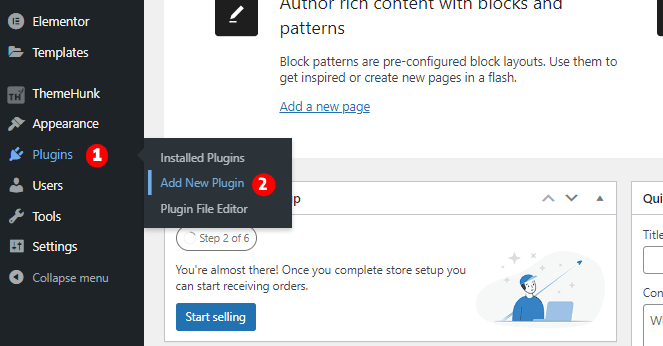
To add a new plugin hover your cursor on Plugins and click on Add New Plugin.
Here you will see the plugins page. On the top left corner, click on Upload Plugin.
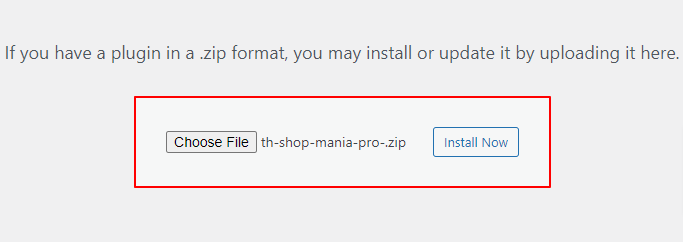
Upload the Shop Mania Pro here and click on Install Now.
Click on Activate Plugin.
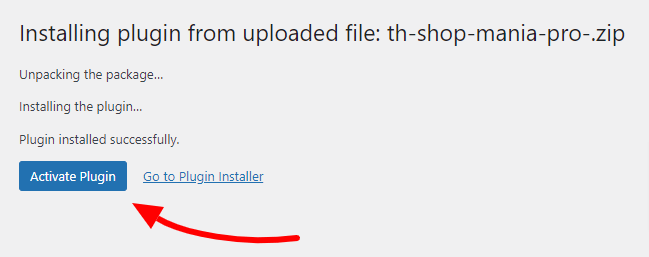
Now you need to activate the plugin by clicking on Activate Plugin. After activation, you will be redirected to the Plugins page where you can find the Shop Mania Pro with other plugins.
Generate and Activate License
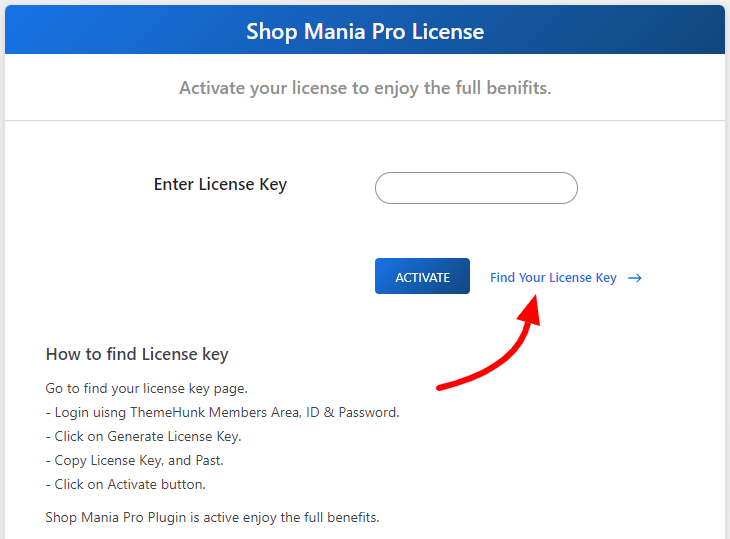
Activating the Shop Mania Pro is not enough, we need to activate the license to make it operational. After activating the license, you will unlock all premium features of the theme.
Navigate to Appearance and click on License
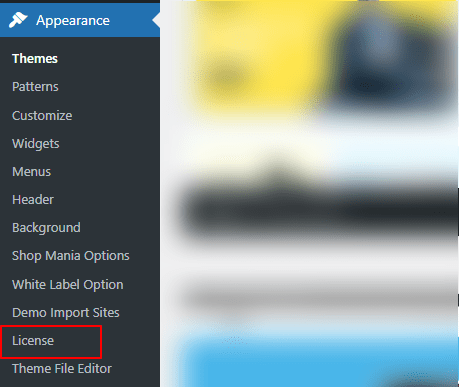
Click on Find Your License Key
Log in with the Member’s Area Credentials

On this page you will see the license key, click on the Copy button to copy the license key.

This will copy the License key to the clipboard.
Now go back to the License Page and paste the License Key into the box.

After pasting the License Key, click on Activate
Importing Clothing Template
To import the demo, first, we need to go to the template page.
Go to Appearance and click on Demo Import Sites

On the next page, you can find the Shop Mania version and a button that reads View All Starter Sites. Click on the button.

Now you will see all the templates of Shop Mania. You can filter the templates by template category and page builder.
Search for the Clothing Template and click on it.

You can view your full site from here. After all, click on Continue.

Now click on Build My Website
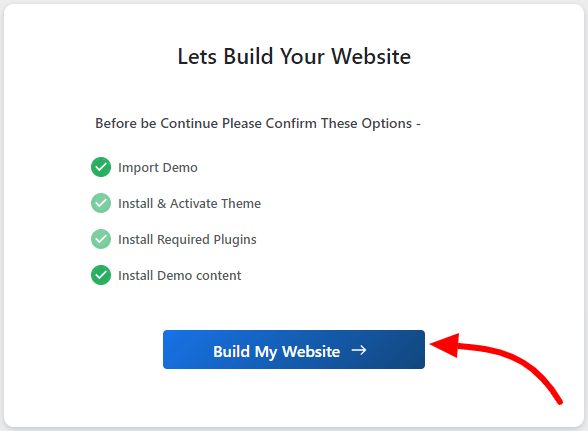
This process may some time to complete.
Note: Don’t exit or close the page while the demo template is being imported. This may cause some problems.
On the next page, you can customize your site from the button Customize and view your site with the View Website button.

The website is built. You can view your live website.
Customizing or Modifying the Clothing Template
If you want to make changes to your site you can do so with the help of Elementor page builder. It is very easy and simple.
These are detailed steps to Customize the Clothing website
Go to the Homepage of your site, you will see Edit With Elementor as shown in the screenshot below.

With the Elementor’s drag-and-drop builder customization is so easy. You can do anything you want including color, typography, content, etc. Even if you want to change the structure of the site then you can do so.
You can add, edit, and replace any section you want. If you want to add a banner you can smoothly add it.

These steps will help you customize your site. The Elementor is a super smooth and easy page builder that provides the drag-and-drop tool for ease.
If you have something creative in your mind for your site then you can make it live here.
Add Product to Your Website
When you import a template, the dummy is imported. So you can replace the content with your original ones. Let’s see how you add products to the woocommerce store.
Go to Products and click on Add New.
The next page you will see will be the product creation page. Fill in the title and description. In the description area, you can highlight the features, benefits, and other information related to the product.

Now scroll; down to Product data and set the product type.
Set Product Type
Here you will get four choices to choose between.
- Simple Product – In simple products, you can add physical products that we mostly see on the internet but without variation. If you have courses then again it comes under simple product, just you need to tick the downloadable box.
- Grouped Product – If you want to sell multiple products as one.
- External / Affiliate Product – If you want to feature an affiliate product from another website on your page,
- Variable Product – If a product has some variations in colour, size, etc.
Pricing and Inventory
You will see two pricing boxes.
- Regular Price – Fill in the price of the product.
- Sale Price – Fill in the discounted price.
Product Image
- Product – Click on Set Product Image and upload or select an image from the media that you want to select.
- Product Gallery Images – If you have multiple images of the product then upload those images here.
Categories and Tags
- Category – Create a category from the button, Add New Category, and assign the categories. You can also make sub-categories if you want.
- Tag – Enter the keywords related to the product. This helps to increase the visibility of the product on the site.
Publish The Product
After all, click on the Publish button and make the product live on your site.

You can preview your product. In case you need to make any changes, you can click on Edit product.
Tips for Optimizing Your Ceramic Shop Website for Better Conversions
Eyes on Analytics – Keep an eye on Analytics and reports. This can help you make a strategy for website growth. You can evaluate the weak points and improve them.
Offer free shipping and discounts – Offering such types of offers encourages users to shop through your site as it seems a profitable deal.
Keep speed – Keeping the website fast and providing smooth performance is very necessary if you want to engage your users on the website.
Use Call-to-Action – Use the buttons to redirect users to other pages. These include buttons, banners, discount offers, etc. This is an easy way to attract users’ attention.
Testing – Before making it live, test whether everything is working properly. This includes checking the pages, buttons, banners, coupons, etc.
Essential Tools and Plugins to Enhance Your Ceramic Shop’s Functionality
- Live Product Search – In an e-commerce site like a Clothing shop it is very necessary that users search and find their products easily. It not only searches products but if you want you can enable the post & page search also.
- Product Compare – Comparing Products is an underrated feature. It assists in comparing two or more products with common values. It creates a simple table where products are listed and can be compared.
- Woo Cart – Woocart is a mandatory functionality of an e-commerce website. This enables a cart in the menu and a floating cart on your page. From the cart, users can directly go the the checkout page.
- Variation Swatches – Website-like clothing always needs a variation plugin as we need to show the variation in products.
- Lead Form Builder – Lead Form Builder is a contact form plugin that also gathers leads from the contacts that you can use in marketing.
- Rank Math – Rank Math is an SEO plugin. It helps to make a stronger searchability of your site on the internet.
- Jetpack – Detailed analytics always helps to prepare a strategy. You can identify the weak points and improve them.
- Woocommerce Addons – Woocommerce addons add some additional functionality to woocommerce. For example, some add-ons help to manage inventory efficiently, so helps to make a secure system.
Conclusion
So we have seen how you can install the Clothing Website Template. You can create a unique but modern e-commerce website using the Shop Mania theme and Clothing template.
Moreover, you can customize your store with Elementor page builder. If you don’t want to design some parts like headers then you can choose from the layout. There are some premade layouts also.
The template is SEO-friendly so if you want to grow your site with the help of a SEO plugin, you can do so. Additionally, the template is responsive and retina-ready. So it gives the best view across all devices.
This comes with almost everything a website owner wants from performance to sleek and minimal design.
Whether you want to sell child clothing or fashion clothes you can rely on the Clothing website template.
I hope this blog will help you. Still, if you have any queries or suggestions then let me know in the comment section.
You can Subscribe to our YouTube Channel, we also upload great content there, also Do Follow us on Facebook and Twitter.
FAQ
Q. Is the Clothing website template compatible with Woocommerce?
Ans. Yes, it is the basic thing a website needs. So the Clothing is fully compatible with Woocommerce.
How can I customize the Clothing website template?
Ans. You can customize the clothing website template with the help of Elementor and Customizer.


